

You’ve invested thousands into a high-end sim rig, yet ten minutes into a qualifying lap at Spa, the cold sweat starts and the room begins to spin. It is a soul-crushing frustration to own professional-grade hardware that you simply cannot use because of persistent nausea and dizziness. You have likely tried every conflicting piece of forum advice, from desk fans to ginger supplements, only to find that even the best software settings still leave you feeling disconnected and unwell.
Finding a permanent motion sickness sim racing solution requires moving beyond basic software tweaks and addressing the fundamental sensory mismatch between your eyes and your inner ear. This guide reveals the engineering secrets and habituation techniques needed to synchronise your physical and visual cues, unlocking the professional-grade immersion you originally invested in. We will provide a clear technical roadmap, covering everything from the vestibular benefits of LowSlider 6 DOF motion platforms to the precise calibration of high-end Pimax VR headsets. You will learn how to align your senses to ensure your next long-duration racing session is defined by adrenaline rather than discomfort.
Key Takeaways
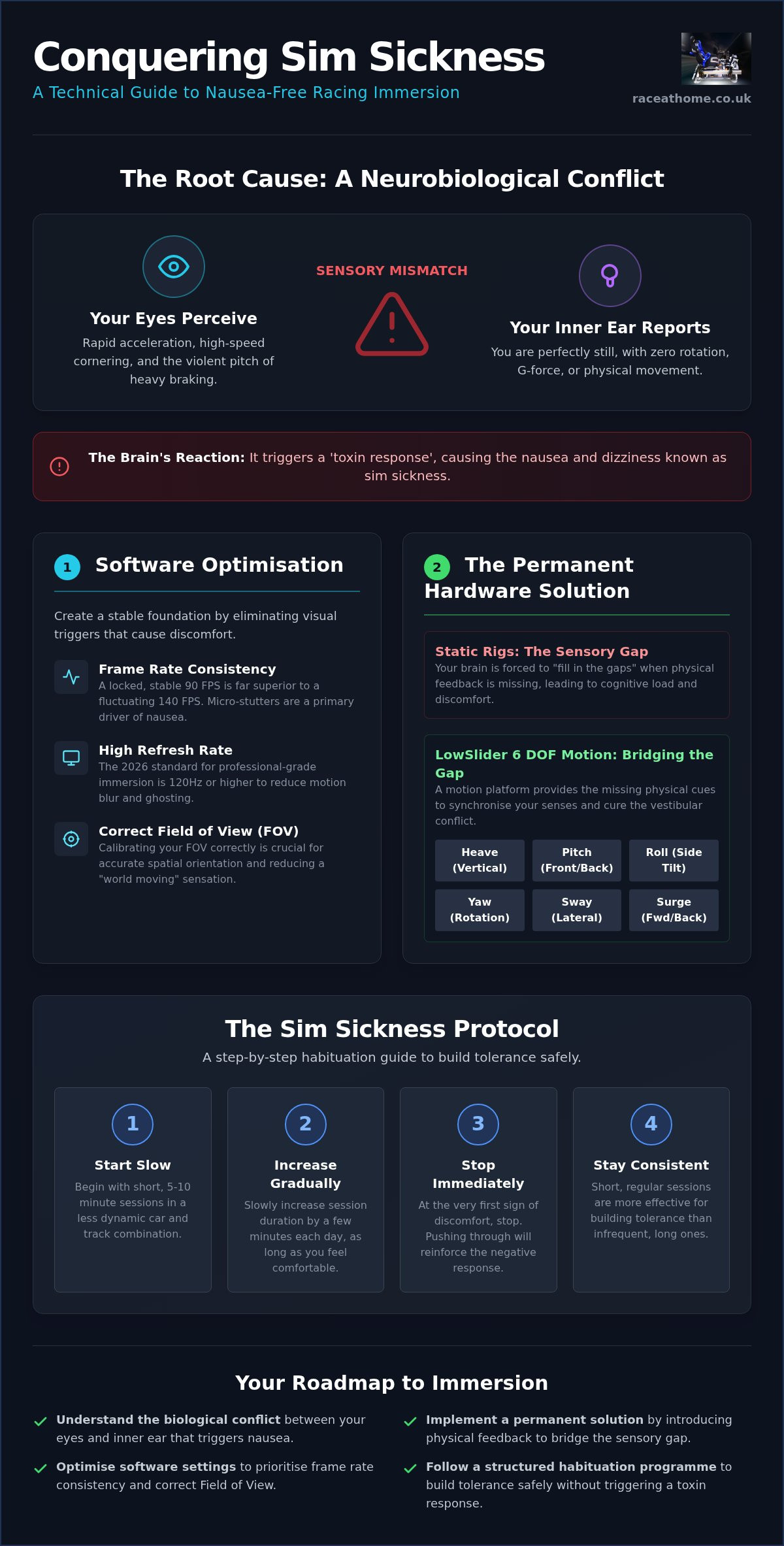
- Understand the biological conflict between your vestibular system and visual perception that triggers nausea whilst racing.
- Implement a permanent motion sickness sim racing solution by introducing physical feedback to bridge the sensory gap.
- Optimise your software settings to prioritise frame rate consistency and correct Field of View for improved spatial orientation.
- Follow a structured 14-day habituation programme designed to build tolerance safely without triggering a toxin response.
- Discover how LowSlider 6 DOF motion platforms provide the missing physical cues like heave and pitch to unlock professional-grade immersion.
Understanding the Science of Sim Sickness and Sensory Conflict
Sim sickness is not a sign of a "weak stomach" or a lack of experience. It is a sophisticated neurobiological alarm. When you are strapped into a high-performance simulator, your eyes perceive rapid acceleration, high-speed cornering, and the violent pitch of heavy braking. However, if you are in a static rig, your vestibular system, the balance organs in your inner ear, reports that you are perfectly still. This fundamental mismatch creates a state of internal confusion. Your brain, unable to reconcile these conflicting signals, triggers a "toxin response." Evolutionarily, the only time your eyes and ears disagreed so violently was after ingesting poison, so your body attempts to purge the perceived toxin through nausea and cold sweats.
Whilst often associated with VR headsets, this discomfort isn't exclusive to virtual reality. Screen-based motion sickness occurs when your peripheral vision is engaged by large monitors or triple-screen setups without corresponding physical movement. In high-performance racing, your brain relies on proprioception, the sense of your body’s position and movement in space. When you lack the physical feedback of a car's chassis rotating or diving, your brain is forced to "fill in the gaps" using only visual data. This cognitive load is exhausting and eventually leads to the visceral discomfort that ends many racing sessions prematurely.
The Vestibular-Ocular Reflex (VOR) Explained
Your inner ear is designed to work in perfect harmony with your eyes through the Vestibular-Ocular Reflex. This system stabilises images on your retina during movement. When you turn a real car, your ears feel the lateral G-forces and your eyes track the apex. In a static simulator, your eyes see the hairpin turn, but your ears detect zero rotation. This sustained sensory mismatch is the primary cause of Simulator Sickness. Your brain struggles to process the digital world because the physical cues it expects are entirely absent, leading to a breakdown in spatial orientation during long stints.
Common Triggers Amongst Sim Racers
Specific movements in-game are more likely to trigger a reaction than others. Lateral movement, such as traction loss or a sudden slide, is particularly problematic because the brain expects a sharp "yaw" sensation that never comes. Software settings also play a role. Many racers struggle with "horizon locking," where the camera stays level whilst the car tilts. This creates a "reverse motion" effect during heavy braking or acceleration, making you feel as though the world is tilting rather than the vehicle. Without physical feedback, these visual cues feel disjointed and unnatural.
Why Traditional "Remedies" Often Fail
Most common advice focuses on masking symptoms rather than curing the cause. Using desk fans or ginger supplements might provide temporary relief, but they don't address the underlying physiological conflict. You cannot simply "get your sim legs" if your hardware is fundamentally incapable of providing the cues your brain requires. Finding a true motion sickness sim racing solution means moving beyond surface-level fixes and investing in hardware that synchronises your senses. Sensory conflict is defined as the asynchronous latency between high-frequency 2026 telemetry data and the user's physiological expectation of physical G-force feedback.
Software Optimisation: Technical Fixes for Visual Lag and FOV
Whilst the biological root of the problem lies in your inner ear, the digital trigger often starts with your display settings. A robust motion sickness sim racing solution requires a meticulous approach to how your PC renders movement. Many racers mistakenly chase the highest possible peak frame rate, ignoring the fact that a fluctuating 140 FPS is far more nauseating than a locked, consistent 90 FPS. If your hardware cannot maintain a steady pace, the resulting micro-stutters shatter the illusion of fluid motion, forcing your brain to constantly recalibrate its spatial awareness. This inconsistency is a primary driver of discomfort during high-speed manoeuvres.
The 2026 Standard for Fluidity and Latency
By the standards of 2026, a refresh rate of 120Hz or higher is the baseline for professional-grade immersion. This frequency aligns more closely with the human brain's visual processing speed, reducing the ghosting effects that can trigger discomfort. Beyond raw refresh rates, you must minimise input lag from your wheel to the screen. Any perceived delay between your physical input and the visual response creates a disconnect that the brain struggles to resolve. For those using high-performance Pimax VR headsets, ensuring visual stability through fixed foveated rendering and high-bandwidth cables is essential to prevent the swimmy sensation that often leads to dizziness.
Calculating and Setting the Correct FOV
Field of View (FOV) is perhaps the most misunderstood technical setting in sim racing. If your FOV is set incorrectly, the world scale becomes distorted, creating a fish-eye effect where objects at the edge of the screen move faster than those in the centre. This distortion amplifies the sensation of Vection and simulator sickness, as your peripheral vision perceives a speed that doesn't match your central focus. You should always use a dedicated FOV calculator to achieve a 1:1 scale based on your screen size and distance. Correcting this ensures that a 90-degree corner in the sim looks like a 90-degree corner in reality, allowing your brain to process spatial data naturally.
Finally, disable artificial immersion filters like motion blur and depth of field. These effects may look cinematic in replays, but during active racing, they obscure the sharp visual cues your brain needs for orientation. If you have optimised your software and still find the experience disjointed, it may be time to consider how professional-grade hardware can provide the physical cues that software alone cannot replicate. Aligning your virtual seat position so the horizon sits at eye level is the final step in creating a stable, nausea-free environment.
Static vs. Motion: How Physical Feedback Cures the Vestibular Gap
Static rigs are fundamentally "numb". Whilst you may have the most sophisticated direct-drive wheel and load-cell pedals, your body remains in a sensory void. This lack of physical feedback is the primary hurdle for those seeking a permanent motion sickness sim racing solution. When your eyes see the car dive under heavy braking but your body remains upright and still, the resulting vestibular gap triggers the nausea discussed earlier. Motion platforms bridge this gap by providing the "real-world" translation of digital data, turning abstract telemetry into tangible sensations that your brain can process without conflict.
Professional-grade 6 DOF motion simulators are designed to provide the missing heave and pitch cues that a static rig simply cannot replicate. For instance, the LowSlider platform utilises an ultra-low profile design to maintain a realistic centre of gravity. This ensures that the physical movement feels like it is coming from the car's chassis rather than an artificial pivot point. By synchronising the physical "dive" of the rig with the visual dip of the cockpit, you eliminate the sensory mismatch before it can trigger a physiological response.
The Magic of Traction Loss
One of the most frequent triggers for sim sickness is the "surprise" element of a slide. In a static rig, you only realise the rear end has stepped out once you see it on screen. By then, your brain is already playing catch-up. High-end twin traction loss motion platforms signal a loss of grip through the "seat of the pants" feel before your eyes even register the movement. This early warning system allows your vestibular system to prepare for the lateral shift, aligning the physical sway with the steering wheel torque and visual cues. When your body feels the slide coming, the brain doesn't panic; it simply drives.
Degrees of Freedom (DOF) and Comfort
Whilst 3DoF systems provide essential pitch and roll, 6 DOF remains the gold standard for long-duration comfort. The addition of "surge" (longitudinal movement) and "sway" (lateral movement) allows for a complete simulation of cornering and braking forces. Precision is vital here. Using high-fidelity components like PT Actuators ensures that the movement is smooth and instantaneous, eliminating the mechanical "noise" or jerkiness that can actually increase nausea in lower-quality systems. Smooth, high-frequency feedback is the key to tricking the brain into total immersion.
Motion Compensation in VR
For VR users, motion platforms require an extra layer of technical finesse known as motion compensation. This software ensures that your virtual head remains stable within the cockpit even as the rig tilts and pitches. Without it, you might feel a "floating" sensation as the car moves whilst your virtual view stays static relative to the room. By 2026, motion compensation technology has evolved to provide sub-millisecond synchronisation between the physical actuators and the Pimax VR display, ensuring the cockpit moves with you in perfect harmony.
The Sim Sickness Protocol: A Step-by-Step Habituation Guide
Even with the most advanced hardware, your brain may still require a period of recalibration. The "Golden Rule" of sim racing is simple: never, ever attempt to push through the nausea. If you feel even the slightest twinge of discomfort, stop immediately and step away from the rig. Continuing to race whilst feeling unwell actually trains your brain to associate the simulator with a threat response, making the problem worse over time. A successful motion sickness sim racing solution relies on positive reinforcement and gradual exposure over a structured 14-day programme.
Environmental factors also play a significant role in your success. Ensure your room is well-ventilated and that you have a clear, stable lighting source that doesn't create reflections on your screens. Your physical posture is equally vital. If your seat is poorly adjusted, your body may experience unnecessary strain that your brain interprets as part of the sensory conflict. By creating a comfortable, controlled environment, you allow your nervous system to focus entirely on the task of synchronising visual and physical data.
In addition to your physical environment, your choice of clothing can significantly impact your comfort and temperature regulation during a race; you may want to explore sports trousers from Omega Sportif to find high-performance apparel that supports your focus and flexibility.
Phase 1: The Stationary and Slow-Speed Phase
Start by sitting in the cockpit with the engine running but the car stationary. Spend five minutes just looking around the virtual environment, allowing your eyes to adjust to the depth and scale of the track. Once you feel settled, perform gentle laps at no more than 20mph. Focus your gaze on the distant horizon rather than the tarmac immediately in front of the bonnet. This helps your brain establish a stable reference point. If you feel perfectly fine after ten minutes, end the session anyway. You want to leave the rig feeling refreshed, not fatigued.
Phase 2: Introducing Motion and G-Force
After a few days of successful slow-speed sessions, it is time to introduce vestibular cues. Set your motion intensity to approximately 20% in your telemetry software. This provides subtle feedback for heave and pitch without overwhelming your senses. Using compact motion simulator platforms allows you to manage your space whilst focusing purely on the synchronisation of movement and vision. Gradually increase the intensity by 5% each day, provided you remain symptom-free. If the nausea returns, dial the settings back and return to the previous day’s intensity.
Phase 3: High-Intensity Racing and VR Integration
The final phase involves combining 6 DOF motion with high-end Pimax VR headsets for full-scale immersion. At this stage, active cooling becomes critical. Use a high-velocity fan directed at your face to mimic the airflow of an open-cockpit car, which provides a constant tactile reference for your brain. Maintain perfect posture; ergonomic seat adjustments ensure your spine is aligned with the rig's pivot points, reducing unnecessary mechanical noise. If you are ready to transition from a static setup to a professional-grade experience, explore our range of UK-built motion platforms to complete your journey toward total realism.
Investing in Realism: Why the LowSlider 6 DOF is the Ultimate Solution
Race@Home builds more than just simulators. We engineer precision tools designed to bridge the gap between digital telemetry and physical reality. Whilst mass-market rigs often rely on exaggerated movements that can actually worsen nausea, our hand-built LowSlider platforms are designed with surgical accuracy. By focusing on the "real-world" translation of data, we provide a motion sickness sim racing solution that allows you to race for hours without the lingering dizziness associated with static rigs. The goal is simple: to make your brain believe the movement it sees is exactly what the body feels.
Every platform is hand-built in the UK. This bespoke approach ensures a level of craftsmanship and dedication to realism that mass-produced alternatives simply cannot match. We understand that a high-end home setup requires more than just raw performance; it requires logistical practicality. That is why our proprietary "Four-Piece" assembly system allows you to move from unboxing to the starting grid in approximately one hour. We support our global community with robust, enthusiast-grade hardware that is as reliable as it is transformative, ensuring that your investment in realism is backed by engineering specialist expertise.
The LowSlider Advantage: Engineering for Comfort
The proprietary LowSlider design features an ultra-low profile. This keeps your centre of gravity as close to the floor as possible, which is critical for preventing the "boaty" or disconnected sensation found in taller, less stable rigs. With the 6 DOF Twin-Traction-Loss system, you receive precise G-force feedback and traction loss cues that signal a slide before your eyes even register it on the Pimax VR display. This high-fidelity response is fully compatible with a wide range of professional sim racing accessories, ensuring your entire cockpit works in perfect harmony with your vestibular system. When the hardware is this precise, the brain stops looking for reasons to be sick and starts focusing on the apex.
Ready to Race Without the Nausea?
You don't have to settle for a compromised experience that leaves you feeling unwell. Our experts are available to consult on your specific rig requirements, ensuring your hardware and software are perfectly aligned for a nausea-free stint. With worldwide shipping and a modular design that grows with your needs, professional-grade immersion is more accessible than it has ever been. Our "no-compromise" attitude toward quality means every actuator and every weld is designed to enhance your performance. If you are ready to unlock the full potential of your simulator and finally implement a permanent motion sickness sim racing solution, it is time to Explore the LowSlider 6 DOF Motion Platform and reclaim your love for high-performance racing.
Reclaim Your Racing Immersion
Eliminating nausea in the cockpit requires a dual approach of technical precision and biological habituation. By synchronising your software settings with the correct Field of View and introducing high-fidelity physical feedback, you can finally bridge the gap between visual data and vestibular reality. You don't have to accept dizziness as part of the experience; it is simply a sign that your sensory cues are out of alignment. Implementing a comprehensive motion sickness sim racing solution means moving beyond temporary masks like fans or supplements, focusing instead on the engineering that makes your brain believe in the digital world.
Our hand-built UK platforms utilise premium PT Actuators to deliver the exact sensations professional drivers use for realistic training. These systems ship worldwide in four easy-to-assemble pieces, ensuring your transition to a professional-grade rig is as seamless as your next lap. It is time to stop fighting your hardware and start driving with total confidence. Upgrade to a LowSlider 6 DOF Motion Platform and Race in Comfort. Your ultimate racing experience is waiting, and it starts with a rig that moves in perfect harmony with your senses.
Frequently Asked Questions
Is motion sickness common in sim racing?
Yes, it is a frequent challenge for both novices and veterans, particularly when transitioning to high-fidelity VR or triple-screen setups. This discomfort stems from a sensory mismatch where your eyes perceive high-speed cornering whilst your body detects zero physical movement. It is a biological response to conflicting data, and finding a permanent motion sickness sim racing solution is often the final step in achieving professional-grade immersion.
Do motion platforms actually help reduce sim sickness?
Yes, motion platforms are highly effective because they bridge the "vestibular gap" by providing the physical cues your brain expects. By adding heave, pitch, and roll sensations that match the visual telemetry, you align your senses and reduce the toxin response triggered by static rigs. High-fidelity actuators ensure these movements are smooth and instantaneous, tricking the brain into a state of total immersion.
How long does it take to get used to VR sim racing?
Most users require a structured habituation period of approximately 14 days to fully adapt to the demands of VR sim racing. This process involves short, controlled stints that gradually increase in intensity and duration. It's vital to follow a protocol that avoids pushing through nausea; this allows your nervous system to build tolerance naturally without associating the headset with physical discomfort.
Will a 6 DOF rig make me more sick than a 3DOF rig?
A 6 DOF rig is generally less likely to cause sickness than a 3DOF rig because it provides a more complete and realistic set of physical cues. Whilst 3DOF covers basic rotation, 6 DOF includes surge and sway, which are critical for simulating braking and lateral cornering forces. This higher level of vestibular alignment creates a more convincing and comfortable experience for your brain.
What are the best VR settings to prevent nausea in 2026?
In 2026, the technical priority is maintaining a locked refresh rate of 120Hz or higher to ensure fluid motion. You should also disable cinematic effects like motion blur and depth of field, ensuring your Field of View is calibrated to a 1:1 scale. Using high-bandwidth cables for your Pimax headset will also minimise the visual latency that often triggers sudden-onset dizziness during fast laps.
Can I use a motion platform in a small room?
Yes, modern engineering has made it possible to integrate high-performance motion into compact home environments. The LowSlider platform features an ultra-low profile design that doesn't require the massive footprints of older industrial simulators. If you have enough space for a standard static cockpit, you likely have enough room for a modular motion upgrade that fits within your existing floor plan.
Should I use "Horizon Lock" to help with motion sickness?
Horizon Lock can be a helpful temporary tool, but it often creates a "reverse motion" effect that some racers find disjointed. It keeps the camera level whilst the car pitches around you, which can help with visual stability but might confuse the brain's perception of the car's chassis. Many find that a physical motion sickness sim racing solution is more effective than relying on artificial software dampening.


