

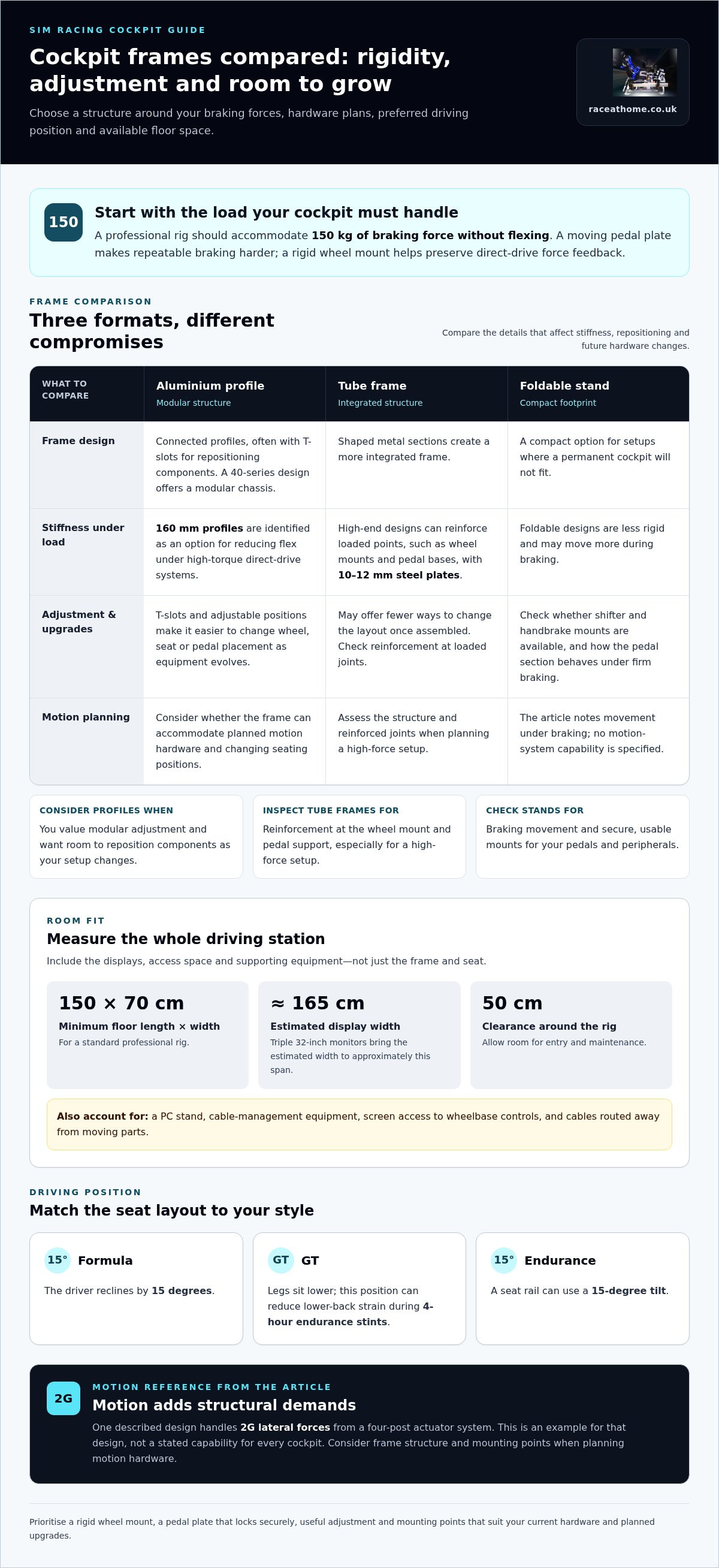
A future-proof sim racing rig is a rigid, adjustable cockpit that can grow with your hardware. Aim for a design that accommodates 150 kg of braking force without flexing, supports direct-drive wheels and load-cell pedals, and leaves room for motion systems or active pedals later. Foldable frames save space, but can move more under braking.
It’s easy to focus on the wheel, pedals and seat you want now. The cockpit matters just as much: if it flexes, force feedback feels less precise, and a future upgrade may mean replacing more than you planned.
This comparison explains how aluminium-profile, tubular and foldable designs differ, and what that means for stiffness, adjustability, motion compatibility and comfort during long sessions. You’ll also learn what to look for in seat and accessory mounts, so you can choose a layout that suits your room and driving style while keeping upgrades in reach.
Key Takeaways
- Compare aluminium-profile, tubular and foldable frames to find the right balance of rigidity, adjustability and space-saving.
- Assess how your cockpit can accommodate direct-drive force feedback, firm braking and future hardware upgrades.
- Match the seating position and frame layout to your preferred driving style, from formula racing to GT and endurance sessions.
- Plan for motion systems and active pedals by considering how the cockpit’s structure and mounting points can support expansion.
- Set up adjustable seat and accessory mounts so you can make changes, return to a familiar position and drive comfortably over long sessions.
Direct-drive wheel and load-cell pedal demands
Compatibility with wheelbases, pedals, shifters and handbrakes depends on secure mounting and useful adjustment. Look for a wheel deck and pedal plate that suit your hardware, along with mounting points for peripherals. If you change equipment later, adjustable plates or compatible slots make repositioning easier.
A direct-drive wheelbase sends force feedback through its mounting points and into the frame. Movement between the base, deck and cockpit can soften that feedback or create unwanted noise. Prioritise a rigid wheel mount, secure fastenings and a frame that stays composed when the wheel loads up through corners and over kerbs.
Load-cell pedals are an important feature in a complete simulator setup, so make sure the pedal plate and frame can handle firm braking inputs. A professional rig should accommodate braking forces of 150 kg without flexing. If the plate shifts under pressure, repeatable braking becomes harder. Check how the pedal tray locks into position, and whether its angle and distance can be adjusted for your seating position.
Compare the main cockpit options against your current hardware and upgrade plans:
| Option | Wheelbase support | Pedal support | Upgrade flexibility |
|---|---|---|---|
| Fixed cockpit | Stable deck suits a mounted direct-drive base | Fixed plate suits a settled pedal position | Changes may require replacement parts |
| Adjustable cockpit | Deck position can be adapted to different bases | Tray position and angle can be changed | Useful as equipment evolves |
| Wheel stand | Compact support for a wheelbase | Pedal section may be less rigid under hard braking | Check for shifter and handbrake mounts |
Choose an adjustable cockpit if you expect to change wheelbases, pedal sets or driving positions. A fixed cockpit can suit a settled setup, while a wheel stand prioritises a smaller footprint.
Allow space for the whole hardware arrangement, not just the seat and frame. A standard professional rig needs at least 150 cm of floor length and 70 cm of width. Triple 32-inch monitors bring the estimated width to approximately 165 cm, so measure the display span alongside the cockpit.
Wheel stands can work well where a permanent cockpit won’t fit, but folding designs are less rigid and may move more during braking. Consider how that movement could affect a load-cell pedal set. Leave 50 cm of clearance around the rig for entry and maintenance, and account for a PC stand and cable-management equipment in the room layout.
Include displays and peripherals in your fit check. Position screens so they don’t obstruct access to wheelbase controls, and route cables away from moving parts. Confirm that shifters and handbrakes have usable mounting positions. A considered layout keeps the wheel, pedals and supporting hardware working as one coherent driving station.
A load-cell brake is an important pedal feature in a complete simulator setup. When choosing pedals, consider whether this braking feature suits how you plan to build and use the simulator, alongside your cockpit’s mounting and adjustment requirements.
A racing simulator rig should support future wheel and pedal upgrades. Check that it can accommodate changes to both, so replacing or improving one component doesn’t make the overall setup unsuitable. Keep upgrade options in mind when assessing the wheel and pedal mounts.
Cockpit designs for motion, formula racing, and endurance
A future-proof sim racing rig should suit both your driving position and planned hardware. For a US build, total cost depends on the frame, seat, driving hardware and motion system. These aren’t US dollar prices.
Aluminium-extrusion and tube-frame designs each have different strengths. Compare their stiffness and adjustability with your preferred driving style and motion plans.
Aluminium extrusion cockpits
Aluminium extrusion frames use connected profiles, often with T-slots that let you reposition components. A 40-series profile design offers a modular chassis, whilst 160 mm profiles are identified as an option for reducing flex under high-torque direct-drive systems.
That adjustability suits drivers who want to change wheel, seat or pedal positions as their setup evolves. For a future-proof sim racing rig, consider whether the frame can accommodate planned motion hardware and different seating positions as your requirements change.
Tube-frame cockpits
Tube-frame cockpits use shaped metal sections to create a more integrated frame. High-end tube designs can reinforce stress points, including wheel mounts and pedal bases, with steel plates 10-12 mm thick.
Compared with adjustable extrusion, a tube frame may offer fewer ways to change the layout once assembled. Its strength depends on the frame and reinforcement at loaded joints, so pay particular attention to the wheel mount and pedal support when planning a high-force setup.
Popular cockpit and frame options
Popular formats include aluminium-profile frames, tube frames and compact wheel stands. Profiles emphasise modular adjustment, tube frames can provide a more integrated structure, and stands suit setups where the cockpit needs to fold or move.
Formula seating reclines the driver by 15 degrees, whilst an endurance cockpit can use a seat rail with a 15-degree tilt. GT seating keeps the legs lower and can reduce lower-back strain during 4-hour endurance stints. Choose the layout around your driving position, not appearance alone.
Motion changes the design priorities. A motion-focused cockpit must keep its structure composed as actuators move the simulator; one described design handles 2G lateral forces from a four-post actuator system. If motion is central to your future-proof sim racing rig, consider how a motion simulator platform fits the frame and seating layout.
A racing simulator rig should have minimal flex under force feedback. The material budget is also a useful reminder to account for the frame itself when comparing an adjustable build with other cockpit formats.
The author’s custom rig materials list includes 40x80 Lite, 40x40 Lite, plus 40x120 extrusion profiles. The guide says T-slot aluminum allows pedal trays and wheel decks to be adjusted by a single millimetre, giving builders precise control over fit as seating and hardware needs change. Check that this adjustment range suits the intended driving posture and that the finished frame stays composed under force feedback or motion loads.
Modular rig upgrades for motion systems and active pedals
Aluminium-profile rigs combine strength with modularity, making them a practical foundation for changing hardware. Common upgrade mistakes include overlooking mounting space, frame stiffness, movement clearances and how components connect.
Rig rigidity and modularity
Rigidity keeps wheel, pedal and seat positions stable as forces act through the frame. Modularity lets you reposition parts or add mounting points instead of rebuilding the whole cockpit. Aluminium profiles support this approach because their slots accept adjustable brackets and plates. A rigid frame without adaptable mounting can limit upgrades, while a flexible layout without adequate support can compromise control feel.
Upgrade paths for rigs
Plan an upgrade path around the hardware you expect to add, such as motion actuators or active pedals. Motion changes how the cockpit and its mounted components move together, so the attachment points and frame structure must suit that arrangement. Active pedals also need a stable mounting surface. A modular rig makes these changes easier to accommodate than a fixed frame designed for one configuration.
Use CAD or a careful drawing to map the cockpit before buying extra components. Include the seat, wheel deck, pedal tray, monitor supports and planned motion hardware in the same layout. This can reveal clashes, such as an actuator occupying space needed for a pedal mount. It also helps you plan cable routes and maintain access to fasteners.
Work through the design in a clear sequence:
- Record the current setup. Mark where the seat, wheelbase and pedals attach, including which parts need adjustment.
- Add planned upgrades. Place motion components and active pedals in the CAD layout, keeping their mountings aligned with the frame.
- Review access and movement. Check that moving parts have clearance and that cables won’t snag during motion.
- Test the configuration. Confirm that the proposed brackets and frame sections can support the equipment together.
Compatibility problems often arise when each upgrade is considered separately. A motion system may change the available mounting space, while active pedals can require a different tray position. Reviewing the complete configuration helps identify conflicts before assembly.
Separate structural needs from convenience upgrades. Reinforce the locations that carry forces first, then add adjustable mounts for accessories or revised seating positions. For example, a cockpit that starts with a fixed wheelbase can still allow a later wheel-deck change if its profile layout provides suitable attachment points.
Keep a record of each configuration in the CAD file, including bracket positions and cable paths. If you change the pedal tray or add motion, update the drawing before moving components. This gives you a repeatable reference for rebuilding the setup and helps preserve the intended alignment between seat, pedals and wheel.
Ergonomics and consistency for long sessions
A cockpit should hold your driving position comfortably and let you reproduce it. For a GT setup, align the seat, wheel and pedals so each input feels natural, then record those positions as your baseline. This reference helps you restore the same posture after adjustments or hardware changes.
Start with the seat. Set its distance so you can operate the pedals without stretching or locking your knees, then adjust the wheel to keep your shoulders relaxed. In a formula-style position, the reclined seat changes how your arms and legs reach the controls. Recheck pedal reach if you change the seat angle.
Next, consider how each control feels in that position. A load-cell brake needs firm, repeatable pressure, so your body should remain supported while braking. If your seat shifts or your foot angle changes between sessions, braking inputs can feel different. Secure the seat and pedal tray before refining the wheel or display positions.
Use a repeatable setup routine rather than relying on memory. Record the seat position, wheel-deck height, pedal distance and display alignment in a simple setup note. If someone else uses the simulator, keep separate settings for each driver. Return each component to its recorded position before comparing lap consistency or changing hardware.
- Set the seat first. Adjust its position and backrest, then confirm your feet reach every pedal comfortably.
- Position the wheel. Set its height and distance so your hands can turn without your shoulders lifting.
- Align the display. Centre the image with your usual seated eye line, then keep that position consistent.
- Save the baseline. Note each adjustment before testing a new position or changing components.
Displays and peripherals also affect posture. If a monitor sits off-centre, you may have to turn your head repeatedly to follow the track. Place the main display in front of your driving position, and arrange shifters or handbrakes where you can reach them without twisting. After moving a peripheral, revisit your saved baseline.
For endurance driving, comfort must work alongside stable control. GT seating keeps the legs lower and can reduce lower-back strain during 4-hour endurance stints. That position still needs suitable pedal reach and back support. If your posture starts to change during a long run, review the seat angle and contact points before altering pedal settings.
Keep adjustment records practical. A note labelled “GT baseline” can list seat and pedal positions, while a separate “formula” setup captures a different recline and reach. Make one adjustment at a time and test it in the simulator. This makes the effect easier to identify and helps you return to a known setup.
Seat and accessory mounting
Seat mounts shape your driving position, while accessory mounts determine how naturally controls fall to hand. Treat the seat, shifter, handbrake and display supports as parts of one layout, not isolated additions. For example, moving the seat can change your reach to both the wheel and pedals.
Start by matching the seat mount to the cockpit. A sliding seat rail allows forward and backward adjustment, helping different drivers find a comfortable position. A fixed mount keeps the seat in one place but offers less flexibility if you change your posture or share the simulator. Secure the seat, then set its position before arranging secondary controls.
Plan accessory mounts around the controls you use. A shifter should sit where you can reach it without pulling your shoulder away from the seat. A handbrake needs a natural grip position that doesn’t obstruct the shifter. If you use both, check their positions together rather than installing each mount in isolation.
A cockpit should allow quick reconfiguration to accommodate a coach’s suggested adjustments. This might mean shifting the seat, wheel or pedals during a coaching session. Accessible mounting points make those changes easier to apply and reverse. Record each adjustment so you can restore your preferred setup after testing a recommendation.
Use this sequence to organise seat and accessory mounts:
- Position the seat. Set the driver’s posture first, then check access to the wheel and pedals.
- Place primary controls. Arrange the shifter and handbrake where they can be operated without changing your seated position.
- Check clearances. Move each control through its normal range and look for contact with the seat, frame or other hardware.
- Save the layout. Note the mount positions before changing components or testing another setup.
Displays and accessory supports also need deliberate placement. A monitor stand should keep the screen aligned with your usual seated position while leaving room to enter and exit the cockpit. Route cables along the frame, away from seat rails and moving components. For instance, a cable crossing a sliding rail can snag when you adjust the seat.
Adjustable mounts are especially useful when your setup changes between driving styles. You might use a shifter for one configuration and move it aside for another. Similarly, a coach’s seating recommendation may require a different seat or pedal position. If your frame accepts repositionable mounts, you can make these changes without rebuilding the cockpit.
Choose sim racing accessories to complement your cockpit’s mounting layout and controls. Thoughtful placement keeps each input within reach, while a recorded baseline makes it easier to return to a familiar position after adjustments.
Race@Home: LowSlider 6 DOF Twin-Traction-Loss Motion Platform
Race@Home’s LowSlider 6 DOF Twin-Traction-Loss Motion Platform adds physical motion to a sim racing setup. Consider it when your cockpit plans include motion feedback and you want the simulator’s responses to feel more immersive. Race@Home also offers a LowSlider 3DoF motion platform, providing another motion option to consider alongside your rig design.
Race@Home’s LowSlider platforms have an ultra-low profile and compact footprint. This can be useful when planning how a motion platform will fit your available space. Race@Home also offers Pimax VR headsets and sim racing accessories for drivers developing other parts of their setup.
If motion is your next upgrade, explore Race@Home’s LowSlider platforms and consider how a motion system fits your cockpit plans. Visit raceathome.co.uk to learn more or contact Race@Home.
Make your next upgrade count
Think of a future-proof sim racing rig as a platform for considered decisions, not a finished shopping list. Before your next change, decide what you want to feel more clearly from the track: movement through corners, greater immersion or a more capable visual experience. That priority can guide your upgrade while keeping the cockpit’s purpose clear.
Race@Home offers the LowSlider 6 DOF Twin-Traction-Loss Motion Platform, the LowSlider 3DoF motion platform and Pimax VR Headsets. These options can help shape a setup around motion or virtual reality as your ambitions develop, rather than adding hardware without a clear goal.
If you’re ready to explore a next step for your rig, contact Race@Home about your rig. Keep building with intention, and let each considered upgrade bring you closer to the drive you want to experience.
Frequently Asked Questions
What makes a sim racing rig future-proof?
A sim racing rig is future-proof when its frame, mounts and layout can adapt as your equipment changes. Prioritise replaceable or repositionable mounting parts, access to fasteners and enough room for peripherals you may add. For example, a cockpit that lets you move its display support can adapt to a different screen arrangement without changing your seating position. Plan around your likely next upgrade instead of buying features you don’t need.


