

More movement doesn’t automatically mean more realistic racing. A simulator that jolts dramatically may feel impressive, but useful motion depends on translating what’s happening on track into clear, coherent cues. If you’re weighing up what to look for in a motion simulator, start with how the movement feels and responds, not just the number of axes on a specification sheet.
It’s natural to want an immersive system that fits your rig and room. A motion platform can bring braking, cornering and loss of traction closer to your senses, but it’s an immersion upgrade, not a shortcut to faster lap times. This guide covers motion quality, degrees of freedom, software and hardware compatibility, and the practical demands of a home setup. You’ll also find out why space at least as large as a small double bed, a solid floor and mains power matter, alongside platform weight, sound and after-sales support. Use these points to decide whether a motion setup suits your racing goals and your space.
Key Takeaways
- Prioritise clear, well-timed movement that reflects on-track events rather than dramatic motion for its own sake.
- Use what to look for in a motion simulator as a checklist: compare cue quality, intended use, footprint, compatibility and support.
- Measure before you buy: allow space at least as large as a small double bed, with extra clearance, and account for a solid floor and mains power.
- Check how the motion system fits your cockpit and racing software. Console compatibility can be selective and may require extra hardware.
- Consider whether a hand-built LowSlider, offering 2 to 6 degrees of freedom, suits your goals and home setup.
What to look for in a motion simulator: start with the experience
A motion simulator uses game telemetry to move the cockpit in response to information about the car’s behaviour. It turns digital events into physical cues. But convincing motion isn’t simply the biggest movement. It should be readable, arrive at the right time and make sense alongside what you see on screen.
The motion platform is one part of a complete simulator, alongside the seat, wheel, pedals, display and racing software. The platform supplies movement; the wheel and pedals provide steering and control feedback, the display shows the track, and the software generates the driving environment and telemetry. If one element feels out of step with the others, the experience can feel less coherent. When deciding what to look for in a motion simulator, assess how the parts work together, not just what the platform does in isolation.
What physical cues can a racing motion simulator reproduce?
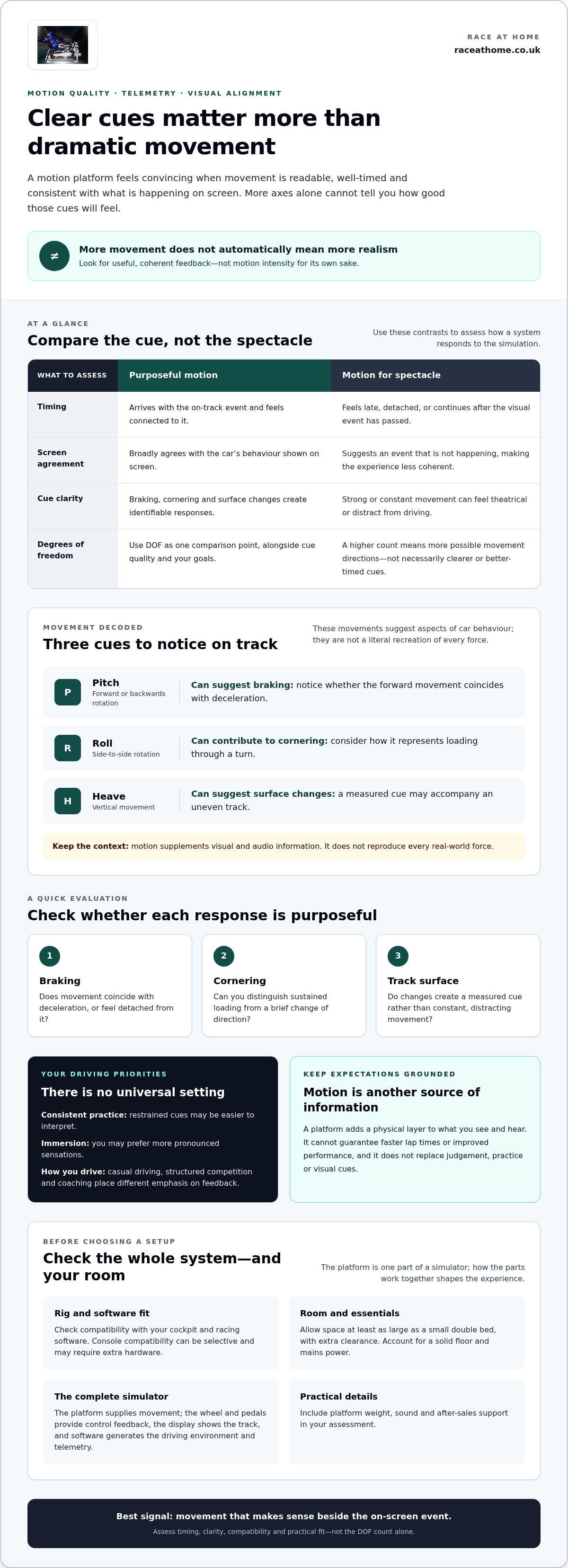
Pitch, roll and heave describe different kinds of movement: rotation forwards or backwards, rotation from side to side, and vertical movement. Depending on the platform and its configuration, these movements can suggest changes in the car’s behaviour. A forward pitch may accompany braking; roll can contribute to the sensation of loading through a corner; heave can add a vertical cue as the car crosses an uneven surface.
These are cues, not a literal recreation of every force acting on a real car. They supplement what you see and hear, helping your body interpret acceleration, braking and cornering alongside visual and audio information. The Motion simulator Wikipedia article provides broader context on motion cueing and the six degrees of freedom. For a home rig, consider whether movement corresponds with the on-screen event or distracts you from it.
Why degrees of freedom are only one part of the decision
Degrees of freedom (DOF) are the independent directions or axes in which a platform can move. A higher DOF count means more possible directions of movement, but it doesn’t tell you the quality, timing or clarity of the cues. Platforms with different DOF counts can suit different priorities, and the number alone won’t tell you which feels more convincing for your driving.
Consider how movement is delivered, how consistently it corresponds with the simulation, and whether the cues suit your goals. A platform that communicates key events clearly may feel more connected than one that produces more movement without a clear purpose. For a closer look at the six-axis concept, the 6 DOF motion simulator guide explores that configuration in more detail. Use DOF as one comparison point, then assess the experience the system is designed to create.
How motion quality, telemetry and visual alignment affect realism
Motion quality depends on the relationship between the simulation and the platform. Racing software produces telemetry, data about the car and its behaviour. A motion system uses supported telemetry to create physical cues: braking might prompt a forward movement, while cornering may produce a lateral response. The cue makes sense when it arrives at the right moment and feels consistent with what the simulation shows.
Convincing motion depends on coherent cues, not movement intensity alone. If the platform reacts late or keeps moving after the visual event has passed, your senses receive conflicting information. A strong movement can then feel theatrical rather than informative. Visual alignment doesn’t mean the platform must mimic every force exactly. It means the physical response should broadly agree with the car’s on-screen behaviour, without suggesting an event that isn’t happening.
How to judge whether motion cues feel purposeful
Compare how a system represents different events rather than judging it by one dramatic moment. Notice whether braking, cornering and changes in track surface produce identifiable responses, and whether those responses feel controlled and repeatable. Tuning can alter how strongly and smoothly cues are represented, so consider whether the sensation stays clear without overwhelming your view or control inputs.
- Braking: Does the movement coincide with deceleration, or feel detached from it?
- Cornering: Can you distinguish a response to sustained loading from a brief change of direction?
- Track surface: Do surface changes create a measured cue rather than constant, distracting movement?
Your preferred driving style matters. A driver focused on consistent practice may value restrained cues that are easy to interpret, while someone prioritising immersion may prefer more pronounced sensations. Think about how you use your simulations, too: casual driving, structured competition and coaching place different emphasis on feedback. There’s no universal setting for every driver.
What motion can and cannot tell you about the car
A motion platform reproduces selected sensations; it doesn’t recreate every real-world force or the full experience of driving on track. It adds a physical layer to what you see and hear, but it can’t guarantee faster lap times or improved performance. Treat motion as another source of information to interpret, not as a substitute for judgement, practice or the visual cues on screen.
The FAA Simulator Motion Requirements discusses the value and limits of motion cues in training simulators. It’s a useful reminder that motion cueing involves choosing which sensations to represent. For more context on forces represented in a rig, explore the article on sim racing motion feedback. You can also explore LowSlider motion platforms to see how these principles apply to home hardware.
Is more motion always better? Compare systems by purpose, not spectacle
No. More movement, or a higher number of axes, doesn’t automatically create better realism. A platform should suit how you race and what you want to feel, fit your room and work with the rest of your setup. Powerful movement can be entertaining, but if cues are hard to interpret or integration is complicated, extra motion may add little value.
Compare options against the same criteria. The table below shifts the focus from headline specifications to what each system needs to do for its driver.
| Buyer or use | Motion purpose | Cue quality | Footprint | Compatibility and support |
|---|---|---|---|---|
| New to motion | Add an understandable physical layer to racing. | Look for cues that are clear and not overwhelming. | Prioritise a manageable fit within your available room. | Clear information about supported equipment and software can make planning simpler. |
| Experienced racer | Refine immersion and add detail to an established rig. | Consider consistency, detail and the ability to adjust the experience. | Factor in the platform alongside your existing cockpit and equipment. | Assess how the system fits your current hardware and simulations. |
| Practice or coaching | Use physical cues as one part of a focused driving session. | Prioritise responses that are repeatable and easy to interpret. | Allow for the rig and the space needed to use it comfortably. | Consider how support needs fit your ongoing use and setup. |
| Commercial use | Choose an experience suited to the intended audience and setting. | Consider whether cues remain coherent across repeated sessions. | Plan around the venue layout and the complete simulator. | Review integration and after-sales support as part of ownership planning. |
Which motion simulator criteria matter for different drivers?
If you’re new to motion, start with understandable feedback, a manageable setup and clear compatibility information. Experienced racers may place more weight on cue detail and adjustability, particularly when integrating a platform with established hardware. For coaching or venue use, repeatability and support may matter more than spectacle. These priorities can guide your comparison without suggesting that motion alone improves lap times or coaching results.
How to compare motion platforms without getting distracted by specifications
Compare the intended motion experience alongside degrees of freedom. Ask what the system is designed to communicate, how it fits your equipment and what practical planning it requires. Claims about realism describe a platform’s approach, but every driver’s experience will differ. This is the heart of what to look for in a motion simulator: a purposeful fit between your goals, the movement and the complete setup.
Premium motion can add a compelling physical dimension, but it also calls for space, setup planning and attention to software and hardware integration. Weigh those requirements against the experience you want. A considered comparison is more useful than choosing a system for its most dramatic movement or biggest specification.
Check your room, rig and software before choosing a motion simulator
A motion system has to work in your home as well as with your racing software. Measure the intended space and account for the complete rig, not just the platform. These checks turn what to look for in a motion simulator into a practical plan for fitting, powering and connecting the equipment.
- Measure the room. Allow space at least as large as a small double bed, with extra clearance around the moving rig. Include the platform’s footprint, space at the front and sides, your seated driving position and attached equipment such as a wheel, pedals or display. Check the route into the room so you can move the platform into position.
- Check the floor and total load. A motion platform needs a solid floor. Its weight is 60-100 kg, plus the driver and equipment, so consider the combined load rather than the platform alone. Include the cockpit and peripherals in your assessment, particularly if the rig will sit on a raised or suspended floor.
- Review power and network access. The platform draws hundreds of watts and can be supplied from regular outlets. Plan access to mains power and a wired network connection as part of the installation. Map cable routes so they stay clear of moving parts and don’t obstruct access around the rig.
- Assess computer, software and hardware compatibility. Leading PC racing sims are supported through native integration or telemetry, but compatibility depends on the particular system and software. Console compatibility is selective and may require extra hardware. For a PC setup, allow CPU headroom alongside a modern multi-core processor, dedicated GPU and fast storage, especially if the computer also runs demanding displays or VR.
Will the motion rig fit your room and existing cockpit?
Measure from the edges of the platform and cockpit, then account for how you’ll get in and out and where connected equipment will sit. Leave clearance around the sides and front, and consider nearby furniture and cables. The platform, driver and attached equipment all contribute to the load, so assess the combined setup rather than the platform’s weight alone.
Consider sound and vibration in your home, too. LowSlider platforms use quiet electric motors, though some sound and vibration remain. Suitable mounts or rubber feet can help manage vibration transmitted to the floor, but the rig still needs a considered position.
Check game, computer and peripheral compatibility
List your cockpit components, racing titles and display setup, then compare them with the motion system’s integration requirements. Leave processing headroom rather than assuming your existing PC has capacity to spare. If you race on console, account for selective support and possible extra hardware when planning the complete setup.
Once you’ve mapped the space, floor, power and software, explore LowSlider motion platform options for a premium, compact addition to a home or commercial rig.
Choose a motion simulator with a clear path from selection to support
A confident choice follows a practical sequence: define what you want from motion, assess how coherently it represents driving cues, check that the platform fits your room and rig, verify software and hardware compatibility, then consider ownership and support. This keeps the decision grounded in your setup rather than specifications alone. Consider fit and ongoing use alongside the experience you want.
- Define your goal. Decide whether you’re prioritising immersion, focused practice, coaching or commercial use.
- Assess the motion. Look for clear, consistent cues that make sense alongside the on-screen action.
- Check the fit. Measure the room, account for clearance and consider the platform with your cockpit and equipment.
- Verify compatibility. Match the system to your racing software, computer, peripherals and, where relevant, console setup.
- Review support. Understand what help is available for ongoing firmware, game compatibility and tuning needs.
What to expect from Race@Home’s LowSlider motion platform
Race@Home designs and hand-builds LowSlider platforms to order for home and commercial sim racing. The compact, low-profile design is intended for buyers balancing physical movement with available space, and the range offers 2 to 6 degrees of freedom. Compare the motion configurations against your intended use rather than treating one specification as the answer for every driver.
Plan for space at least as large as a small double bed, with additional clearance around the rig. Include your cockpit and attached equipment in the room layout, and leave room to enter, exit and use the simulator comfortably. A compact platform can help with home-space constraints, but it still needs a suitable position and enough surrounding space.
Make your next step with support and ownership in mind
Ownership includes more than the initial selection. Most products include at least a one-year warranty, and after-sales support is available for firmware, game compatibility and tuning. LowSlider platforms ship worldwide from the UK. Customer assembly involves four pieces and takes under an hour, giving you a clear idea of what setup entails.
Use these details alongside your own checklist: make sure the motion experience suits your goals, the platform works with your equipment, the room can accommodate it, and the support fits your expectations. That’s a more useful way to answer what to look for in a motion simulator than choosing on movement or DOF alone.
Explore Race@Home motion platforms to compare LowSlider options for your sim racing setup.
Make your next move towards a more connected rig
Turn your priorities into a shortlist. Decide which sensations matter most to your driving, then compare platforms against the space and equipment you have. This keeps the choice focused on how you want to experience racing, not just the most impressive-sounding specification.
Race@Home’s hand-built LowSlider motion platforms are designed for home and commercial sim racing. They use quiet electric motors, though some sound and vibration remain, and most products include at least a one-year warranty. Keep these ownership details in mind alongside motion quality and compatibility.
The right fit makes digital feedback feel more immediate while working naturally with your rig and routine. Explore Race@Home motion platforms to find a premium motion setup for a more immersive racing experience.
Frequently Asked Questions
What does a motion simulator do with racing game telemetry?
It uses telemetry from a supported racing simulation to drive physical movement in the cockpit. Depending on the system and its configuration, data about events such as braking or cornering can be translated into cues you feel through the rig. This adds a physical layer to the game’s picture and sound. For a useful result, the telemetry source, motion system and software integration need to work together.
Can a motion simulator work with a static sim racing cockpit?
It can if the platform and cockpit can be integrated safely and suit one another. Before planning an upgrade, consider how the motion hardware attaches, whether the cockpit can accommodate movement, and how the seat, wheel and pedals will sit once assembled. Include the combined load of the platform, driver and equipment in your floor assessment. The layout of a static rig may need adjustment to make room for the moving system.
Is a motion simulator suitable for driver coaching as well as home racing?
Yes. Motion systems can be used for home racing, coaching and commercial simulation, with the setup chosen for its intended role. In a coaching session, physical cues give a driver another sensation to discuss alongside on-screen actions and driving feedback. They don’t guarantee faster laps or better performance. For regular instruction, prioritise cues that are consistent and understandable, so they support discussion rather than distract from it.
How much clearance should I leave around a home motion simulator?
Allow space at least as large as a small double bed, plus extra clearance at the front and sides. Measure the complete rig in its intended position, including attached displays and other peripherals, rather than relying on the platform dimensions alone. Leave room to get in and out, and consider doors, nearby furniture and cable routes. The space should accommodate the rig’s movement without equipment or obstacles encroaching on its operating area.
Can I use a motion simulator with a console?
Some console titles can work with motion platforms, but console compatibility is selective and may require extra hardware. Compatibility depends on the specific console, game and motion system combination, so don’t assume support for one title means support for every game on that console. Include your current wheel and pedals in the compatibility picture, too. PC racing simulations are supported through native integration or telemetry, depending on the title and system.
Will a motion simulator make noise or cause vibration?
LowSlider platforms use quiet electric motors, though some sound and vibration remain. How much you notice can depend on how the system is being used and how vibration transfers to the floor. Suitable mounts or rubber feet can help reduce transmitted vibration, but they don’t make the system silent. If the rig will be near other living spaces, consider its position and the likely impact during your usual racing sessions.
Does a motion simulator need a wired network connection?
Yes, plan for a wired network connection as part of the installation. Include a cable route when arranging the computer, platform and cockpit, and keep it clear of moving parts and walkways. A wired connection is a practical setup requirement, so don’t base your layout on Wi-Fi alone. Also plan access to mains power, since the platform needs to be powered during use.


