

A motion platform add-on for an existing cockpit turns simulator telemetry into physical movement. A plug-in, supported interface or dedicated motion application sends data to motion-cueing software and a controller, which drive the platform. Fit depends on the cockpit’s structure, the complete moving load, the platform’s degrees of freedom and its electrical requirements. Assess it as part of the whole system, not simply as hardware to place beneath the seat.
Extra immersion is only useful when the movement suits the simulator cues and the platform works safely and practically with your cockpit and space. This guide explains how telemetry becomes movement, what degrees of freedom mean, and how to assess payload, power and physical fit before choosing an add-on.
You’ll also learn why a platform cues changes in force rather than reproducing sustained G-loading, and why cockpit weight includes more than the driver. These factors help you judge whether your existing setup is a suitable foundation for motion.
Key Takeaways
- Telemetry becomes physical feedback through a simulator interface, motion-cueing software and a controller; the platform can only reproduce the data it receives.
- Choose degrees of freedom for the cues you value: a 6 DOF platform can move in pitch, roll, yaw, surge, sway and heave.
- Assess payload as the combined weight of the pilot, seat, cockpit frame, controls and all other moving equipment.
- Allow at least 2 m x 1.5 m of floor space, and make sure the emergency stop is reachable from the seated position.
- Before fitting a platform, consider how its electrical supply, connections and moving parts will work with your existing cockpit and room layout.
How simulator telemetry controls platform movement
A motion platform converts simulator telemetry into physical cues through software, a controller and powered movement. In a flight simulator, those cues should suggest changes in aircraft motion, rather than reproduce every attitude directly.
Telemetry-driven platform movement
Telemetry-driven movement converts simulator data into timed cues that you feel through the cockpit. A plug-in, supported interface or dedicated motion application passes data to motion-cueing software, which instructs a controller and the platform’s actuators. For example, a change in pitch can prompt a brief tilt rather than a continuous copy of the aircraft’s attitude. Carefully shaped cues can add immersion without turning every simulator input into a large physical movement.
A washout filter gradually returns the platform towards centre after a cue. Platforms reproduce changes in force more effectively than sustained forces, so they cannot recreate sustained G-loading. Nor can they correct an inaccurate flight model: movement reflects the telemetry sent by the simulator. If the platform reaches its travel limits, reduce motion amplitude before adding smoothing.
Fit with a racing cockpit or seat mount depends on mounting geometry, load capacity and the motion system’s telemetry connection. A cockpit’s brand alone doesn’t establish compatibility. The platform must support the actual frame and moving load.
For home sim racing, value comes from matching supported telemetry, cockpit fit and useful movement to your needs. A lower-cost platform that lacks the right interface or requires extensive adaptation may offer poorer value than a compatible system.
In the United States, the total cost depends on the platform, controller, required motion software and cockpit mounting needs. Compare the complete hardware and software requirements, not just the platform.
Simulator and middleware compatibility
Compatibility means the simulator can send usable telemetry through an interface or middleware supported by the platform and operating system. A USB connection alone doesn’t prove the full system will work. The exact simulator edition, aircraft type and VR setup can also affect the connection. A mismatch may interrupt the data path before the hardware receives movement cues.
For flight simulation, middleware supports MSFS 2020 and 2024, X-Plane 12 and DCS World. The software must receive telemetry from the selected simulator, then pass motion cues to the platform controller. For racing, support depends on the game and its telemetry interface, so compatibility is specific to the software combination, not simply the cockpit.
For racing and flight simulator games, the required setup is a supported game interface or plug-in, motion-cueing software and a compatible controller. MSFS 2020 and 2024, X-Plane 12 and DCS World are supported by motion-platform middleware; racing-game support depends on the specific title and interface.
Flight-simulation movement should cue changes in aircraft motion rather than copy its attitude one-to-one. For example, a brief pitch cue can suggest acceleration, while pitch and roll can communicate a change in flight direction. A six-degrees-of-freedom system offers more movement axes, but more freedom does not make every cue more useful. Profiles should suit broad aircraft classes, as a trainer, light helicopter and airliner produce different useful sensations.
Customer experiences also point to the need for measured tuning. One flight-sim user reported reducing motion effects to about 90% after shifting momentum caused fatigue after about an hour. That’s an individual report, but it illustrates why intensity and cue duration shape comfort as well as immersion. A carefully tuned platform makes telemetry legible, rather than simply making every movement stronger.
Choosing platform degrees of freedom
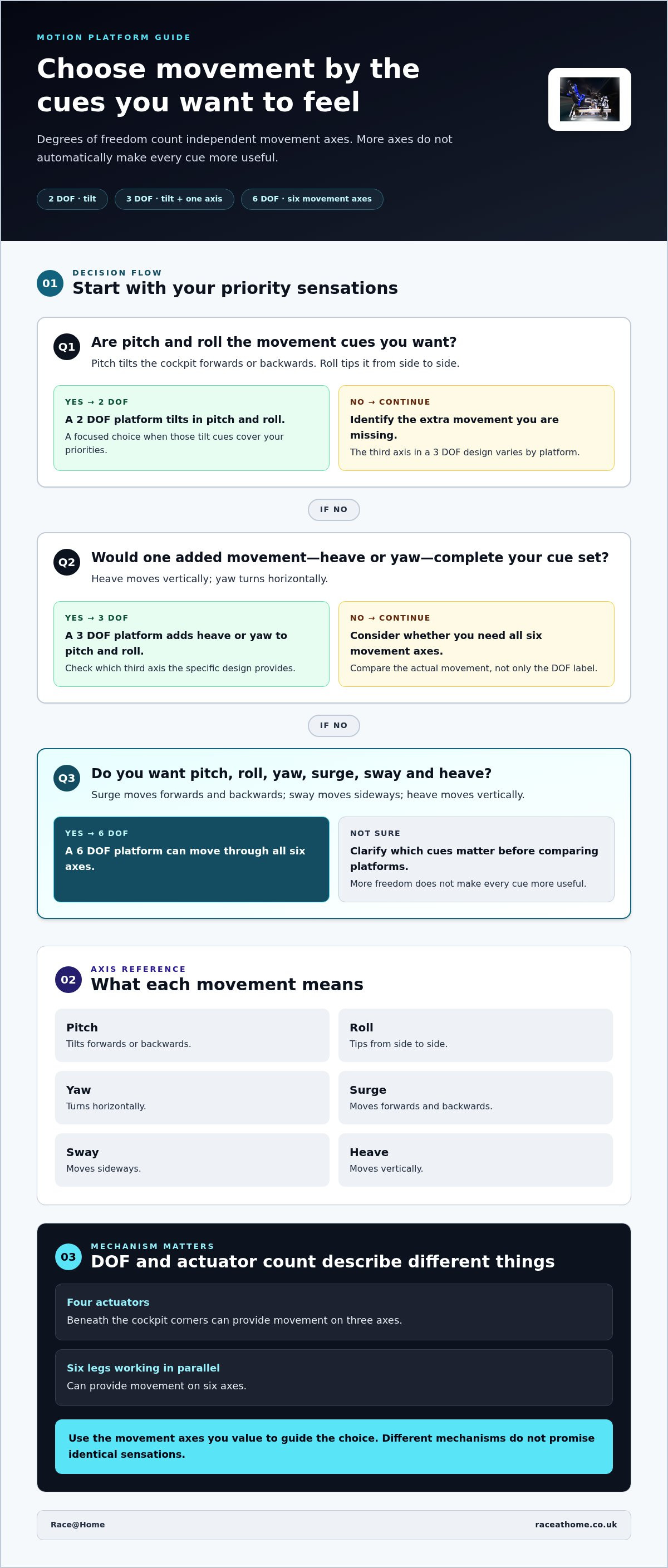
Degrees of freedom describe the directions in which a platform can move. For a cockpit used for racing or flight simulation, the useful choice depends on the cues you want to feel and how the mechanism produces them.
Motion axes
A motion axis is a direction of movement, such as pitch, roll or heave. Pitch tilts the cockpit forwards or backwards; roll tips it from side to side. Yaw turns it horizontally, while surge, sway and heave move it forwards and backwards, sideways and vertically.
These axes shape the sensations available to the pilot. In sim racing, pitch and roll can suggest braking, acceleration and cornering; heave can add a vertical cue. In a flight simulator, yaw may help represent a change in heading. Because the platform moves the cockpit, controls and seat mounts must remain part of the same moving assembly.
Degrees of freedom
Degrees of freedom, or DOF, count how many independent movement axes a platform can provide. A 2 DOF platform tilts in pitch and roll, whilst a 3 DOF platform adds heave or yaw. The third axis varies by design, so the label alone doesn’t tell you which extra cue you’ll feel.
A 6 DOF platform can move through pitch, roll, yaw, surge, sway and heave. Four actuators beneath the cockpit corners can provide movement on three axes; six legs working in parallel can provide movement on six axes. These figures describe different mechanisms, not a promise that every platform will produce identical sensations.
Choose by matching movement to your preferred driving or flying. If cornering and braking cues matter most, pitch and roll may address those sensations without adding every axis. If you want vertical movement or yaw, identify that requirement before comparing 3 DOF designs, since their third axis can differ. More axes mean more possible cues, but useful movement still depends on how the simulator’s telemetry is translated.
Degrees of freedom don’t equal sustained force. A home platform can cue changes, but cannot reproduce sustained G-loading. Motion profiles also need to suit the vehicle: a light helicopter, trainer and airliner call for different useful cues. In racing, the profile should likewise make sense for the simulated car, rather than simply maximise movement.
Latency is the delay between a simulator event and the platform’s response. It can affect how connected a cue feels, while excessive movement can make a profile tiring. VR motion compensation is a separate consideration: the headset’s view and the cockpit’s movement need to be handled together. Neither more DOF nor stronger movement automatically solves these setup questions.
Compare the axes against the cues you value, then consider how each platform’s movement suits your cockpit and simulator. Exploring motion platform configurations can help you relate a DOF choice to the movement you want from your setup.
What is the maximum payload capacity?
There’s no universal maximum payload for a motion platform. Capacity depends on its design and the complete moving assembly. For a flight simulator or sim racing cockpit, count the pilot, seat, frame, controls and every other item that moves with the platform. The combined load, not the bare cockpit frame, is what matters.
Separate moving equipment from stationary equipment when assessing payload. A monitor fixed to a desk doesn’t move with the platform; one mounted on the moving frame does. The same distinction applies to a dedicated computer, steering wheel, pedals and accessories. Include any equipment attached to a seat mover or cockpit frame in the moving load.
Assess the final configuration, not just the parts currently installed. A heavier seat, added controls or a mounted display changes the total payload. Make a complete inventory and use each item’s stated mass to calculate the combined load. This gives you a more useful comparison between platform capacity and your actual cockpit than the frame’s weight alone.
Platform footprint and payload
Allow at least 2 m x 1.5 m of floor space for a motion platform. Measure the platform’s footprint against the room, including space needed for cockpit movement and access. The platform must support the combined moving load whilst occupying a workable area; a compact footprint doesn’t mean the cockpit’s full moving mass can be ignored.
Payload and footprint answer different questions. Payload is the load carried by the moving mechanism; footprint is the floor area it occupies. Controls extending beyond the cockpit frame may need more room than the platform base suggests. Consider the full assembly’s position, including the space needed to enter and exit.
Before comparing a full-frame system with a seat mover, identify which parts will move. A seat mover carries the seat and pilot, while a platform carrying the whole cockpit also moves its frame and attached controls. That difference affects the payload calculation and the arrangement of cables, displays and other equipment.
Emergency-stop access
A motion rig should have an emergency stop within reach while the pilot is seated. If the cockpit moves, the stop must remain accessible from the occupied seat, not behind equipment or out of easy reach. Include its position in the layout plan alongside the platform footprint and moving parts.
Telemetry-driven movement makes this practical assessment important. A simulator may cue movement during a turn or braking event, so the pilot needs a clear route to the stop from the normal driving position. Account for the seat, controls and any covers when planning access. The emergency stop, payload and available floor area all belong in the installation plan, not as afterthoughts.
Electrical requirements for platform installation
A motion platform needs electrical power for its actuators, controller and control electronics. Requirements depend on the platform’s hardware, so use its stated input and connection specifications when planning the cockpit installation. Don’t infer them from the number of degrees of freedom: different mechanisms can have different electrical demands.
Keep the power path separate from the telemetry path. The simulator computer sends movement data through software and an interface; the platform’s power supply runs the hardware that creates movement. A USB connection may carry data, but doesn’t prove the platform has the power or simulator compatibility it needs. Treat each connection according to its purpose.
Actuator demand changes with movement. An acceleration cue can require a different response from a stationary moment, so the supply and controller must support the platform’s operating demands. Smooth motion also depends on coordinated control: software shapes the cue, while powered hardware executes it. Electrical capacity alone cannot fix an unsuitable profile or unsupported telemetry.
Plan the installation before positioning the cockpit. Identify the platform’s power inlet, controller, computer connections and cable routes, then compare them with the room’s sockets and the cockpit footprint. A cable crossing the moving area, for example, could snag as the platform tilts or shifts. Route cables to accommodate movement without obstructing access.
Account for stationary equipment as well as moving equipment. The computer may sit beside the rig, while the platform controller and actuators connect to the moving assembly. This layout affects cable length, socket access and emergency-stop placement. Arrange outlets according to the equipment’s stated electrical requirements, not assumptions based on a different simulator.
Before installation, list each component in a connection plan: simulator computer, motion software, controller, platform and power source. Match each connector to its purpose, then check that cables remain clear throughout the platform’s movement. If you reposition the cockpit, review the cable route and emergency-stop access again. This ties electrical planning to the actual hardware instead of treating the platform as an isolated unit.
Finally, distinguish electrical compatibility from physical fit. A platform may fit beneath a cockpit yet still need a suitable power connection and practical cable routing. An available socket, in turn, doesn’t prove that the hardware and controller are compatible. Assess the platform’s electrical specifications, the simulator’s data path and the room layout together.
Fitting a motion platform under an existing cockpit
Existing sim racing cockpits can use seat movers or platforms that carry the full frame. Fit depends on mounting points, moving load and available space. Installation means securing the assembly, connecting compatible hardware and software, then calibrating the movement cues to suit the cockpit.
Add-on types for existing cockpits
A seat mover shifts the seat and pilot, while a full-frame platform moves the cockpit structure and attached controls. These add-on types suit different setups: a seat mover focuses movement around the driver, while a full-frame design carries more of the rig. For example, a cockpit with the wheel and pedals fixed to its frame needs coordinated movement if those controls move with the seat.
Full-frame platforms can have different degrees of freedom. Four actuators beneath the cockpit corners can provide movement on three axes, while six legs working in parallel can provide movement on six axes. The actuator layout and attachment points matter: movement must transfer through the cockpit, rather than leave a control deck or seat outside the moving assembly.
Under-cockpit fitting
An under-cockpit installation places the platform between the floor and existing frame, making the frame part of the moving structure. First, compare the platform’s mounting arrangement with the cockpit’s support points. Then consider the seat, wheel, pedals and displays, as each component’s movement affects how the rig feels during braking or cornering.
Check clearance throughout the platform’s travel, not just when it is centred. A wheel deck, pedal plate or frame rail could hit nearby furniture as the actuators move. Cables also need routes that allow for movement. The complete layout, including pilot access and emergency-stop position, should remain usable once the cockpit is mounted.
Installation and calibration
Installation difficulty depends on how well the platform’s mounting points, payload and connections match the existing cockpit. A compatible frame with accessible attachment points is more straightforward to assemble than one that needs structural changes. After securing the platform, connect its controller and the simulator’s telemetry path, then confirm the software recognises both.
Calibration turns simulator data into controlled movement. Start with restrained cues, then assess whether braking produces the intended pitch or a cornering cue feels direct and balanced. If motion reaches the platform’s travel limits, reduce amplitude before adding smoothing. This helps distinguish a mounting issue from a software profile demanding excessive movement.
For flying, choose cues that suit the aircraft; for racing, tune braking and cornering separately. A stable cockpit position and clear actuator travel help preserve immersion across both uses. Explore motion platform options for a cockpit upgrade shaped around physical movement.
Race@Home: LowSlider 6 DOF Twin-Traction-Loss Motion Platform
Race@Home’s LowSlider 6 DOF Twin-Traction-Loss Motion Platform is an option for sim racers seeking six-axis movement and a compact platform design. The proprietary LowSlider design has an ultra-low profile and compact footprint, useful qualities to consider when assessing space beneath an existing cockpit.
If you’re weighing full-frame motion against fewer axes, Race@Home also offers a LowSlider 3DoF motion platform. Its simulators are hand-built to order and shipped worldwide in four pieces for customer assembly; the company states they can be fully set up in under an hour. Compare your cockpit’s mounting arrangement, moving load and room layout with the platform you’re considering.
For details on Race@Home’s motion platforms, visit raceathome.co.uk.
Shape your next cockpit upgrade
Choosing a motion platform add-on for an existing cockpit gives you the chance to define what you want to feel in every session. Look beyond movement alone: the right upgrade should support how you race, the immersion you value and how you may want your setup to develop.
Race@Home offers the LowSlider 6 DOF Twin-Traction-Loss Motion Platform and the LowSlider 3DoF motion platform, giving you different motion-platform options to explore. Pimax VR Headsets are also part of its offering if you’re considering a wider sensory upgrade. Focus on the experience you want, then let that guide the next choice for your cockpit.
If you’re ready to discuss how a motion platform could suit your setup, contact Race@Home about your cockpit. A considered upgrade can make each cue feel more connected to the action on screen, bringing a new dimension to the way you race.
Frequently Asked Questions
How does it turn a game into motion?
The simulator sends telemetry that motion software translates into commands for the platform’s controller and actuators. For example, a braking cue in a racing game can prompt a brief forward pitch, whilst a change in aircraft attitude can produce a tilt. The platform doesn’t move the game itself; it turns selected data into physical cues. The feel depends on the telemetry received and how the motion profile interprets it.
What commonly goes wrong during setup?
Setup can falter when part of the data chain is incompatible or incorrectly configured. A USB connection alone doesn’t prove a game supports the platform, and even the right telemetry plug-in must communicate with its controller. Excessive motion gain is another common issue: cues can hit travel limits and feel abrupt. Reduce amplitude before adding smoothing, then check that each cue behaves sensibly in a controlled simulator session.
What movement can a home motion rig reproduce?
Depending on its design and degrees of freedom, a home rig can cue pitch, roll, yaw, surge, sway and heave. A braking cue might suggest a forward shift; a cornering cue could create roll. These are brief signals of changing force, not sustained G-loading. The platform also cannot correct inaccurate game physics: its movement reflects the simulator’s telemetry rather than independently recreating real-world forces.
What must be compatible with the platform?
The simulator edition, operating system, motion middleware, controller and platform must work together. For flight simulation, middleware supports MSFS 2020 and 2024, X-Plane 12 and DCS World. The aircraft type and VR arrangement can also affect the data path. Race@Home offers the LowSlider 6 DOF Twin-Traction-Loss Motion Platform and LowSlider 3DoF motion platform; most products include at least a one-year warranty.
What cockpit measurements and mounting requirements should I check before buying a motion add-on?
For a motion platform add-on for an existing cockpit, measure the frame’s support points, width, length and clearance beneath the seat and control decks. Compare these measurements with the platform’s mounting layout, then consider whether the seat, wheel, pedals and attached frame will move together. Measure nearby obstructions across the platform’s full movement, not just at centre. Allow for cable routes and access to the emergency stop.
How much space, power, and floor reinforcement does a motion platform need?
Allow at least 2 m x 1.5 m of floor space as a general planning guide, with extra clearance for movement and access. Race@Home states its platform needs space at least as large as a small double bed, plus clearance. Its power draw is hundreds of watts and can use regular outlets. Use a solid floor; whether reinforcement is needed depends on the floor’s construction and the complete moving load.
Which motion platforms are compatible with popular racing cockpits and seat mounts?
Compatibility depends on whether the platform supports the cockpit or seat mount’s geometry, the complete moving load and the simulator’s telemetry connection. A cockpit’s brand alone doesn’t establish fit.


