

A UK-made racing simulator has no single fixed price: the total depends on the cockpit, controls, display and whether you choose fixed or full-motion hardware. Motion adds physical cues for acceleration, braking and changes in grip, making the experience more than visuals on a screen.
The right setup involves more than choosing a wheel or seat. Component compatibility, available space and the type of motion system all shape the result. A motion platform can add vivid feedback, while a simpler setup may better suit your room or driving style.
This guide explains the main factors that affect the cost of a UK-made racing simulator, which major equipment brands and components to consider, and how motion options differ. You’ll also see what to weigh when comparing builds, so you can focus on the hardware that delivers the immersion you want without paying for features you won’t use.
Key Takeaways
- Compare cockpit, wheel, pedals, display and motion as one system to understand what shapes the overall investment.
- Check how the simulator’s connections and software compatibility work with the equipment you plan to use.
- Learn how force feedback and motion platforms translate in-game driving data into physical sensations.
- Assess warranty, returns and support terms alongside the hardware, as these affect the ownership experience.
- Consider the space and practical setup involved when weighing a home simulator against a showroom demo or installation option.
Compatibility with major equipment brands
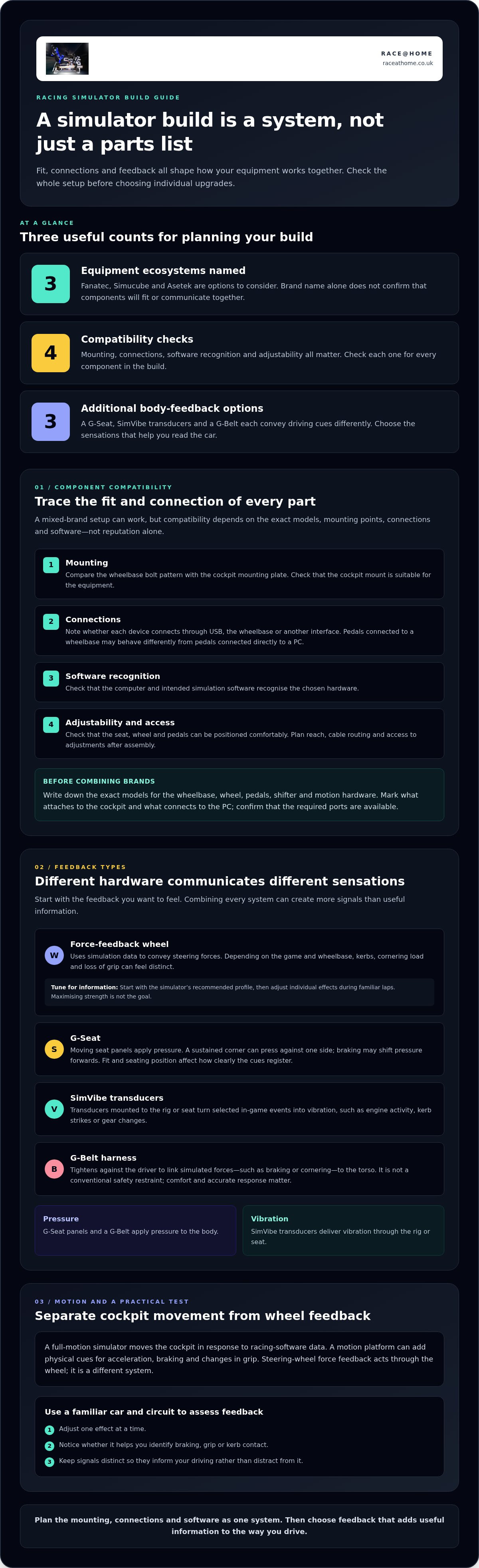
A UK-made racing simulator can combine equipment from different manufacturers, but connections and mounting points must match. Fanatec, Simucube and Asetek are names to consider when planning a setup. Compatibility depends on the specific wheelbase, steering wheel, pedals, rig and software working together, not on brand reputation alone.
Start with the wheelbase. Check how it attaches to the cockpit, how the steering wheel connects and how the unit communicates with the computer. Then confirm how the pedals connect. Pedals connected to a wheelbase may behave differently from those connected directly to a PC, which can affect setup and troubleshooting.
Fanatec, Simucube and Asetek have their own equipment ecosystems. Don’t assume a wheel, pedal set or mounting bracket from one range will fit another. Compare the exact model names and connection requirements before combining components. Matching mounting points is only part of the decision: the computer and simulation software must also recognise the hardware.
For a mixed-brand setup, map each connection before buying. List the wheelbase, wheel, pedals, shifter and motion hardware, then note what attaches to the cockpit and what connects to the PC. If the pedals connect separately, for example, make sure the computer has the right port available. This simple inventory can reveal conflicts early.
- Mounting: Compare the wheelbase bolt pattern with the cockpit’s mounting plate.
- Connections: Note whether each device connects through USB, the wheelbase or another interface.
- Software: Check that the intended simulation software can recognise the chosen hardware.
- Adjustability: Make sure the seat, wheel and pedals can be positioned comfortably for the driver.
Professional-grade sim racing equipment can provide detailed control and feedback, but the whole setup matters. A high-performance wheelbase won’t compensate for pedals that are too far away or a flexible cockpit mount. Plan the arrangement first, considering reach, cable routing and whether you can still access adjustments after assembly.
A UK sim racing equipment retailer can help explain how listed components fit into a build, but the model numbers are essential. Bring a complete parts list rather than asking whether a brand is compatible in general. If you already own Fanatec equipment, for example, identify its precise models and connections before selecting additional hardware.
Compatibility is a system-level decision, not a comparison of brand names. Confirm the mounting, connections and software support for every component. This helps you build around the driving feel you want while avoiding hardware that won’t fit or communicate as intended.
Professional-grade components and force feedback
Professional-grade equipment turns driving inputs into detailed feedback. A force-feedback wheel conveys steering forces, while pedals register braking and throttle pressure. These components work best when their settings complement one another. If wheel resistance is too strong, for example, subtle changes in grip may be harder to read. Set up the wheel, pedals and driving position as a coordinated system.
Force feedback uses data from the simulation to move the steering wheel. Depending on the game and wheelbase, kerbs, cornering load and loss of grip can each produce a distinct sensation. Tune the effects to reveal useful information rather than simply maximising strength. Start with the simulator’s recommended profile, then adjust individual effects during familiar laps.
A G-Seat applies pressure through moving seat panels rather than relying only on steering-wheel movement. During a sustained corner, pressure against one side can suggest lateral load; under braking, it may shift forwards. Unlike a brief vibration, this sensation can continue while the driving force persists. Fit and seating position affect how clearly you feel the cues.
SimVibe is associated with tactile feedback from transducers mounted to a rig or seat. These devices convert selected in-game events into vibration, such as engine activity, kerb strikes or gear changes. Their effect differs from a G-Seat: transducers deliver vibration, while seat panels apply pressure. Keep the signals distinct, as overlapping effects can make the car’s behaviour harder to interpret.
A G-Belt harness adds another form of body feedback by tightening against the driver. For example, it can apply pressure during braking or cornering, linking simulated forces to the torso. It is not the same as a conventional safety restraint. Its value depends on how accurately it responds to the simulation and whether it remains comfortable throughout a session.
Before choosing these features, decide which sensations matter most. If steering detail is your priority, focus first on the wheelbase and its force-feedback settings. If you want cues across the body, compare a G-Seat, SimVibe transducers and a G-Belt separately. Each adds hardware and adjustment, so combining every system may create more signals than useful information.
Make a short test plan using one familiar car and circuit. Adjust one effect at a time, then note whether it helps you identify braking, grip or kerb contact. A balanced profile lets you read the car without distracting from driving. For a component-led approach, explore sim racing hardware choices alongside the feedback systems you want to use.
Full-motion simulator technology
A full-motion simulator moves the cockpit in response to data from the racing software. Instead of only seeing the car pitch under braking, you feel the seat move with it. This is separate from steering-wheel force feedback, which acts through the wheel. Together, the systems can make driving inputs feel more physical.
Degrees of freedom describe the directions in which a platform can move. A 3DoF system moves along three axes, whilst a 6 DOF platform can move across three linear axes and rotate around them. The exact movement profile depends on the platform’s design and control system. More degrees of freedom can offer more ways to represent vehicle behaviour, but they don’t automatically make every cue clearer.
Motion cues turn software telemetry into movement. Braking, for example, can prompt a forward pitch, while acceleration can create a rearward sensation. Cornering may produce roll or a lateral cue. The platform must interpret the data quickly and smoothly, as delayed movement can feel disconnected from the action on screen.
Twin traction loss is designed to add a distinct rear-slide sensation. If the car’s rear steps out, the platform can move to suggest the loss of grip. This sensation isn’t exclusive to traction-loss systems: other motion platforms can represent slides through different combinations of movement. The mechanism and tuning determine how the cue reaches the driver.
Before choosing a motion configuration, consider the feedback you want and the hardware around it. The seat, wheel, pedals and display must remain usable as the platform moves. Check cable routing, how the cockpit sits on the floor and whether the motion profile suits your driving style. A compact footprint can also be important in a home with limited space.
Use this sequence to compare platforms:
- Identify the cues: Decide whether braking, cornering, vertical movement or rear traction loss matters most.
- Match the movement: Compare the platform’s degrees of freedom with those cues.
- Consider the setup: Account for cockpit clearance, cable routing and the position of controls.
- Review the software: Ensure the simulator can send motion data to the platform.
Motion is most effective when it communicates useful information rather than creating constant movement. If every kerb strike triggers a strong response, for instance, it may obscure more important changes in grip. Tune the profile around clear events, then adjust it during familiar laps. This makes each movement easier to interpret.
A 3DoF platform can suit drivers seeking a defined set of motion cues, whilst 6 DOF offers movement across more axes. Neither is automatically the right choice for every racing setup. Compare the sensations each system can deliver, the available room and how its movement will work alongside your wheel and pedals.
What warranty, returns, and customer support do UK racing simulator manufacturers offer?
Warranty, returns and support terms vary between racing simulator manufacturers in the UK, so compare them before choosing a system. Consider the cockpit, motion platform, wheelbase and pedals as separate components when reading the terms. A wheelbase fault, for example, may follow a different support process from an issue with the simulator frame.
Start with the written warranty. Identify which parts it covers, what faults qualify and how to make a claim. Check whether you need a serial number, proof of purchase, photographs or diagnostic details. For a motion system, identify the component involved, such as an actuator, controller or power supply. Keep invoices and setup records together.
Warranty length is only one part of the comparison. Read the exclusions and conditions too: terms may distinguish manufacturing faults from damage, wear or problems caused by incorrect use. Look for instructions on transport and packaging if a component needs to be returned. Understanding the process beforehand helps when a heavy or costly item needs attention.
Returns are separate from warranty claims. Read the retailer’s or manufacturer’s returns policy before ordering, including how to start a return and package the equipment. A complete simulator can include a frame, seat and electronics, so consider how to protect each part. Check whether separately purchased accessories follow the same return process as the main hardware.
Customer support is most useful when you can describe a specific issue. Check the available contact routes and what information support needs. A concise fault report can include the component model, software, connection path and behaviour observed. If a wheel disconnects during a session, recording when it happens gives support a clearer starting point.
- Warranty: Record covered components, exclusions and the claim process.
- Returns: Understand the policy, packaging expectations and separate accessory terms.
- Support: Note the contact method and details needed to describe a fault.
For a mixed-brand setup, keep each manufacturer’s paperwork with the component details. If a Fanatec wheelbase and pedals are paired with a cockpit from another brand, note which company handles each part. This helps distinguish a hardware fault from a compatibility or software issue. A clear inventory also makes it easier to describe the setup when seeking technical guidance.
Before buying, save the relevant warranty and returns information alongside your order details. Compare the support process as carefully as the simulator’s equipment and motion features. This gives you a practical record if a component needs attention and helps clarify which steps apply to the wheelbase, pedals or frame.
Are there UK racing simulator manufacturers with showrooms, demos, or installation services?
Showrooms, demonstrations and installation are separate purchasing options, not standard features of every UK racing simulator manufacturer. A showroom lets you see a physical rig; a demo lets you try its controls or motion; installation covers delivery, assembly and setup. Consider each separately rather than assuming one includes the others.
A demonstration is most useful when it answers a specific question. If you’re comparing fixed and motion platforms, focus on how movement feels during braking and cornering. To assess a wheel and pedals, try the seating position and control reach. A focused test can show whether the equipment suits your driving style better than photographs alone.
Before planning a visit, identify what you need to evaluate. Shortlist the wheelbase, pedals, display and motion features that matter to your setup. Then check whether the demonstration covers those components together. A rig with a different seat position or control layout may feel very different from the configuration you plan to use at home.
Define installation carefully. It can mean assembling the cockpit, connecting electronics, configuring software or positioning the system in its final room. These are different tasks. A rig might arrive assembled but still need the computer and simulator configured. Compare the exact work included with the physical and technical tasks you’re prepared to handle yourself.
Space matters for both demonstrations and home setup. Measure the intended area, including doorways and clearance around furniture. Then consider the cockpit’s footprint, seat movement and motion-platform clearance. A setup that fits on a showroom floor may not suit a spare room with limited access. Recording these constraints helps you assess a proposed configuration realistically.
- For a demo: List the hardware and sensations you want to try, such as pedal feel or motion response.
- For a showroom: Consider whether the displayed rig matches your intended equipment and seating position.
- For installation: Separate physical assembly from computer, software and room setup.
If a showroom or demo is part of your decision, use the visit to assess fit and feel, not just appearance. If you’re comparing an installation option, define which setup tasks matter most in your home. A clear list of components, room constraints and desired feedback will make the next decision more practical. Explore options for your simulator setup.
Race@Home: LowSlider 6 DOF Twin-Traction-Loss Motion Platform
The LowSlider 6 DOF Twin-Traction-Loss Motion Platform from Race@Home brings physical movement into your racing setup, including cues for vehicle motion and traction loss. Its ultra-low profile and compact footprint suit drivers seeking full-motion feedback without a bulky platform. A LowSlider 3DoF motion platform offers another motion option, whilst Pimax VR Headsets and Sim Racing Accessories can complement your equipment choices.
Each simulator is hand-built to order around the LowSlider design and ships worldwide in four easy-to-assemble pieces. You can set it up yourself in under an hour. When weighing motion options, consider the driving sensations you want, the room available and your existing hardware.
Visit raceathome.co.uk to explore Race@Home’s simulator options.
Shape your next racing setup
Start by deciding which sensations should define your driving experience. A UK-made racing simulator can be tailored to how you want to feel each corner, braking point and change in grip, rather than built around a checklist of features. Set your priorities, then choose hardware that supports them.
Race@Home offers the LowSlider 6 DOF Twin-Traction-Loss Motion Platform and the LowSlider 3DoF motion platform for different motion configurations. Pimax VR Headsets can bring the cockpit visuals closer, whilst Sim Racing Accessories can complement your setup. Think about how each option fits your space and existing equipment, and which one would make the biggest difference to your sessions.
You don’t need to settle every detail at once. A clear idea of your preferred motion, visuals and controls gives you a useful starting point for planning a rig that feels coherent and immersive. Contact Race@Home about your simulator to take the next step towards a setup shaped around your driving ambitions.
Frequently Asked Questions
What UK-made racing simulator rigs and cockpit models are available?
Race@Home offers LowSlider motion platforms, including the LowSlider 6 DOF Twin-Traction-Loss Motion Platform and LowSlider 3DoF motion platform. The LowSlider range covers 2 to 6 degrees of freedom, allowing buyers to consider different motion configurations. These are motion platforms rather than a catalogue of separate cockpit models. Compare the movement you want with your room, existing rig and equipment before choosing a configuration.
Can you buy a complete UK-made racing simulator package, and what does it include?
Build your setup around a LowSlider motion platform and choose equipment to suit your needs. Wheels, pedals, speakers, mounts and an emergency stop button are optional accessories, not automatic inclusions. Pimax VR headsets are also available to complement a simulator. Most products include at least a one-year warranty. Review the items in your chosen configuration so you know what is included in your order.
Where can I buy racing simulator equipment, and what are the shipping costs?
You can buy Race@Home equipment directly through its website, with shipping available in the UK and worldwide. Shipping costs vary by destination and order details. Motion platforms ship in four pieces for customer assembly. When planning your order, consider the delivery destination and the space needed to receive and handle the components.
Are these racing simulator products compatible with PC, PlayStation, and Xbox?
Race@Home platforms support major PC racing simulators, while console support covers selected titles and may require extra hardware. Compatibility depends on the specific game, platform and equipment combination, not every PlayStation or Xbox title. A PC setup using a supported racing simulation, for example, follows a different compatibility path from a console setup. Match your chosen title and hardware before building around a platform.
Which racing simulator brands and manufacturers are based in the UK?
Race@Home and Race Sim are mentioned as UK racing simulator names. Race Sim states that it was established in 2019.


