

If your physical rig moves but your virtual horizon remains static, you aren't truly racing. You're simply fighting a losing battle against your own inner ear. You've likely invested in a Pimax Crystal Super or Crystal Light to capture that breathtaking 3840 x 3840 clarity, yet tracking drift and software conflicts often shatter the illusion. Achieving a flawless Pimax VR motion simulator setup is the final hurdle between owning high-end components and commanding a professional-grade cockpit.
We know that the technical synergy between high-fidelity VR and 6 DOF platforms is notoriously difficult to master. This guide promises to bridge that gap. You'll learn the exact configuration steps required to eliminate latency and secure a stable, 1:1 tracking experience. We will explore the vital updates in Pimax Play v2.0.2, the implementation of OpenVR Motion Compensation, and the logistics of organising cables on a moving rig. It's time to transform your home setup into a seamless environment where every digital bump translates into a precise physical sensation.
Key Takeaways
- Discover why an expansive Field of View is the critical sensory link between ultra-high visual fidelity and the physical G-forces of a motion rig.
- Identify the ideal headset for your cockpit by comparing the performance-focused Pimax Crystal Light with the flagship Crystal Super.
- Master the configuration of OpenXR Motion Compensation to achieve a stable Pimax VR motion simulator setup that cancels out physical rig movement.
- Benchmark your PC against 2026 standards to ensure your hardware can maintain the frame stability required for a nausea-free experience.
- Learn how the LowSlider’s ultra-low centre of gravity and bespoke mounting points create the ultimate professional-grade racing environment.
The Synergy of Pimax VR and Motion Simulator Platforms
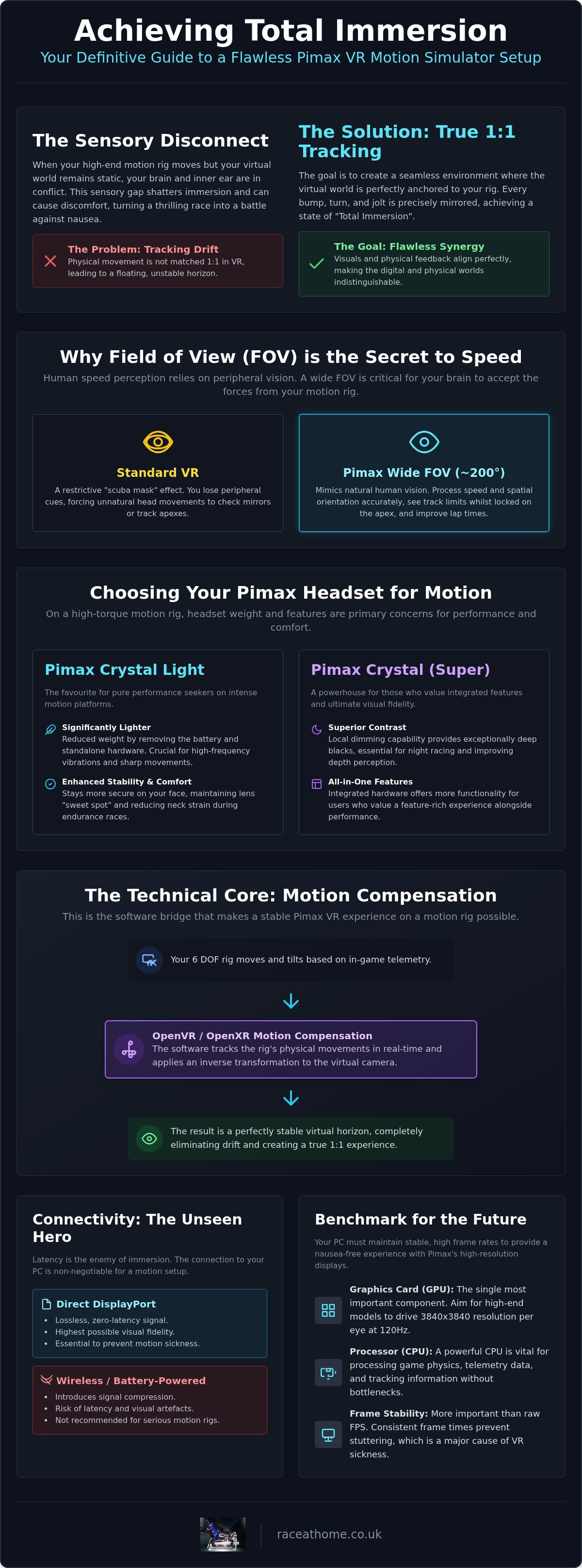
A high-performance simulator is more than a collection of expensive components. It's a delicate ecosystem where visual data and physical feedback must align with absolute precision. When you configure a Pimax VR motion simulator setup, you aren't just mounting a headset. You're building a sensory bridge. Standard VR hardware often suffers from a restrictive "scuba mask" effect that forces you to turn your entire head just to check a wing mirror. Pimax changes the equation. By offering a field of view that closely mimics human biology, it allows your brain to process speed and spatial orientation exactly as you would on a real circuit.
Why FOV is the Secret to Speed Perception
Human beings don't just perceive speed through their central vision. We sense it through our periphery. In a real racing environment, you rely on the edges of your sight to detect the subtle rotation of the car or the rapid approach of a barrier. Pimax's signature 200-degree FOV replicates this natural behaviour. If you can see the track limits whilst staying locked onto the apex, your lap times will naturally fall. This is precisely why sim racing VR and motion combined is the gold standard for enthusiasts. It provides the visual depth required for your brain to accept the physical forces being generated by your rig.
Overcoming the 'Disconnection' Barrier
Total immersion is fragile. It breaks the moment your eyes and your inner ear disagree. This "sensory gap" is usually the result of low-resolution textures or high latency. A high-end motion simulator uses telemetry to tilt and surge your seat, but if the visuals are pixelated, the illusion vanishes. Pimax headsets tackle this with ultra-high-resolution panels that virtually eliminate the "screen door effect" entirely. When you pair this visual fidelity with refresh rates of 120Hz or higher, the virtual world remains perfectly fluid. Every jolt from the suspension and every slide of the tyres is mirrored by sharp, high-fidelity optics. This technical harmony ensures your body and mind are fully committed to the race. By matching the rig's telemetry to the headset's optics, you achieve "Total Immersion", where the digital and physical worlds become indistinguishable. It's the difference between playing a game and driving a car.
Choosing the Best Pimax Headset for Your Motion Rig
Selecting the right hardware is a pivotal decision in your Pimax VR motion simulator setup. While the history and evolution of XR has brought us numerous standalone options, professional sim racing demands a tethered, high-bandwidth approach. The 2026 lineup, featuring the Pimax Crystal Super and the streamlined Crystal Light, offers distinct advantages depending on your rig's intensity. If you are running a high-torque 6 DOF system, the physical inertia of the headset becomes a primary concern for neck fatigue and tracking precision.
Pimax Crystal Light vs. Crystal: A Motion Perspective
The Pimax Crystal Light has emerged as the favourite for pure performance seekers. By removing the battery and standalone processing hardware, Pimax reduced the weight significantly. This is crucial when your motion platform is simulating high-frequency road vibrations or sharp kerb strikes. A lighter headset stays more secure on your face, maintaining the "sweet spot" of the lenses whilst reducing the strain on your neck during long endurance stints. However, the original Pimax Crystal remains a powerhouse for those who value integrated features. Its local dimming capability provides deep blacks that are essential for night racing at Le Mans, where visual contrast can make or break your depth perception. You can find a full breakdown of these specs in our guide to the best VR headset sim racing 2026.
Display Port vs. Battery-Powered VR on Rigs
Latency is the enemy of immersion. On a moving platform, even a few milliseconds of delay between a physical jolt and the visual update can trigger motion sickness. This is why a direct DisplayPort (DP) connection is non-negotiable. Unlike battery-powered or compressed wireless solutions, a DP connection ensures a lossless, zero-latency signal. However, managing this tether on a 6 DOF rig requires careful organisation. If you don't secure the cable with enough slack for traction loss movements, you risk damaging the ports or, worse, yanking the headset off mid-corner. Use high-quality cable sleeves and overhead booms to ensure the tether never interferes with the rig's behaviour.
Professional driver training often requires the extreme 3840 x 3840 resolution of the 2026 flagship models to read distant apex markers and dashboard telemetry with absolute clarity. Whether you choose the lightweight agility of the Crystal Light or the visual depth of the Super, the integration with your platform remains the key. If you are looking to pair these optics with a world-class platform, exploring the LowSlider motion range is the logical next step for your cockpit evolution. Balancing visual fidelity with physical comfort ensures that your focus remains on the track, not on the hardware strapped to your face.
The Technical Core: Motion Compensation and Tracking Stability
The most sophisticated Pimax VR motion simulator setup is effectively useless if the virtual world doesn't stay anchored to your car. Without motion compensation, your headset interprets the physical pitch and roll of the rig as head movement. When you brake hard and the platform tilts forward, the virtual dashboard appears to rise towards your face. This sensory mismatch is the primary cause of motion sickness and breaks the immersion we strive to achieve. Motion compensation solves this by subtracting the rig's telemetry from the headset's tracking data, ensuring your virtual eyes remain fixed within the cockpit regardless of the platform's behaviour.
Setting Up OpenXR Motion Compensation
OpenXR Motion Compensation (OXMC) has become the industry standard for 2026. The configuration process involves three critical stages to ensure a stable 1:1 experience. First, you must mount a dedicated tracker, such as a SteamVR Lighthouse tracker, directly to a rigid part of the moving chassis. This serves as the "anchor" for the software. Next, within the OXMC interface, you sync this tracker with your Pimax headset. Finally, you must fine-tune the coordinate offset. If this is done correctly, you can lean into a corner or experience violent traction loss whilst your virtual head stays perfectly positioned relative to the steering wheel. This technical precision is what separates a hobbyist rig from a professional-grade simulator.
Inside-Out Tracking Challenges on Motion Rigs
Whilst the Pimax Crystal Light offers incredible clarity, its inside-out tracking presents unique challenges on a moving platform. Standard camera tracking relies on "seeing" static features in your room to calculate position. During sudden traction loss or high-frequency vibrations, these cameras can struggle to maintain a lock. To optimise this, ensure your racing environment is well-lit and contains distinct, non-reflective features for the cameras to track. If you experience "jitters", it is often caused by electromagnetic interference (EMI) from your actuators. Grounding your rig and using shielded cables is essential to prevent this electrical noise from corrupting your tracking data.
Software prioritisation is the final piece of the puzzle. By using the latest Pimax Play v2.0.2 diagnostic tools, you can identify if background processes are causing micro-stutters. Addressing vr motion simulator lag through proper Windows optimisation ensures that the tracking data and motion telemetry arrive at your brain at exactly the same time. When these elements align, the result is a breathtakingly realistic experience that allows you to push your car to its absolute limit with total confidence.
Optimising Your PC and Software Environment
The performance demands of a Pimax VR motion simulator setup in 2026 are uncompromising. You aren't just pushing pixels; you're orchestrating a symphony of data. Whilst many guides suggest an RTX 3080 is sufficient, the reality of driving a Pimax Crystal Super at 3840 x 3840 per eye requires an RTX 50-series or equivalent as the new baseline. This isn't just about raw speed. It's about VRAM overhead and the ability to maintain a rock-solid 120Hz refresh rate whilst your PC simultaneously processes high-frequency motion telemetry.
The GPU/CPU Balancing Act
VRAM is often the hidden bottleneck when dealing with the expansive field of view provided by Pimax. To maintain visual fidelity without dropping frames, you must utilise Fixed Foveated Rendering (FFR). In titles like iRacing and ACC, this technique can reclaim 20-30% of your performance by reducing detail in your peripheral vision where it matters less. It's a vital trade-off that keeps your primary focus area crystal clear whilst freeing up resources for the sim's physics engine.
Hardware Integration and Cable Routing
The physical footprint of a 6 DOF rig presents unique challenges for cable integrity. Standard cables are rarely long enough to accommodate the full range of travel, especially during extreme traction loss. You'll likely need active DisplayPort extensions to maintain signal strength without introducing latency. Cheaper passive cables often fail when stretched or subjected to the electromagnetic environment of a high-torque simulator.
Organising your tether is a matter of engineering, not just tidiness. Use overhead bungee systems or articulated booms to keep the cable clear of the rig's moving parts. If the cable snags during a 30-degree pitch, you risk more than just a disconnect; you could damage the headset's internal ports. Additionally, monitor your sim rig motion platform compatibility regarding USB bandwidth. A single motherboard controller can easily become overwhelmed by the combined data stream of a direct-drive wheel, load-cell pedals, and motion actuators. Distribute your peripherals across different USB controllers to ensure zero-drop data transmission.
To ensure your hardware is perfectly matched for this level of performance, you can explore our range of LowSlider motion platforms, which are engineered to thrive under these extreme technical loads and provide a stable foundation for your VR experience.
The Race@Home LowSlider: The Ultimate Pimax Partner
Achieving the perfect Pimax VR motion simulator setup requires more than just high-end electronics. It demands a mechanical foundation that understands the unique physics of virtual reality. The Race@Home LowSlider is engineered with an ultra-low profile that places your seat as close to the floor as possible. This design choice is critical for VR. By lowering your centre of gravity, we reduce the "pendulum effect" common in taller rigs. When you pitch or roll, the movement feels tighter and more authentic to the car's chassis, preventing the exaggerated vestibular shifts that often lead to nausea in high-fidelity headsets like the Pimax Crystal Super.
The compact footprint of the LowSlider is a significant advantage for home users. Unlike bulky industrial platforms, our design fits within standard VR "guardian" boundaries. This allows you to maintain a safe and professional-grade racing environment without needing a dedicated warehouse. Our platform is built with VR-first telemetry in mind, ensuring that the motion cues are filtered to complement, rather than conflict with, the high-speed refresh rates of your Pimax headset.
Precision Engineering Meets Visual Fidelity
The LowSlider 6 DOF Twin-Traction-Loss Motion Platform is designed to bridge the gap between visual data and physical sensation. Whilst the Pimax lenses clarify every detail of the track surface, our actuators translate those textures into your spine with zero mechanical "slop". This precision is essential because even a millimetre of play in the frame can disrupt the tracking sensors. Our hand-built UK construction ensures that every movement is intentional. With our proprietary Twin Traction Loss system, you feel the rear tyres begin to rotate before your eyes even register the slide. This early warning system allows for more intuitive corrections, making the most of the Pimax’s expansive field of view.
Global Support and One-Hour Setup
We understand that the complexity of a Pimax VR motion simulator setup can be daunting. Whilst the software configuration requires patience, your hardware shouldn't. The LowSlider arrives with a simplified "four-piece" assembly process, allowing most users to go from unboxing to racing in approximately one hour. This efficiency doesn't come at the cost of support. We provide worldwide shipping and dedicated guidance to ensure your rig integrates perfectly with your Pimax base stations and trackers. Our bespoke mounting solutions are pre-drilled and tested, providing a rock-solid anchor for your Lighthouse sensors, which eliminates the vibration-induced tracking jitters found in lesser frames.
If you are ready to stop compromising and start experiencing true immersion, it's time to upgrade your cockpit. Explore the LowSlider 6 DOF Motion Platform today and discover how British engineering can transform your virtual racing career into a visceral, real-world experience.
Mastering the Future of Virtual Racing
Building a professional Pimax VR motion simulator setup is no longer a matter of trial and error; it's a precise engineering exercise. By aligning the expansive field of view of a Pimax headset with the rapid response of a high-performance motion platform, you've bridged the gap between digital data and physical reality. We've explored the necessity of mastering OpenXR motion compensation and the critical role of hardware like the RTX 50-series to maintain that elusive 120Hz stability. Every technical adjustment serves one goal: total sensory immersion.
As an Official Pimax Hardware Partner, Race@Home provides the integrated solution required to eliminate tracking drift and maximise realism. Our award-winning LowSlider engineering offers an ultra-low centre of gravity that transforms virtual telemetry into tangible sensations. With global shipping and a straightforward 1-hour assembly, your transition from a static seat to a 6 DOF cockpit is faster than you might think.
Build Your Bespoke Pimax & LowSlider Motion Rig Today
The track is waiting. It's time to feel every kerb, every slide, and every victory with the clarity and visceral force you deserve. Your ultimate racing experience starts here.
Sim racing is an intense mental and physical workout. If you're looking for a way to stay connected with your gaming community while giving your senses a rest from the VR headset, you can discover Sankki and enjoy a social, real-time multiplayer card game.
Frequently Asked Questions
Does a Pimax VR headset work with all motion simulators?
Pimax headsets are compatible with any motion platform that supports OpenVR or OpenXR standards, which covers the vast majority of consumer and professional rigs. However, the quality of the integration is what defines the experience. High-end platforms like the LowSlider are specifically engineered to handle the high-bandwidth data requirements of a Pimax VR motion simulator setup, ensuring that physical movement and visual updates remain perfectly synchronised without mechanical interference.
What is motion compensation and why do I need it for my Pimax setup?
Motion compensation is a software process that subtracts the physical movement of your simulator from the tracking data of your headset. Without it, your Pimax will interpret the rig’s tilt as you moving your head, causing the virtual cockpit to shift unnaturally around you. This is the primary cause of motion sickness. Implementing a dedicated tracker as an "anchor" ensures your virtual eyes stay fixed relative to the steering wheel at all times.
Will a Pimax 8K X or Crystal cause motion sickness on a 6 DOF rig?
Nausea is typically caused by latency or sensory mismatch, not the headset's resolution. In fact, the high refresh rates and expansive field of view found in the Pimax Crystal series actually help reduce motion sickness by providing visuals that match your inner ear's perception. If your rig is calibrated correctly and you've utilised OpenXR Motion Compensation, the high-fidelity 120Hz+ output provides a stable environment that your brain can easily accept as reality.
Can I use inside-out tracking on a motion platform, or do I need base stations?
Inside-out tracking is functional but presents challenges on moving rigs because the cameras rely on a static room environment. Sudden traction loss or high-frequency vibrations can cause the headset to lose its tracking lock. For the most robust Pimax VR motion simulator setup, we recommend using SteamVR Lighthouse base stations. They provide a more reliable spatial anchor that isn't affected by the rig's physical behaviour or changes in room lighting during long sessions.
How do I prevent my VR cables from tangling on a motion simulator?
Effective cable management requires an overhead bungee system or an articulated boom that keeps the tether clear of the rig's travel path. You must leave enough slack to accommodate the platform's maximum range of motion, particularly for 6 DOF systems with significant pitch and traction loss. Use a strain-relief clip to secure the cable to the rig's frame before it reaches the headset, preventing the moving platform from pulling on the ports.
What are the minimum PC specs for Pimax VR sim racing in 2026?
To run the 2026 Pimax flagship models at their native 3840 x 3840 resolution, an NVIDIA RTX 5080 or 5090 is the new baseline. You also require a high-clock multi-core CPU, such as an Intel i9-14900K or AMD equivalent, to handle the simultaneous processing of the sim's physics, VR runtimes, and motion telemetry. Insufficient hardware will lead to micro-stutters, which are significantly more noticeable and disruptive when you are on a moving platform.
Is it difficult to set up a Pimax headset with SimHub and motion software?
The configuration is straightforward if you follow a logical progression. You'll need the latest Pimax Play v2.0.2 software to manage the headset, whilst SimHub or proprietary platform drivers handle the telemetry. The main challenge is ensuring that your motion software and VR runtime aren't competing for the same CPU cores. By using affinity masks to distribute the load, you can ensure that the data flow remains fluid and the physical feedback is instantaneous.
Why is the LowSlider platform recommended for VR users over taller rigs?
The LowSlider’s ultra-low centre of gravity is designed to eliminate the "pendulum effect" that plagues taller simulators. In a VR environment, exaggerated lateral movements can confuse your vestibular system and break the illusion of being in a car. By keeping the seat pivot points close to the floor, the LowSlider ensures that the physical jolts and slides feel tight and authentic, perfectly complementing the high-speed visual data provided by your Pimax headset.


