

If you believe a standard high-end gaming rig is enough to drive a professional-grade motion platform, you're risking more than just a lower frame rate. You're inviting the jarring disconnect of sensory mismatch. You've likely felt that unsettling wave of motion sickness when a micro-stutter breaks the immersion, or noticed the frustrating lag between a visual turn and the physical surge of your seat. It's a common hurdle that separates a desktop hobby from a world-class simulation experience.
This 2026 motion simulator PC build guide provides the technical blueprint to ensure your hardware never bottlenecks your physical feedback. We'll show you how to master the requirements for a no-compromise rig, focusing on the PC as the essential brain driving your LowSlider 6 DOF platform. You'll learn how to select telemetry-optimised CPUs and VR-ready graphics cards that deliver zero-latency feedback and stable frame rates in Pimax VR. We're moving beyond basic specs to explore the engineering precision required for a clean, seamless integration that feels as visceral as the real tarmac.
Key Takeaways
- Master the telemetry pipeline to eliminate the sensory mismatch and motion sickness that's often caused by micro-stutters and latency gaps.
- Identify the 2026 hardware benchmarks, including the RTX 5090, needed to power this motion simulator PC build guide and its demanding physical feedback.
- Learn why Pimax VR headsets provide the essential visual fidelity that's required to match the visceral immersion of the LowSlider 6 DOF platform.
- Implement professional-grade strain relief and cable management to ensure your PC components remain secure during intense 6 DOF movement.
- Organise your software stack to bridge the gap between digital data and real-world sensation.
The Architecture of Immersion: Why Motion Simulators Demand More Power
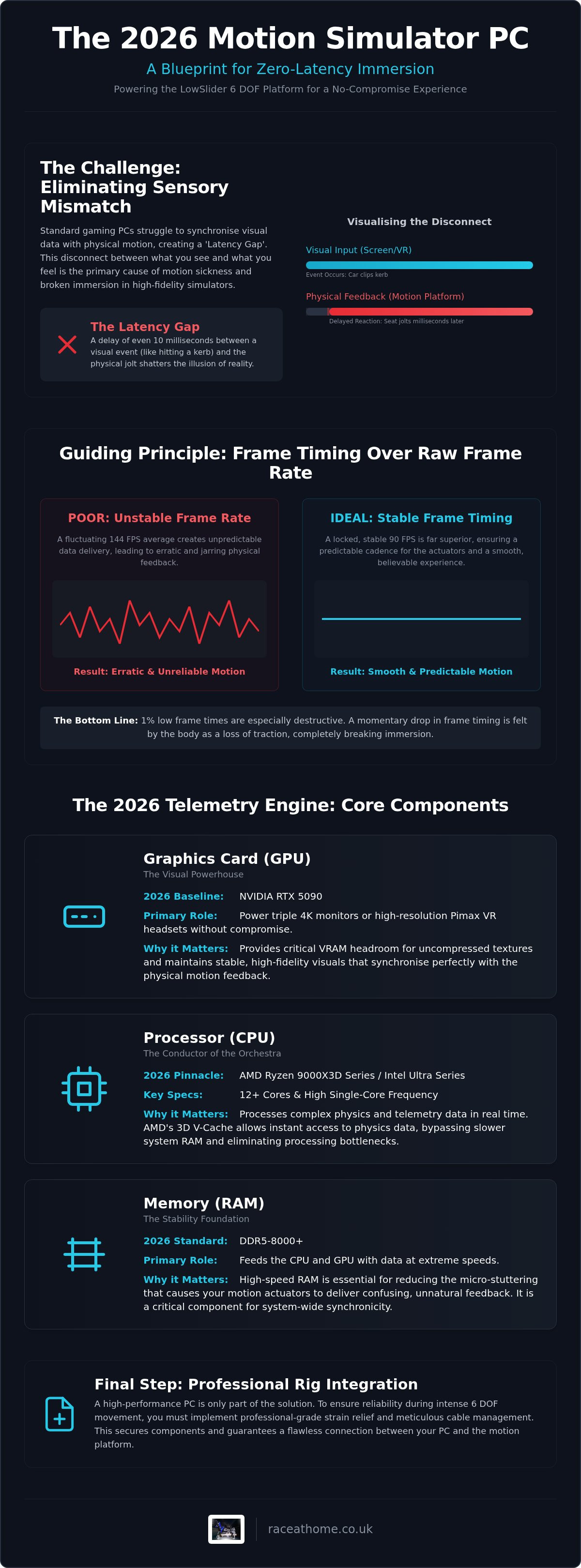
To achieve true immersion, your PC must do more than just render pixels. It functions as a real-time physics server. The telemetry pipeline is the invisible bridge where raw game data transforms into physical force. When you clip a kerb in a simulation, the game engine calculates the impact and sends that data to your motion software, which then instructs the actuators on your LowSlider 6 DOF platform to react. This entire process must happen in milliseconds. If there is even a 10ms delay between the visual flash of the kerb and the physical jolt, the illusion of realism shatters instantly.
This "Latency Gap" is the primary cause of sensory mismatch. Your eyes perceive a high-speed turn, but if your inner ear feels the lateral G-force a fraction of a second later, your brain registers a conflict. This often results in the dreaded motion sickness that plagues poorly configured rigs. Understanding this relationship is a cornerstone of any effective motion simulator PC build guide. Investing in the right components for this motion simulator PC build guide isn't just about speed; it's about eliminating the friction between the digital and physical worlds.
The evolution of motion simulator technology has significantly increased the demand for high-frequency data polling. Systems like the LowSlider 6 DOF Twin-Traction-Loss require constant, high-speed updates to manage complex multi-axis movements simultaneously. Unlike static rigs, a motion platform requires a PC that can maintain a perfect rhythm between software output and mechanical response.
The Role of the CPU in Motion Telemetry
Your CPU is the conductor of this high-speed orchestra. Whilst the GPU handles the visuals, the CPU must process complex physics solvers and manage the background overhead of motion software like SimHub or SRS. Single-core clock speed remains the most critical factor here. High frequencies ensure that telemetry data is extracted and dispatched without being queued behind other tasks. If your processor struggles with these background calculations, you'll experience "stuttering" in your seat, even if your on-screen frame rate looks smooth.
Frame Timing vs. Frame Rate
Raw FPS is often a vanity metric in motion simulation. What matters most is frame timing consistency. A fluctuating 144 FPS creates unpredictable telemetry delivery, leading to erratic physical feedback. A locked, stable 90 FPS is far superior because it ensures a predictable cadence for the actuators. On a high-performance rig like the LowSlider 6 DOF, 1% lows are particularly destructive. A sudden drop in frame timing causes a micro-stutter that your body feels as a momentary loss of traction, even when the car is perfectly stable. Precision requires synchronisation; without it, the hardware's potential is wasted.
Core Components: Specifying Your 2026 High-End Sim Racing Build
Entering the 2026 hardware landscape requires a shift in perspective. You aren't just building a gaming PC; you're assembling a high-performance telemetry engine. For enthusiasts running high-fidelity setups like the LowSlider 6 DOF Twin-Traction-Loss Motion Platform, this motion simulator PC build guide highlights why hardware must be capable of handling massive data throughput without breaking a sweat. Every component must be chosen to sustain the relentless flow of information between the virtual track and your physical seat.
The RTX 5090 is the non-negotiable baseline for triple 4K or high-resolution VR in 2026. This isn't about vanity frames; it's about the VRAM headroom required for uncompressed textures in titles like Assetto Corsa Evo. To maintain those critical 1% lows discussed in the previous section, DDR5-8000+ memory is essential. High-speed RAM reduces the micro-stuttering that otherwise confuses your motion actuators, making it a focal point of any modern motion simulator PC build guide.
The Processor: The Brain of the Motion Rig
AMD's 3D V-Cache technology in the Ryzen 9000X3D series and the high-efficiency architecture of Intel Ultra processors represent the pinnacle of 2026 processing power. The massive L3 cache on AMD chips allows the CPU to access physics data almost instantaneously, bypassing slower system RAM. For a 2026 build, 12 or more cores are necessary to manage the game engine whilst handling the background overhead of motion drivers and telemetry tools. The ideal CPU for 6 DOF telemetry processing must offer high single-core frequency paired with a robust multi-threaded architecture to prevent data bottlenecks.
Graphics and Memory: Rendering the Realism
Modern simulations demand massive VRAM; often exceeding 20GB for the most detailed environments. PCIe 5.0 NVMe storage is also a requirement to virtually eliminate load times and mid-race asset streaming stutters. When selecting a Power Supply Unit (PSU), don't just look at the total wattage. High-end 2026 GPUs exhibit significant transient power spikes that can trip standard units. A high-quality, ATX 3.1 compliant PSU is vital for system stability. This ensures that a sudden surge in graphical complexity doesn't result in a system crash during an intense corner.
Finally, consider the thermal load. High-performance sim rigs generate significant heat, which can lead to thermal throttling during a long endurance race. Ensure your case airflow is optimised to keep both the CPU and GPU within their peak performance windows. Proper cooling isn't just about longevity; it's about maintaining the consistent frame delivery that your motion platform depends on.
Visuals and VR: Balancing Resolution with Motion Synchronicity
Virtual Reality isn't just an alternative display method; it's the natural partner for the LowSlider 6 DOF platform. Whilst triple screens provide a massive field of view, VR offers a 1:1 spatial relationship between your head movements and the car's cockpit. This depth perception is vital for judging braking distances and apexes accurately. However, this immersion comes at a significant computational cost. To avoid the sensory mismatch mentioned earlier, your visual output must remain perfectly synchronised with your physical feedback.
The Pimax Crystal Super represents the pinnacle of 2026 visual fidelity, offering extreme resolutions that challenge even the most robust motion simulator PC build guide. Driving these displays requires a PC equipped with DisplayPort 2.1 to handle the massive bandwidth of uncompressed, high-refresh-rate signals. Without this connectivity, you're forced to rely on display stream compression, which can introduce subtle visual artefacts or latency. Foveated rendering, powered by integrated eye-tracking, is another essential tool. It allows the GPU to focus its power only where you're looking, maintaining the high frame rates necessary for motion synchronicity.
Optimising for Pimax VR Headsets
Achieving a seamless Pimax VR motion simulator setup requires a delicate balance between PiTool settings and in-game telemetry demands. You should prioritise a raw signal over hardware encoding whenever possible to minimise visual latency. Even a few milliseconds of delay in the video feed can disrupt the inner ear's perception of movement on a 6 DOF rig. It's often better to slightly reduce anti-aliasing than to sacrifice the frame timing consistency that keeps the physical and visual worlds in lockstep.
The Triple Screen Alternative
For those who prefer physical displays, a triple 4K setup remains a formidable choice. Managing this resolution across three screens requires sophisticated GPU surround configurations. In a moving cockpit, the importance of G-Sync or FreeSync cannot be overstated. Because the entire rig is in motion, any screen tearing or stuttering becomes far more noticeable and distracting than on a static setup. You should also consider bezel-free kits to minimise visual interruptions, ensuring your spatial awareness remains as high as possible during high-speed manoeuvres. Whether you choose VR or triples, the goal remains the same: fluid, high-resolution visuals that match the intensity of the LowSlider's mechanical precision.
Rig Integration: Cable Management and PC Placement for Moving Platforms
Deciding where to place your PC is a pivotal moment in any motion simulator PC build guide. On-rig placement minimises the distance for high-bandwidth VR cables but subjects your components to constant G-forces and mechanical stress. Conversely, keeping the PC off-rig protects it from vibration but introduces the risk of cable snagging during aggressive manoeuvres. For most professional-grade setups, an off-rig approach is preferred to maintain thermal efficiency and component longevity, provided you engineer the cable paths with precision. If your rig is situated in a dedicated sim racing centre, ensure the enclosure has active cooling to prevent heat soak during endurance sessions. For those looking to establish a professional identity for their venue, custom commercial signage from Signarama can ensure your facility looks as high-end as the hardware it houses.
If you choose to mount your PC directly to the frame, you must mitigate the impact of high-frequency vibrations. Vertical GPU mounts are essential here; they prevent the weight of a 2026-tier graphics card from exerting leverage on the PCIe slot during rapid heave movements. Adding anti-vibration rubber mounts between the case and the rig can further dampen the mechanical energy that might otherwise loosen internal connections. Cable length must account for the full range of actuator extension to ensure that a maximum pitch or roll doesn't physically wrench the connectors from their ports.
The Clean Build: Professional Cable Routing
A "clean build" is about more than aesthetics; it's about operational reliability. We recommend using industrial-grade cable drag chains on the LowSlider 6 DOF Twin-Traction-Loss Motion Platform base to manage the umbilical cord of data and power. These chains keep cables organised and prevent them from becoming entangled in the platform's mechanical linkages. It's a standard of craftsmanship that separates enthusiast setups from professional-grade engineering.
Signal integrity is equally critical. High-torque actuators can generate significant electromagnetic interference (EMI), which may manifest as "ghost" inputs or visual flickers in your Pimax VR headset. To prevent this, you must separate high-voltage power cables from sensitive USB and DisplayPort data lines. Whilst wireless peripherals might seem like a tidy solution, they often introduce the very latency we've worked so hard to eliminate. Stick to high-quality, shielded wired connections to ensure your telemetry remains pure and your feedback remains instantaneous.
The Final Configuration: Marrying Your Build to the LowSlider Platform
The final phase of this motion simulator PC build guide is the critical bridge between your high-performance hardware and the mechanical precision of the actuators. You've assembled a powerhouse; now you must teach it how to communicate with your seat. The LowSlider platform is designed for rapid deployment, offering a one-hour assembly promise that ensures you spend more time on the track than in the workshop. This seamless integration relies on a well-organised software stack that translates complex in-game physics into tangible, visceral sensations.
Fine-tuning the feedback loop is where your rig truly comes alive. It's about more than just movement; it's about the nuance of the road surface and the subtle weight transfer during a high-speed corner. By calibrating your system for specific cars and tracks, you ensure the physical response perfectly matches the visual data from your Pimax headset. This level of synchronicity is what separates a standard setup from a professional-grade simulation environment.
Calibrating the LowSlider 6 DOF
Integrating a 6 DOF motion simulator requires specialised software to manage the complex interactions of six independent axes. One of the most critical aspects of this setup is the twin traction loss system. When configured correctly, it provides an unparalleled rear-end feel, allowing you to sense the exact moment the tyres lose grip on the tarmac. You should organise and save distinct profiles for different racing disciplines. A GT3 car requires a completely different motion signature than a high-downforce Formula machine. Having these bespoke presets ready ensures maximum realism across your entire sim racing library, allowing you to jump from a rally stage to a Grand Prix circuit without losing the "feel" of the car.
The Race@Home Advantage
Choosing hand-built sim rigs from Race@Home means you aren't just buying hardware; you're investing in UK-based engineering expertise. Our bespoke systems are designed to be the ultimate companion for your 2026 high-end PC build. Because we specialise in the intersection of digital data and physical feedback, we provide the level of technical support required for such complex builds. If you encounter a telemetry bottleneck or a software conflict, our experts are on hand to guide you through the resolution. This motion simulator PC build guide has provided the blueprint, but the final step is the most rewarding. Enquire about your custom LowSlider build today and start feeling the track exactly as the engineers intended.
Take Control of the Ultimate Simulation Experience
Mastering the technical landscape of 2026 requires more than just raw power; it demands perfect synchronisation between your digital brain and physical actuators. This motion simulator PC build guide has highlighted how the right combination of telemetry-optimised CPUs and high-bandwidth connectivity eliminates the latency that breaks immersion. By prioritising consistent frame timing and robust cable management, you've laid the foundation for a rig that translates data into visceral sensation without compromise.
Your journey doesn't end with the PC. To truly feel every kerb and weight shift, you need a platform engineered for precision. Our LowSlider 6 DOF Twin-Traction-Loss Motion Platform features a proprietary ultra-low profile design and is hand-built in the UK to ensure professional-grade reliability. With worldwide shipping in four easy-to-assemble pieces, the path to a world-class setup has never been clearer. It's time to bridge the gap between the virtual and the real. Build your dream rig with a LowSlider 6 DOF platform today and experience the future of sim racing. We're ready to help you cross the finish line.
Frequently Asked Questions
What is the minimum GPU required for a 6 DOF motion simulator in 2026?
The baseline for a premium 2026 setup is the NVIDIA RTX 5090. Driving high-resolution Pimax VR headsets or triple 4K monitors requires immense VRAM and processing power to maintain the 90+ FPS needed for synchronised motion. Lower-tier cards often struggle with the texture overhead of modern sims like Assetto Corsa Evo. If you want to avoid the micro-stutters that cause motion sickness, investing in a flagship GPU is a necessity for your motion simulator PC build guide.
Does a motion platform increase the CPU load on my gaming PC?
Yes, adding a motion platform introduces significant background processing requirements. Your CPU must handle the physics solver of the game whilst simultaneously running telemetry software like SimHub or SRS to drive the actuators. This multitasking can consume several threads and requires high single-core clock speeds to prevent data bottlenecks. For a 6 DOF rig, we recommend a processor with at least 12 cores to ensure the motion feedback remains fluid and responsive during intense racing.
How do I prevent my PC cables from snapping on a full-motion rig?
Effective cable management is essential for protecting your hardware from the aggressive pitch and roll of a 6 DOF system. You should utilise industrial-grade cable drag chains to guide the umbilical cord from the PC to the moving platform. Ensure that every cable has enough slack to account for the maximum extension of the actuators. Using heavy-duty strain relief brackets at the GPU and motherboard ports prevents mechanical leverage from damaging sensitive internal connections during rapid movements.
Is VR better than triple screens for a motion simulator setup?
VR offers superior spatial awareness and a 1:1 relationship between your head movement and the car's cockpit, making it the natural choice for a LowSlider 6 DOF platform. It provides the depth perception needed to judge apexes with pinpoint accuracy. However, triple 4K screens are often preferred for longer endurance races where physical comfort and the ability to see external peripherals are priorities. Both options require a high-end PC to maintain the synchronicity required for motion.
Can I use a pre-built gaming PC for a Race@Home LowSlider rig?
You can certainly use a pre-built machine, provided it meets the high-performance benchmarks outlined in this motion simulator PC build guide. Most off-the-shelf gaming PCs are under-specced in terms of RAM speed and cooling for the sustained loads of a motion simulator. If you choose a pre-built, ensure it features an RTX 50-series GPU and a processor with robust multi-threaded performance. We often recommend bespoke builds to guarantee every component is optimised for telemetry throughput.
Why is the AMD Ryzen 9800X3D recommended for sim racing builds?
The 3D V-Cache technology in the Ryzen 9800X3D is a game-changer for sim racing physics. By providing the processor with massive amounts of high-speed L3 cache, it can access complex track and tyre data almost instantaneously. This significantly improves 1% low frame rates, which are critical for maintaining the consistent feedback loop required by motion actuators. It effectively eliminates the micro-stutters that disrupt the physical sensation of traction loss on a 6 DOF platform.
How do I reduce electromagnetic interference (EMI) in my motion rig?
To minimise EMI, you must physically separate your high-voltage power cables from sensitive data lines like USB and DisplayPort. High-torque actuators generate significant electrical noise that can interfere with wheel bases or VR signals. Using shielded cables and ensuring your rig is properly grounded are essential steps. We also suggest using ferrite cores on data cables to further suppress unwanted noise. This ensures your telemetry remains pure and your physical feedback stays precise.
Is a motion simulator worth the investment for competitive sim racing?
A motion platform like the LowSlider 6 DOF provides critical sensory data that a static rig simply cannot replicate. By feeling the exact moment the rear end loses grip or the weight shifts under braking, you can react instinctively rather than waiting for visual cues. This leads to greater consistency and improved lap times over a race distance. Beyond the performance gains, the level of visceral immersion makes every session feel like a genuine professional-grade driving experience.


