

What if your fastest simulator lap is the least useful practice for a real track day? It’s natural to chase lap times, but training for track days with a simulator is more valuable when each session has a clear purpose. You can rehearse track layouts and build repeatable habits, but a screen can’t reproduce the grip, forces or changing conditions you’ll encounter on circuit. The aim isn’t to mistake a game for instruction. It’s to arrive better prepared to learn safely.
This guide sets out a practical routine for sharpening observation, consistency and decision-making through focused exercises, rather than unstructured laps. You’ll learn how to set useful goals, review your performance and identify which skills still need to be tested in the car, on track. We’ll also look at motion feedback: a LowSlider 3DoF or 6 DOF platform can add simulated movement cues to home practice, making the experience more informative without replacing real-world experience.
Key Takeaways
- Make training for track days with a simulator purposeful: choose one skill to practise rather than chasing lap times.
- Build a repeatable session around a baseline, focused practice and review. Change one variable at a time.
- Use drills to develop observation, consistent braking references, smooth inputs and predictable decisions around traffic.
- Prioritise a stable cockpit and comfortable seating. Consider motion feedback as an optional way to experience simulated vehicle movement.
- Take one learning objective to the circuit, while following event guidance and adapting to real conditions.
How training for track days with a simulator can build useful habits
Training for track days with a simulator works best as deliberate practice: choose a specific habit, repeat it, then review what happened. Instead of treating each session as a race, use virtual laps to rehearse looking ahead, choosing consistent braking references, applying smooth inputs and making considered decisions. This can help you arrive with a clearer plan for learning on circuit, but it doesn’t replace real track time or appropriate instruction.
Sim racing uses simulation to recreate aspects of driving and motorsport, but the experience is shaped by the software, equipment and settings. Treat it as a space to practise repeatable actions, not proof that a particular technique or pace will transfer unchanged to a real car.
A simulator can make practice more repeatable, but it can’t guarantee real-world performance gains.
Which driving habits can simulator practice help you rehearse?
Use repeated laps to build a consistent visual routine. Look towards the next section of track rather than fixating on the car’s nose, and identify a braking reference before you reach the corner. After each run, review whether your braking, steering and throttle inputs were smooth and repeatable. The aim isn’t to memorise one perfect lap. Practise noticing changes and choosing a measured response when traffic or a mistake disrupts your plan.
What a simulator cannot reproduce on a real track
A screen can show the corner and a wheel can provide vehicle-response cues, but neither recreates real forces, physical risk or the consequences of a mistake in a car. Weather, surface conditions and visibility also change on circuit. A virtual car’s apparent limits depend on its software and setup, so don’t assume its grip and behaviour match your own vehicle. Use simulation to prepare questions and habits, then learn the real car and circuit progressively, following event guidance and appropriate instruction.
Keep the distinction clear: the simulator is a practice tool, not a verdict on how fast you’re ready to drive. On track, conditions and guidance take priority over virtual lap times or remembered braking points. This boundary lets you practise with confidence without carrying game-like assumptions into a real session.
How to build a simulator practice plan before your next track day
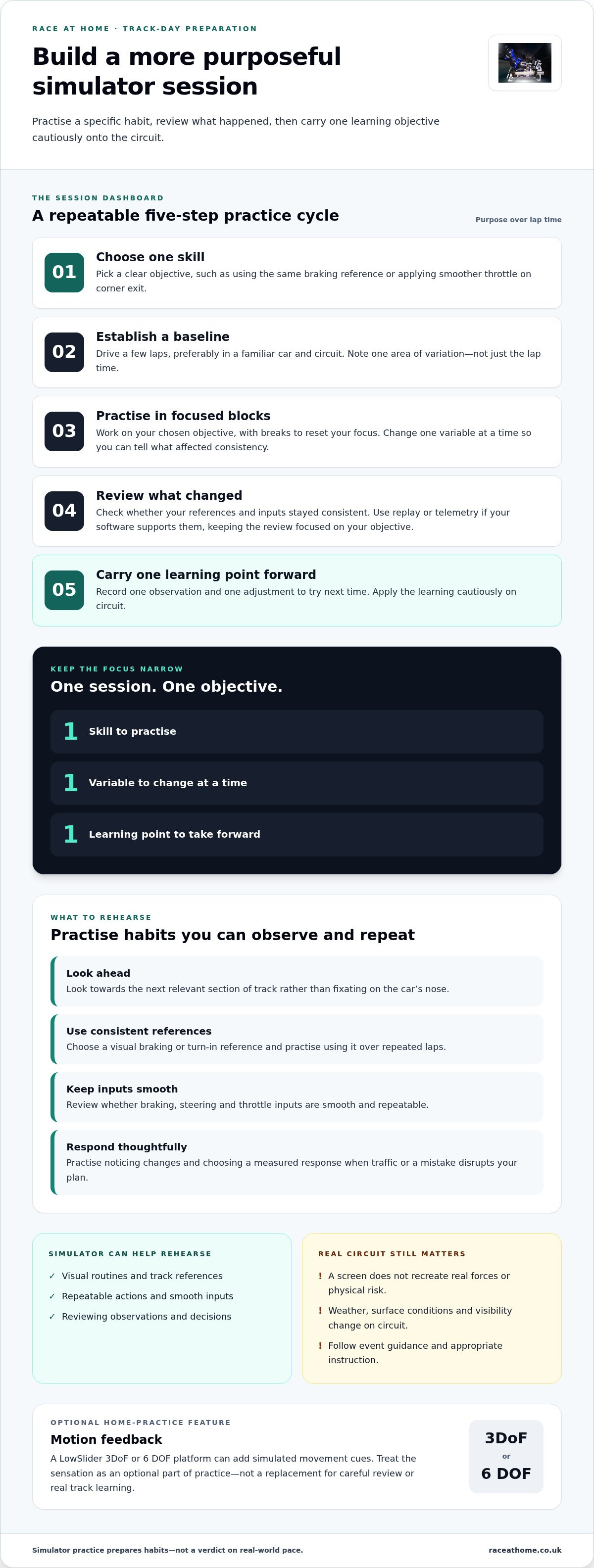
A productive session needs a clear purpose, not a target lap time. For training for track days with a simulator, use the same simple cycle each time: choose one objective, establish a baseline, practise, review and repeat. This makes it easier to spot what’s becoming more consistent without mistaking one quick lap for meaningful progress.
Set a useful objective for each simulator session
Pick one skill, such as using the same braking reference or applying smoother throttle on corner exit. If possible, use a familiar car and circuit so you’re not learning several new things at once. Drive a few baseline laps and note what you observe. Perhaps your braking point varies, or you turn in before you’ve finished slowing. Record the observation, not just the lap time.
Keep practice in short, purposeful blocks, with breaks to reset your focus. During each block, work on your chosen objective and change only one variable, such as your braking marker. If you alter the car setup, line and braking point together, it’s harder to tell what affected consistency. Professional programmes also use simulators for structured preparation. Winfield Racing School describes simulator use for track discovery, data analysis and driver debriefing in its simulator practice plan.
Review each run and adapt the next drill
After a block, identify where your references or inputs changed from lap to lap. Use replay or telemetry features if your chosen software supports them, but keep the review focused on the session’s objective. For example, check whether you reached your braking reference consistently before assessing how the corner felt. Finish by writing down one learning point and one adjustment to try next time.
Save this routine and repeat it before your track day:
- Choose: Pick one skill to practise.
- Baseline: Run a few laps and note one area of variation.
- Practise: Work in focused blocks, changing one variable at a time.
- Review: Use your observations, replay or supported telemetry to assess consistency.
- Carry forward: Record one learning point to take into your next session, then apply it cautiously on circuit.
If you’re considering motion feedback for home practice, explore LowSlider motion platforms as an optional way to experience simulated vehicle movement. Keep your training objective in focus: added sensation can inform the session, but it doesn’t replace careful review or learning on track.
Which simulator drills best prepare you for track-day driving?
The most useful drills train actions you can observe and repeat: where you look, which reference you use, how smoothly you operate the controls and how you respond to other cars. A fast lap may feel satisfying, but it doesn’t show by itself whether those habits are consistent or suitable for a real circuit.
Practise observation, references and consistency
Choose a visual braking or turn-in reference and use it over several laps. Practise looking towards the next relevant point on the circuit rather than fixating on the road immediately ahead of the car. Afterwards, review whether your approach, line and control inputs were repeatable. Don’t force the car onto a single “perfect” line: the appropriate path depends on the corner, vehicle and conditions. Practise a line you can follow smoothly and predictably, while staying ready to revise it.
Build decision-making into the exercise. For example, practise maintaining a predictable approach when another car is nearby, leaving room rather than making a sudden move to protect a virtual lap time. This rehearses awareness and restraint, not a reason to take risks on a real track. In training for track days with a simulator, a useful drill gives you something specific to notice and review.
Use telemetry and motion feedback with realistic expectations
If your software supports replay or telemetry, compare patterns in braking, steering and throttle application across laps. Treat the information as evidence to examine, not an automatic coaching verdict: a trace can show that inputs differed, but context is needed to understand why. Academic research on simulator-based driver evaluation explores how simulator data can be used to assess driving, offering context for this kind of structured review.
Motion feedback can add physical cues that make simulated vehicle movement more tangible. What you feel still depends on how the software represents the car and how the hardware conveys that response, so motion alone can’t prove that a technique will transfer. For more on what a motion platform can communicate, see this 6 DOF motion simulator guide.
Consistency in a simulation shows repeatability there, not readiness for a real circuit. Use drills to arrive with clearer references and more deliberate habits. Validate them on track, within the conditions and guidance of the day.
How to choose a simulator setup for track-day practice
The right setup is one that lets you practise comfortably and repeatably. For track-day preparation, stable controls, a secure cockpit and a seating position you can maintain matter more than adding equipment for its own sake. If your wheel or pedals shift between sessions, it’s harder to tell whether a change in your driving made the difference.
Static rig or motion platform: what changes during practice?
A static cockpit gives you a steady base for working on visual references and control inputs. You can practise looking ahead, braking consistently and making smooth steering and throttle adjustments without movement from the platform.
A motion platform adds physical feedback, making simulated vehicle movement more tangible. That can make a session feel more immersive, but it doesn’t reproduce every sensation or force experienced in a real car. Neither a static rig nor a motion system guarantees quicker laps or better track-day results. Choose according to the feedback you want during practice, then judge progress by whether your habits are controlled and repeatable.
Match the home setup to your available space and goals
Consider where the cockpit will sit, how much room it occupies and whether it’s practical to use regularly. A setup that fits your space and is ready for focused sessions is more useful than one that makes practice difficult to organise. Keep the goal in view: dependable positioning and repeatable inputs support deliberate training for track days with a simulator, whatever the hardware level.
If you want movement feedback in a compact home setup, Race@Home’s LowSlider platforms use a hand-built, low-profile design. They’re shipped in four pieces for customer assembly, which can be completed in under an hour. These details can help you assess how a motion platform might fit into your space and setup plans.
For broader planning advice on cockpit components and motion, read the sim racing setup guide. If you’re ready to explore motion feedback for your practice space, view LowSlider motion platforms.
How to take simulator practice onto your next track day
The circuit is where you find out which habits carry across. Treat simulator notes as prompts for observation, not instructions to follow regardless of what’s happening around you. The car, surface, weather and traffic may all differ from the virtual session, so real track-day rules, event briefings and instructor guidance always take priority.
Before the event: turn practice notes into simple priorities
Keep your preparation light. Choose one or two observations from your simulator sessions, such as looking further through a corner or paying attention to how progressively you brake. Don’t try to recall every virtual lap or reproduce a simulated braking point exactly. Use those references to notice what the real circuit is telling you, then adjust to the car, conditions and guidance on the day.
At the event, listen carefully to the briefing and any instructor advice. If the circuit feels different from the simulation, adapt rather than forcing a familiar line or input. The purpose of training for track days with a simulator is to arrive ready to observe and learn, not with assumptions about pace or grip.
After the event: review what transferred and what did not
After each session, jot down which visual cues or control habits felt familiar and which changed on circuit. Note the context too: for example, whether traffic, surface conditions or the car’s response affected your plan. A short debrief gives you a more useful next step than simply comparing lap times.
Use those observations to shape a future simulator exercise. If looking ahead felt natural but your braking references varied, practise those references in a focused session. If a simulated cue didn’t match the real car, record the difference rather than treating either experience as a universal rule. This cycle turns the track day into feedback for your next round of home practice.
Motion feedback is an optional part of a home setup. A platform can add a physical interpretation of simulated vehicle movement, but it remains a simulation cue, not a substitute for circuit experience or instruction. For more on how motion hardware can be used in driver-training contexts, read the commercial motion simulator driver-training guide.
Keep the loop simple: practise a habit, observe it on circuit, then refine your next session. If motion feedback is part of your home-practice goals, explore Race@Home’s LowSlider platforms as a way to add simulated vehicle movement to your rig.
Make your next simulator session count
Useful preparation starts with a clear objective, not a chase for the perfect lap. Choose one habit to practise, such as looking ahead or using a consistent reference, then review what changed between runs. On circuit, carry those observations with you, but let the briefing, instructor guidance and real conditions shape every decision. Simulation builds repeatable habits; the track is where you learn how they apply to your car.
For training for track days with a simulator, consistency matters more than adding complexity. A stable setup helps you focus on your inputs, while optional motion feedback can add a physical layer to simulated vehicle movement without standing in for real-world experience.
Race@Home hand-builds LowSlider 6 DOF and 3DoF motion platforms around a low-profile design. They’re shipped in four pieces for customer assembly, which can be completed in under an hour. Explore Race@Home motion platforms for focused sim practice and consider whether motion feedback suits your home setup.
Practise with purpose, stay adaptable on track, and let each session give you a sharper focus for the next.
Frequently Asked Questions
Is training for track days with a simulator worthwhile?
Yes, training for track days with a simulator can be worthwhile when you practise specific habits, such as looking ahead, using repeatable references and applying smooth inputs. Repeated virtual scenarios give you room to observe and review your driving in a controlled setting. However, a simulator can’t recreate real risk, every physical sensation or changing circuit conditions. Treat it as preparation that complements, rather than replaces, track time and appropriate instruction.
Can a simulator make you a better driver on a real track?
A simulator can help you rehearse habits that may transfer to circuit driving, including observation, consistency and deliberate control inputs. How much carries across depends on the simulation, how you practise and the real-world context. A faster virtual lap alone doesn’t prove you’re ready to drive at that pace. On track, base your decisions on actual conditions and follow event briefings and qualified guidance.
What should I practise in a simulator before a track day?
Choose one objective for each session, such as using a consistent visual reference, braking smoothly or applying controlled throttle on corner exit. Repeat the same scenario so you can focus on that skill, then review what varied between attempts. Note one useful learning point to carry forward. Keep virtual practice relevant to your goals, but be prepared to adapt your approach to the real circuit and the advice given at the event.
Does a motion simulator improve track-day training?
A motion platform can add physical feedback, making simulated vehicle movement more tangible during practice. Those cues are produced by the platform and simulation, though, and don’t recreate every force or consequence of driving a real car. Treat motion as one source of information alongside what you see and how you operate the controls. Focused practice and careful review still matter, and real circuit experience remains essential.
Should I focus on lap time or consistency in simulator practice?
Start with consistency. Repeating a controlled line, braking reference and smooth set of inputs gives you a clearer basis for reviewing your driving than chasing one fast lap. Once your approach is repeatable, look for where your inputs vary and choose one area to work on. Lap time can provide context, but it shouldn’t be your only measure of progress or a guarantee of performance on a real circuit.
Can simulator practice replace a track-day instructor?
No, simulator practice can’t replace event briefings, qualified instruction or learning under real circuit conditions. A simulator lets you repeat scenarios and reflect on your technique, but it can’t respond to your actual driving, surroundings and decisions as an instructor can. Use virtual practice as supplementary preparation. On the day, follow the event’s guidance and adapt to the car, circuit and conditions rather than relying on assumptions formed in simulation.
How do I use telemetry when preparing for a track day?
If your chosen simulation provides telemetry, use it to compare patterns across repeated laps, such as braking points and control inputs. Focus on whether those patterns are consistent and relevant to your practice objective. A graph can show differences, but it won’t automatically explain their cause or provide a complete assessment of your driving. Software features vary, so use telemetry to support observation and reflection, not to replace judgement.


