

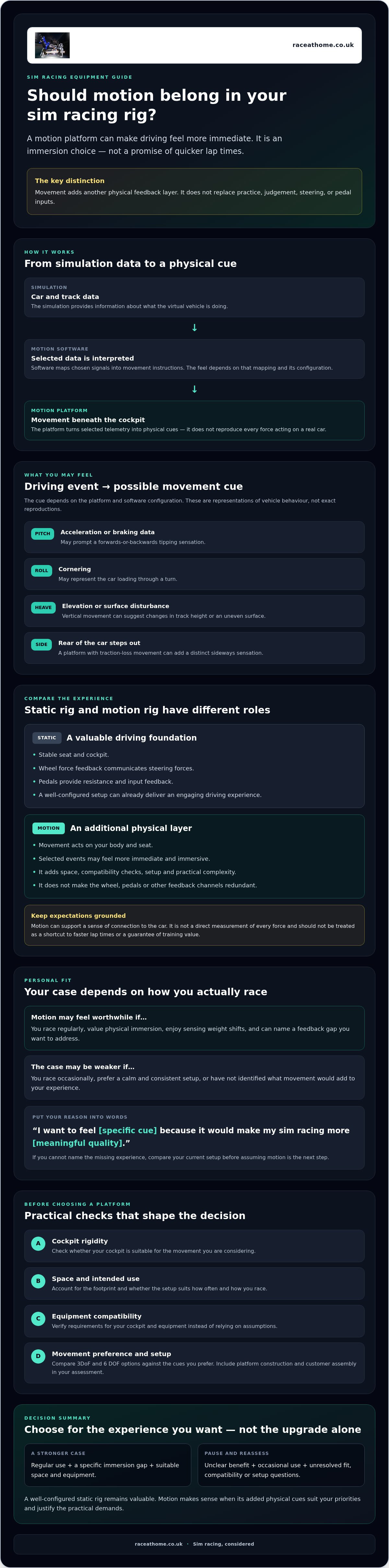
A motion simulator may make a race feel more real without making you faster. That distinction matters when you’re justifying a motion simulator purchase: a well-configured static rig already delivers force feedback and an engaging driving experience, so what would movement add for you?
Motion can turn digital cues into physical ones. As the car loads through a corner, pitches under braking or crosses an uneven surface, movement can make those sensations feel more immediate. But immersion is personal, and the benefit needs to justify the space, compatibility checks and setup involved.
This guide will help you make a clear case for or against the upgrade. Consider how often you race, what motion feedback can realistically contribute, and why it shouldn’t be treated as a route to quicker lap times. You’ll also find practical checks for your cockpit and equipment, including how the movement cues offered by 3DoF and 6 DOF platforms may suit different preferences. The aim is to decide whether motion belongs in your rig, rather than assume it’s the inevitable next step.
Key Takeaways
- Trace how simulation data passes through motion software to create physical cues, then identify which sensations would add value to your driving.
- Compare motion and static rigs across feedback, complexity, footprint and intended use. A well-configured wheel, pedal and seating setup remains valuable.
- Make justifying a motion simulator purchase easier by listing your current equipment and naming the specific experience gap you want to address.
- Check cockpit rigidity, available space and compatibility requirements before choosing a platform, rather than relying on assumptions about your setup.
- Compare 3DoF and 6 DOF options against your preferred motion cues, and include construction and customer assembly in your practical assessment.
Justifying a motion simulator purchase starts with what you want from sim racing
The key question isn’t whether a moving rig sounds more exciting. It’s whether physical feedback would make your time in the simulator more engaging or informative. A motion simulator translates selected simulation data into physical movement, giving you another way to experience what the virtual car is doing. For an introduction to the technology and its movement axes, see this overview of the motion simulator.
Movement can deepen immersion, but it isn’t a promise of faster lap times. A motion cue may make an event feel more immediate; it doesn’t replace practice, judgement or the core inputs that control the car. The decision is about whether the experience suits your priorities, not about comparing every platform specification.
What does a motion simulator add to a static rig?
A static rig gives you a stable seat and cockpit. Steering-wheel force feedback and pedal sensations convey important information through your hands and feet. A motion platform adds movement beneath the rig. For example, braking-related simulation data may prompt a pitch cue, so you feel the cockpit tip forwards as the car slows. Cornering and changes in the track surface can also be represented through movement, depending on the system and its configuration.
These channels have different roles. The wheel communicates steering forces, the pedals provide resistance and input feedback, and platform movement acts on your body and seat. None makes the others redundant. The value depends on whether that additional physical layer helps you feel more connected to the car, not on an assumption that it gives you a more accurate or faster driving technique.
Who is most likely to value motion feedback?
Motion is more likely to feel worthwhile if you regularly sim race and place a high value on physical immersion. If you enjoy sensing the car’s weight shift and want your cockpit to respond to events on track, movement may fill a gap in your experience. If you race occasionally, the upgrade may see less use, making its personal value harder to justify.
Be honest about your preferences as well as your frequency of use. Some drivers want a calm, consistent platform for focused practice; others want a more physical, enveloping session. Your available space and intended use matter too. A setup that fits comfortably and suits the way you actually race makes a stronger case than one chosen simply because motion is the next possible upgrade.
To begin justifying a motion simulator purchase, describe the experience you want in one sentence. If you can name the feedback you’re missing and expect to use the simulator regularly, you have a clearer basis for weighing the practical checks that follow.
How motion feedback turns sim racing telemetry into physical cues
Motion starts with information from the simulation. Software interprets selected data about the car and track, then sends movement instructions to the platform. The platform responds beneath your cockpit, turning digital telemetry into a physical cue. It doesn’t reproduce every force in a real car. Instead, it uses selected signals to suggest what the vehicle is doing.
That translation involves choices. A study of motion cueing quality explores the challenge of creating useful vehicle sensations within a simulator’s limited movement range. In practice, the feel depends on how software maps simulation data to movement and how that mapping is configured. A cue can support your awareness, but it isn’t a direct measurement of every force acting on the car.
Which driving events can motion help you feel?
Depending on the platform and software configuration, acceleration or braking data may prompt a pitch cue, while cornering may be represented by roll. Heave, or vertical movement, can suggest changes in elevation or a disturbance in the surface. If the rear of the car steps out, a platform with traction-loss movement can add a distinct sideways sensation. These movements represent vehicle behaviour, rather than reproducing it exactly, so their training value shouldn’t be overstated.
Motion works alongside your other senses. Vision shows where the car is going; sound adds engine and tyre cues; the steering wheel and pedals communicate their own forces and inputs. Movement may make some events feel more immediate, but it can’t replace looking ahead, interpreting those signals or practising deliberate control.
How do 3DoF and 6 DOF affect the purchase case?
Degrees of freedom describe the directions in which a platform can move. 3DoF covers three movement axes, while 6 DOF covers six, including rotational and linear movement. More axes don’t automatically make a platform the right choice for you. First decide which sensations matter most, then compare configurations with those priorities in mind. For a deeper technical explanation, read this 6 DOF motion simulator guide.
This distinction can make justifying a motion simulator purchase more concrete. Are you looking for a particular cue, or for the broader sensation of a cockpit responding to the race? If you’re assessing platform options, you can also explore Race@Home motion platforms and consider how their movement configuration aligns with your priorities.
Motion simulator versus static rig: compare the benefits and trade-offs
A motion platform adds another layer of physical feedback, but it also brings more hardware and practical checks. A well-configured static rig remains a capable option: a rigid cockpit, well-positioned seat, steering wheel and pedals can provide a focused, engaging experience. The useful comparison isn’t “basic versus serious”; it’s whether movement adds enough value for you to accommodate it.
| Consideration | Static rig | Motion simulator |
|---|---|---|
| Sensory feedback | Wheel, pedals and seat convey steering, input and contact cues. | Adds physical movement to selected simulation cues. |
| Complexity | Fewer moving parts and fewer motion-specific checks. | Requires a compatible platform, suitable cockpit and motion software configuration. |
| Physical footprint | Measures around the cockpit and its controls. | Allow for the platform and any movement or access clearance it requires. |
| Intended use | Suited to drivers prioritising stable controls and a consistent seat position. | May suit drivers who specifically want a more physical, immersive session. |
When is a static rig still the sensible choice?
If your main issue is an unstable seat, a flexing cockpit or controls that don’t feel comfortable and consistent, address those fundamentals first. Motion won’t correct poor positioning or replace a rigid frame. It may also be less compelling if you race infrequently, have limited room or prefer a calm setup with minimal movement. A static rig can support focused practice and enjoyable racing; movement isn’t a requirement for taking sim racing seriously.
More movement doesn’t automatically mean faster or better racing. Lap times depend on many aspects of driving and practice, and motion hardware shouldn’t be treated as a performance guarantee. Its value rests on the experience and cues it adds for you.
What should you compare before choosing motion?
Start with the sensations you want, then check the platform’s degrees of freedom and how they relate to your priorities. Measure the available room, including space around the rig, and check that your existing cockpit is suitable for the platform. Confirm software and hardware requirements against current product information rather than assuming compatibility.
Use this sim racing setup guide for broader compatibility planning. If you’re justifying a motion simulator purchase, write down what your current rig does well and what you want movement to add. This keeps the decision centred on a real need, rather than the assumption that a more complex setup must be an upgrade.
Build your personal case for a motion simulator before you buy
Start with your current rig, not a product shortlist. Record what you already use, including the cockpit, seat, wheel, pedals and any other equipment that affects fit. Then name the experience gap you want a platform to address. Is it greater physical immersion, a particular movement cue or a stronger sense of connection to the car? If you can’t name the gap, pause before adding more hardware.
Separate essentials from enhancements. A secure, comfortable seating position and reliable core controls may be essential to your setup; motion may be an optional immersion upgrade. This distinction helps you prioritise improvements and keeps justifying a motion simulator purchase tied to your own use, rather than someone else’s idea of a complete rig.
Use a simple decision checklist for your own racing habits
Make the case specific to your routine. Note how often you race, which driving experiences you enjoy and what you hope to feel more clearly. Rank the cues that matter to you instead of treating every possible movement as equally valuable.
- Use: How regularly do you race, and what kinds of sessions do you return to?
- Feedback: Which cues matter most to you, such as braking movement, cornering response or a traction-loss sensation?
- Success: Define a personal outcome, such as feeling more immersed or enjoying your sessions more. Don’t make faster lap times the required proof of value.
If your desired outcome is clear and relevant to the way you race, you have a stronger basis for comparing options. If it isn’t, refine the goal before looking at platforms.
Check the practical fit of a motion platform
Measure the space available around the cockpit, then compare it with the platform’s current dimensions and any movement or access clearance the supplier specifies. Check mounting and compatibility with your cockpit, seat and existing hardware. Confirm software, system and load requirements using current product information. Don’t assume your equipment will connect or fit simply because it works together now.
Consider the wider setup too. The sim racing accessories guide can help you review the equipment around your rig. To assess a compact, low-profile option against your measurements, explore Race@Home motion platforms. Check the platform details and assembly requirements against your space and setup before deciding.
Choose a motion simulator that fits your case and plan the next step
Once you’ve identified the sensations you want and checked your space, use those requirements to compare platform options. A 3DoF configuration may suit the movement cues you prioritise; a 6 DOF option may be worth investigating if you want to explore a broader set of movement axes. Neither is automatically the better choice. The question is whether the platform’s movement, technical requirements and physical fit support your reasons for justifying a motion simulator purchase.
Race@Home designs and hand-builds LowSlider platforms in both 3DoF and 6 DOF configurations. Their compact, low-profile design may be relevant if space is a key constraint. Check those features against your measured setup rather than assuming any platform will fit every cockpit or room.
How to assess a LowSlider platform against your requirements
Compare each configuration with the cues you ranked earlier and the way you plan to use your rig. Before deciding, check current product information for dimensions, compatibility, technical specifications and requirements for your cockpit and hardware. Specifications can vary by platform, so confirm the details for the exact option you’re considering.
LowSlider platforms are hand-built to order. That describes how they’re made, not a promise about performance or suitability. Also consider the practical details: the platforms ship in four pieces for customer assembly, which Race@Home says can be completed in under an hour. Check what tools, preparation or help you’ll need, and whether assembling the platform yourself fits your plans.
What to clarify before placing an order
Before committing, confirm the shipping arrangements, what arrives in the package and what you’ll need to prepare for assembly. Ask about compatibility with your cockpit, seat and existing equipment, as well as product-specific software, hardware or space requirements. If a specification affects whether the platform will work in your setup, get current confirmation instead of relying on a general description.
Keep your decision criteria in view: the movement cues you want, the space you have and the practical requirements you can accommodate. If the product details answer those questions, you’ll be in a stronger position to make a considered choice. Explore Race@Home motion simulator platforms and review the current information to confirm fit before deciding.
Make your next move with confidence
A motion simulator earns its place when its physical cues match what you value, fit your setup and suit how often you race. Justifying a motion simulator purchase isn’t about expecting quicker lap times; it’s about deciding whether added movement will make your sessions more immersive and enjoyable. Compare the sensations you want, check compatibility and dimensions, and be realistic about the space and setup effort you can accommodate.
Race@Home’s hand-built-to-order LowSlider range includes 3DoF and 6 DOF motion platforms to assess against your preferred cues and practical requirements. The platforms have a compact, low-profile design and ship in four pieces for customer assembly, which Race@Home says can be completed in under an hour. Confirm the current specifications and fit for your rig before choosing.
Whether you add motion now or stay with a static rig, make the decision based on how you actually race. To compare your requirements with the available options, explore Race@Home motion simulator platforms.
Frequently Asked Questions
Is a motion simulator worth buying for home sim racing?
It can be worthwhile if physical movement would make your regular sim racing more immersive and you have the space and compatible setup for it. The value is personal: consider how often you race, which motion cues you want and what your current rig is missing. A well-equipped static rig can still offer a focused, engaging experience, so justifying a motion simulator purchase means weighing the added feedback against the practical changes involved.
Can a motion simulator make you faster in sim racing?
Not automatically. Motion can add physical cues that suggest how the car is behaving, but it doesn’t guarantee quicker lap times or replace practice, visual awareness and control. Treat movement as another way to experience a simulation, not a shortcut to better results. If you’re assessing its value, set a personal goal around immersion or enjoyment rather than assuming performance gains will prove the upgrade worthwhile.
What does a motion platform add to a static sim racing rig?
A motion platform moves the cockpit in response to selected simulation data, adding physical sensations alongside the wheel, pedals and screen or headset. Depending on its configuration, it may cue events such as braking, cornering or changes in the track surface. These movements suggest vehicle behaviour rather than reproducing every real-world force. They complement your existing controls and sensory information, but don’t replace steering feedback, pedal feel, vision or sound.
How do I decide whether a 3DoF or 6 DOF simulator suits me?
Identify the movement cues you want, then check which configuration provides the relevant axes and suits your setup. 3DoF covers three movement axes, while 6 DOF covers six, including rotational and linear movement. More axes aren’t automatically better for every driver. Compare current specifications and requirements for each platform, and decide based on the sensations you want, compatibility, available space and intended use.
Will a motion simulator work with my existing sim racing rig?
It may, but don’t assume compatibility. Check the platform’s current requirements against your cockpit, seat, mounting arrangement and other hardware. You’ll also need to verify software and system compatibility for the specific platform and simulation you use. Confirm dimensions and relevant load or technical specifications using current product information before ordering. If anything is unclear, ask the supplier about your exact setup rather than relying on general compatibility claims.
How much space do I need for a home motion simulator?
The space required depends on the platform and your complete cockpit, so check the current product dimensions rather than relying on a general estimate. Measure the available area, including room around the rig for access and any movement clearance specified by the supplier. A compact, low-profile design may suit some home setups, but you still need to confirm fit against your room, cockpit and intended position.
Is a motion simulator difficult to assemble at home?
Assembly requirements vary by product, so check what the manufacturer supplies and what you’ll need to prepare. Race@Home states that its platforms ship in four pieces for customer assembly, which can be completed in under an hour. Confirm the instructions, tools or other preparation required for the specific platform before ordering. Customer assembly is a practical consideration, but it isn’t the same as a turnkey rig installation.


