

The most convincing motion simulator may not be the best choice for vehicle-dynamics testing. A motion simulator for driver development can make changes in grip, weight transfer and vehicle behaviour feel more tangible, but bigger or more dramatic movement doesn’t automatically support better learning or reliable engineering results. Motion cues need to serve a clear objective, and movement alone can’t validate a vehicle model or test result.
If you’re weighing up a motion platform, ask what it will add to your training or testing: useful physical feedback, or mainly a more immersive experience? The answer depends on the skill or decision you’re targeting, how the motion is generated, and whether your software and controls work with the system.
This guide explains which driver-development tasks may benefit from motion cues, how motion platforms compare with static rigs and specialist engineering simulators, and what to check before choosing hardware. Use the evaluation checklist to assess software compatibility, integration and validation needs, and compare options such as Race@Home’s LowSlider platforms against your objectives.
Key Takeaways
- Separate driver practice from engineering validation: motion cues can support learning, but they don’t prove that vehicle-dynamics results are valid.
- Trace how simulated vehicle behaviour becomes platform movement, then assess whether those cues suit the task you want to practise.
- Compare static rigs, motion platforms and specialist engineering simulators by intended use, integration demands and evidence requirements.
- Define objectives, users, scenarios, software compatibility and who will configure and operate the system before evaluating hardware.
- Assess whether a motion simulator for driver development fits your setup, including options such as Race@Home’s LowSlider platforms, against your specific requirements.
What can a motion simulator contribute to vehicle dynamics testing and driver development?
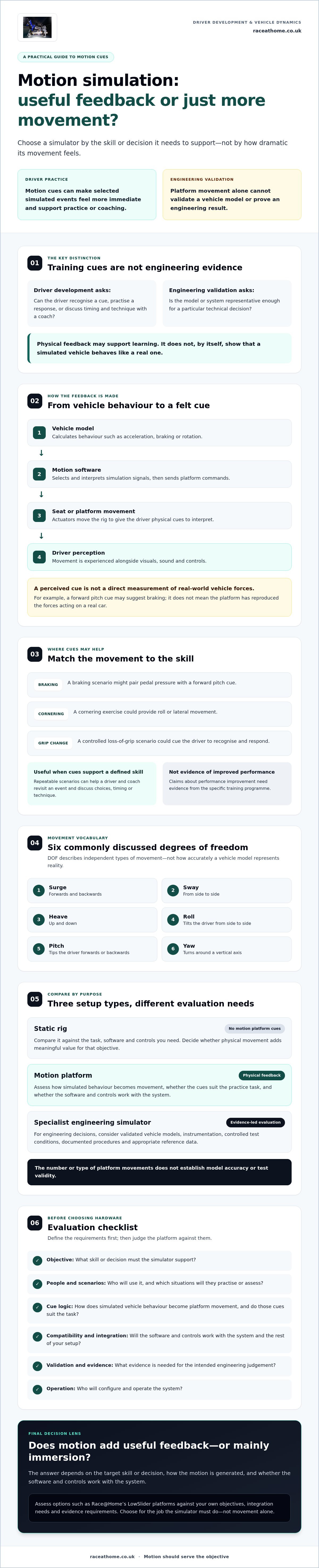
Driver practice and validated vehicle-dynamics engineering are different tasks. A motion platform can make selected events feel more immediate, helping a driver experience cues linked to braking, cornering or a change in grip. That physical feedback doesn’t, by itself, prove that the simulated vehicle behaves like a real one.
A motion simulator translates selected signals from a simulation into physical cues by moving the driver’s seat or platform. Systems can produce different combinations of movement, often described by degrees of freedom (DOF). The number and type of movements available don’t establish how accurately the vehicle model represents reality or whether a test result is valid.
Motion hardware can deliver physical cues for practice; it cannot, on its own, validate a vehicle model or engineering result.
Which driver-development tasks can benefit from motion cues?
For familiarisation and coaching, motion cues can help connect a driver’s inputs with sensations in the seat. A braking scenario might pair pedal pressure with a forward pitch cue. A cornering exercise could provide roll or lateral movement, while a controlled loss-of-grip scenario could give the driver a cue to recognise and respond to. These are simulated signals, not proof that the forces or vehicle response precisely match a real car.
Repeatable scenarios let a coach and driver revisit the same event, compare choices and discuss timing or technique. This can make practice more structured, although claims of improved performance need evidence from the specific training programme. A motion simulator for driver development is most useful when its cues support a defined skill, rather than simply adding spectacle.
How is driver development different from engineering validation?
Driver development focuses on the person: familiarising them with simulated vehicle behaviour, practising responses and supporting coaching conversations. Engineering validation focuses on whether a model or system produces results that are sufficiently representative for a particular technical decision. That may require validated vehicle models, instrumentation, controlled test conditions and documented procedures, alongside comparison with appropriate reference data.
Motion can form part of a driver-in-the-loop setup, but platform movement alone doesn’t establish that those engineering requirements have been met. Before assessing hardware, write down the decision the simulator must support. Is the aim to practise driver responses, assess a design or generate evidence for an engineering judgement? The answer shapes the software, data and validation process you need, as well as whether motion cues add meaningful value.
How motion cues translate vehicle behaviour into driver feedback
A simulator’s movement begins as data. The vehicle model calculates behaviour such as acceleration, braking or rotation. Motion software interprets selected signals and turns them into commands for the platform, then actuators move the seat or rig to give the driver physical cues to interpret alongside visuals, sound and controls.
Simulation signals guide platform movement, which creates perceived feedback, not a direct measurement of real-world vehicle forces. A forward pitch cue might suggest braking, for example, but it doesn’t mean the platform has reproduced the forces acting on a real car. The University of Leeds Driving Simulator describes vehicle-development work comparing simulator testing with real-world testing. This is a useful reminder to assess a simulator against its intended purpose.
What do degrees of freedom mean in a motion simulator?
Degrees of freedom (DOF) describe independent types of movement. The six commonly discussed axes are:
- Surge: movement forwards and backwards.
- Sway: movement from side to side.
- Heave: movement up and down.
- Roll: rotation that tilts the driver from side to side.
- Pitch: rotation that tips the driver forwards or backwards.
- Yaw: rotation around a vertical axis, turning left or right.
More axes don’t automatically mean better feedback. Suitability depends on which cues matter for the task, how they’re generated and whether the driver can interpret them consistently.
Why do motion cueing and software integration matter?
Motion cueing maps simulation data to platform movements within the system’s physical limits. Because a platform can’t reproduce every vehicle movement without restriction, its software has to select and shape cues. The result depends on the vehicle model, cueing configuration, hardware and learning objective. If these elements don’t align, movement may feel convincing while communicating the wrong emphasis.
Before choosing a motion simulator for driver development, check whether your specific simulation software natively supports the platform or whether integration relies on a custom or otherwise unverified setup. Confirm how configuration is handled, then assess latency and repeatability using representative scenarios. Don’t assume compatibility or performance from an axis count or product description alone.
If you’re comparing hardware, review Race@Home motion platforms as one option, then check their suitability against your software, integration and training requirements.
Static rigs, motion platforms, and specialist simulators: what should you compare?
Choose a system around the decision or skill you need to support, not the biggest movement range on a specification sheet. A motion platform can add physical cues to a simulation, but it doesn’t automatically provide the software, measurements or validation process needed for a complete engineering test setup.
| System | Feedback | Typical use | Integration and validation | Practical complexity |
|---|---|---|---|---|
| Static rig | Visual, audio and control feedback, without platform movement. | Practising visual references, control inputs and repeatable scenarios. | Check software, controls and data needs. Validation depends on the model and intended decision, not on whether the rig is static. | Usually fewer moving-system requirements; assess the full rig and software setup. |
| Motion platform | Simulation-driven physical movement adds selected motion cues. | Driver familiarisation or coaching where physical feedback is relevant. | Confirm software integration and cue configuration. Movement alone doesn’t validate vehicle behaviour. | Consider platform setup, operating limits and repeatable configuration. |
| Specialist engineering simulator | Feedback is configured for defined engineering workflows and may combine motion with instrumentation. | Vehicle development or technical evaluation requiring specific evidence. | Assess model validation, measurement systems, interfaces and documented procedures against the engineering task. | Can involve more complex software, equipment and specialist workflows. |
When is a static simulator enough for driver development?
A static rig may be a sound choice if coaching centres on braking points, visual references, steering inputs or repeating a scenario consistently. If the learning objective depends on feeling a simulated load change, motion may be worth evaluating. If it doesn’t, a well-configured static setup may meet the need without moving hardware. Compare the value of those cues with your software’s capabilities and the task you’re teaching.
When should buyers investigate a specialist engineering simulator?
Look beyond a standard motion setup if your work requires validated vehicle models, measurement systems or established engineering workflows. Before selecting equipment, document required interfaces and confirm software capability, evidence requirements and technical support responsibilities with the relevant providers. These needs are separate from buying a motion platform: Race@Home sells simulator hardware, not simulation software development or turnkey installations.
If you’re comparing movement options, this guide to 6 DOF motion simulators provides further context. For a motion simulator for driver development, weigh its cues against the training objective, integration demands and evidence your programme must produce.
How to evaluate a motion simulator for your driver-development programme
Start with the job the simulator must do, rather than a preferred platform configuration. Use this sequence to turn broad aims into requirements you can discuss with suppliers and assess in a trial.
- 1. Define the objective. Specify the decision or skill the system should support, such as practising responses to a particular vehicle behaviour or helping coaches review driver inputs.
- 2. Identify users. Record who will drive, coach, configure the software, operate sessions and maintain the complete system. Include their experience and onboarding needs.
- 3. Select scenarios. Choose representative, repeatable exercises and note which cues matter. Don’t select movement features without a clear link to the task.
- 4. Confirm software and interfaces. Name the simulation software, version, controls and data interfaces in your setup. Ask which are supported and verify compatibility for that exact configuration.
- 5. Set evidence requirements. Decide what you’ll record, how you’ll judge whether the system meets its purpose, and whether your use requires engineering validation beyond driver feedback.
- 6. Check practical requirements. Assess the platform’s physical footprint, operating environment, required external equipment and installation responsibilities. Clarify what the supplier provides and what your team must arrange.
Which technical and operational questions should buyers ask?
Ask how motion cues are configured, whether users can adjust them and how you’ll maintain repeatable settings across sessions. Check the system’s stated operating requirements and any external equipment needed. Keep a written record that separates confirmed specifications from points awaiting supplier confirmation. For a motion simulator for driver development, unresolved software compatibility or unclear setup responsibilities can undermine an otherwise suitable hardware choice.
Assign named owners for configuration, operation and maintenance before purchase. Plan how new users will be introduced to the system and how settings will be controlled between users or scenarios. Race@Home supplies motion-platform hardware; software development and turnkey installation sit outside its offering, so document who will handle those parts of your setup.
How can a team assess whether motion adds value?
Set a baseline using your existing static or real-world training approach, then define observable measures before a trial. Depending on the objective, these might include whether drivers identify a cue, describe their response consistently or complete a coaching scenario as intended. Review those observations alongside participant feedback and practical limits such as configuration demands. A trial can inform your decision, but don’t treat subjective impressions as proof of performance gains or a guaranteed return on investment.
For more evaluation context, read the commercial driver-training guide. If a motion platform appears to fit your requirements, explore Race@Home motion platforms and check the exact software and integration needs for your setup.
Where Race@Home motion platforms may fit in a development setup
Race@Home is a UK-based maker of hand-built LowSlider motion platforms. Its hardware may be worth evaluating if your driver-development programme has a clear use for physical motion cues. The right fit depends on the task, simulation software, integration requirements and whether you need driver practice or evidence for engineering validation. A platform’s movement range alone can’t answer those questions.
The available platforms include the LowSlider 6 DOF Twin-Traction-Loss Motion Platform and the LowSlider 3DoF motion platform. These are hardware options to assess within a wider system, not a complete software or engineering-validation package. Race@Home does not develop vehicle-simulation software or provide turnkey installations, so establish who will supply and configure the rest of your setup.
What should buyers establish before considering a LowSlider platform?
Start with the driver-development task. Identify the cues drivers need to practise, then decide whether physical movement adds value beyond the software’s visuals, audio and controls. Name the simulation software and confirm compatibility and system requirements for the exact proposed configuration before assuming it will work.
Also assess the intended site. The LowSlider design has an ultra-low profile and compact footprint, but check the space needed for the complete rig, access around it and any external equipment. Products ship worldwide in four pieces for customer assembly in under an hour. Confirm that the assembly approach and site conditions suit your team, and clarify who is responsible for configuring the full system.
What is the next step for a potential motion-platform buyer?
Prepare a short brief before discussing hardware. Include:
- Who will use and operate the simulator, and what skills or behaviours they’ll practise.
- The scenarios and motion cues the programme needs to reproduce.
- Your simulation software, controls and relevant data interfaces.
- Available space, required external equipment and assembly responsibilities.
- Any integration, repeatability or validation requirements the platform must meet.
This gives you a practical basis for asking whether a motion simulator for driver development suits your objectives, and for separating confirmed product details from points that still need checking. For broader planning, see the simulator setup guide.
If a LowSlider platform appears relevant, contact Race@Home to discuss its motion-platform hardware and confirm product details against your software, space and integration needs. Keep the decision grounded in what your programme requires, not assumptions about performance or validation.
Choose motion that serves your development goals
A motion platform can make selected vehicle cues more tangible for driver practice, but it doesn’t validate vehicle behaviour or engineering results by itself. The value of a motion simulator for driver development depends on a clear training objective, suitable software integration and cues that help the driver or coach do meaningful work. If your priority is visual references and control inputs, a static rig may be enough. If physical feedback is essential, assess the platform against the specific task.
Race@Home’s hand-built-to-order LowSlider platforms offer hardware options to consider, including an ultra-low-profile design with a compact footprint. They ship worldwide in four pieces for customer assembly in under an hour. Before choosing, confirm software compatibility, integration responsibilities and practical requirements for your space.
Have a defined use case in mind? Discuss your motion-platform requirements with Race@Home and check whether its hardware aligns with your setup. With the right questions in hand, you can build a driver-development system around purposeful feedback. Contact Race@Home to discuss the LowSlider platforms and your requirements.
Frequently Asked Questions
Can a motion simulator be used for vehicle dynamics testing?
Yes, a motion simulator can form part of vehicle-dynamics testing, but its role must be clearly defined. It can provide physical cues in a driver-in-the-loop simulation, while engineering conclusions still depend on validated vehicle models, suitable instrumentation, documented procedures and comparison with appropriate reference data. Platform movement alone doesn’t verify model accuracy or prove that results represent real-world vehicle behaviour. Treat the motion system as one part of the test setup.
How does a motion simulator help with driver development?
A motion simulator for driver development can add physical feedback to visual and control cues, helping drivers practise responses to simulated braking, cornering or changes in grip. Coaches can repeat scenarios and discuss the driver’s inputs and reactions. The value depends on whether those cues support a defined learning objective and are configured appropriately. Motion can make practice more immersive, but it doesn’t guarantee improved performance.
Is a motion simulator the same as a vehicle dynamics simulator?
No. A motion simulator is hardware that translates selected simulation signals into physical movement. A vehicle-dynamics simulator refers more broadly to the system used to model and explore vehicle behaviour, which may include software, controls, data and, in some setups, a motion platform. Adding movement doesn’t validate the underlying model. For engineering use, confirm the model, instrumentation and procedures meet the requirements of the decision being made.
What does 6 DOF mean on a motion simulator?
Six degrees of freedom (6 DOF) means movement across six independent axes: surge forwards and backwards, sway side to side, heave up and down, roll tilting from side to side, pitch tipping forwards or backwards, and yaw turning around a vertical axis. The label describes movement types, not cue accuracy or suitability. Consider which movements are relevant to your training task and how the system produces them.
Can a motion platform work with my existing simulation software?
It may, but compatibility depends on the exact platform, simulation software, version and interfaces in your setup. Check whether the software offers native support or whether integration needs a separate configuration, then verify requirements with the relevant providers. Don’t assume that a platform will work with every simulator. Confirm how motion cues are configured and assess latency and repeatability using the scenarios you expect to run.
What should I compare before choosing a motion simulator for driver development?
Start with your objective, users and scenarios, then compare static rigs, motion platforms and specialist engineering simulators against those needs. Check software compatibility, controls, interfaces, movement cues, physical footprint and required external equipment. Establish who will configure, operate and maintain the complete setup. If you need engineering evidence, assess model validation and instrumentation separately from motion hardware, and decide in advance how you’ll judge whether the system meets its purpose.


