

The best motion platform for Assetto Corsa Competizione isn’t automatically the one with the most degrees of freedom. What matters is whether it turns supported ACC telemetry into clear, useful cues, from braking pitch to cornering load, without overwhelming your cockpit or taking over your space.
If you’re comparing 3DoF and 6 DOF, look beyond immersion. Compatibility, software configuration, cockpit rigidity and physical clearance all affect how well a system works in practice. This guide compares motion platform types for GT racing, explains which cues can add useful feedback and outlines what to check before choosing and configuring your setup. It also covers the different focus of the LowSlider 3DoF motion platform and LowSlider 6 DOF Twin-Traction-Loss Motion Platform. Check current ACC compatibility details before purchase.
Key Takeaways
- Choose a motion platform for ACC by the race cues you want to feel, not by DOF count alone.
- Check the complete telemetry route, including ACC support, motion software and the platform connection, before you buy.
- Compare 3DoF and 6 DOF against your feedback priorities, cockpit and available space. Neither is an automatic upgrade for every driver.
- Use the buying checklist to check mounting, driving position and clearance around your moving rig.
- Compare LowSlider’s 3DoF and 6 DOF options, and consider the practical implications of their ultra-low-profile design and customer assembly.
Why add a motion platform to Assetto Corsa Competizione?
In Assetto Corsa Competizione, you can see a car pitch under braking, bounce over a kerb and load up through a corner. A motion platform adds another layer: physical movement beneath your cockpit that can make those events feel more present. The hardware translates supported simulator data into movement. Motion software and its configuration determine how those cues reach the rig.
A motion simulator can move in different directions, often described using degrees of freedom (DOF). The important question isn’t simply how much a platform moves. It’s whether the movement communicates useful information. A pronounced jolt may feel dramatic, but a controlled cue can be easier to interpret over a full stint. The right platform depends on the feedback you value, as well as compatibility and fit with your setup.
What can motion feedback add to an ACC session?
With a suitable setup, braking may be represented by a forward or backward shift in the rig, while cornering can create a sense of lateral load. Kerbs and surface changes may add smaller jolts or vibrations, depending on the platform and software configuration. These sensations can make race events more physically legible, but they’re interpretations of simulator data, not a perfect recreation of every force acting on a real car.
Motion is distinct from steering-wheel force feedback. The wheel communicates resistance and detail through your hands; a platform moves the cockpit and your body. How convincing or useful either feels depends on cue settings, software, the supported telemetry path and your preferences. If movement feels excessive or poorly timed, it can distract rather than inform. Aim for clarity over intensity.
Who benefits most from an ACC motion platform?
Experienced sim racers who already understand ACC’s handling may value motion as an added layer of immersion and physical feedback. It can make braking transitions, cornering and changes in track surface feel more immediate, especially when the cues are tuned to suit their driving style. It won’t replace visual awareness, steering feedback or practice.
Newcomers can enjoy motion too, but should first check the basics: whether their cockpit is suitable, how the simulator is running and whether the complete software and hardware chain can provide compatible data. A motion platform adds sensation, not a guaranteed lap-time advantage. Before choosing, consider what you want to feel, how much movement you find comfortable and whether your existing rig can accommodate it.
How ACC motion platforms translate telemetry into race cues
A motion platform doesn’t read the on-screen action directly. In a typical setup, supported simulator telemetry passes to motion software, which interprets selected data and sends movement commands to the platform. The platform then moves according to those commands and its own capabilities. Every link matters: if ACC, the software, the connection method and the hardware aren’t compatible, the intended cues may not reach the rig as expected.
Compatibility is a complete-path question, not just a claim that a platform works with racing games. Before buying, check current ACC and platform documentation for the supported telemetry route, required software or plugins, connection method and configuration steps. Don’t assume a feature or signal is available until you’ve confirmed those details.
Which ACC events can a motion platform represent?
Depending on the telemetry provided and the system configuration, movement may be assigned to events such as braking, acceleration, cornering or kerb contact. These are potential cue categories, not a guarantee that every platform supports or reproduces each ACC event in the same way. Check which signals the software can use and how the hardware responds before choosing a system.
Good tuning makes cues distinct and readable. If every event triggers strong movement, the feedback can become tiring or mask finer changes. Start with a restrained profile, then adjust the movement until you can interpret it clearly in a session.
What do degrees of freedom mean in practice?
Degrees of freedom describe independent directions or types of movement. In simple terms, a 3DoF system moves along or around three axes; a 6 DOF system can represent movement across six, commonly described as pitch, roll, yaw, surge, sway and heave. The exact implementation and available cues depend on the platform, software and telemetry path. More axes can offer a broader range of movement, but they don’t automatically make feedback clearer or more useful for every driver.
For a deeper explanation of the mechanics and trade-offs, read this 6 DOF motion simulator guide. Motion simulation also has applications beyond entertainment: automotive engineers use motion simulation to examine vehicle behaviour and support durability analysis. That context helps explain the technology’s broader role, but doesn’t establish compatibility with ACC or any particular platform.
When choosing a motion platform for ACC, match verified telemetry support and useful cues to your preferences rather than counting axes alone. You can review Race@Home’s motion platform options, then confirm current ACC compatibility and setup requirements before deciding.
3DoF, 6 DOF and traction loss: which suits ACC racing?
For GT racing, the useful comparison isn’t simply “more movement is better”. A 3DoF platform can focus on a selected set of motion cues, while a 6 DOF system can represent a broader range of movement. Traction loss adds a specific sensation of the rear of the car stepping out, if the system and its configuration support that cue. The right choice depends on what you want to feel and what your cockpit can accommodate.
| Approach | Movement and potential ACC cues | Buyer priorities |
|---|---|---|
| 3DoF | Movement across three degrees of freedom. Depending on implementation, cues may focus on pitch, roll and heave, which can suggest braking, cornering or changes in track surface. | A more focused motion experience, with attention to desired cues, cockpit fit and the requirements of the complete system. |
| 6 DOF | Movement across six degrees of freedom, commonly described as pitch, roll, yaw, surge, sway and heave. The platform and software determine how these movements are used. | A broader range of potential physical cues, provided the telemetry path, configuration and rig suit the setup. |
| Traction loss | A distinct cue intended to represent the rear of the car moving out of line. Its effect depends on how the system implements and configures it. | Drivers who specifically want to sense rear-end movement and can verify the required support and space. |
When might a 3DoF platform be the right fit?
A 3DoF platform may suit you if you want a focused set of movement cues rather than the broadest possible range. First decide which movements matter to you, then check cockpit compatibility, footprint and the complete software and hardware requirements. Race@Home’s LowSlider 3DoF motion platform is one option to assess against those criteria. Confirm its current specifications and ACC compatibility before choosing.
When should you consider 6 DOF and twin traction loss?
If you’re looking for a wider range of physical cues, a 6 DOF system may be worth comparing. Race@Home’s LowSlider 6 DOF Twin-Traction-Loss Motion Platform is an option for buyers prioritising multi-axis feedback and twin traction loss. The name alone doesn’t confirm how a cue behaves with ACC, so check current platform documentation, telemetry support and configuration details. For a closer explanation of the rear-end movement cue, read the twin traction-loss explanation.
Whichever design you consider, realistic motion should complement consistent driving, not compete with it. Movement that’s too intense or poorly tuned can distract you from steering and visual cues. The right platform is the one that communicates the feedback you value at a level you can comfortably interpret, not simply the one that moves the most.
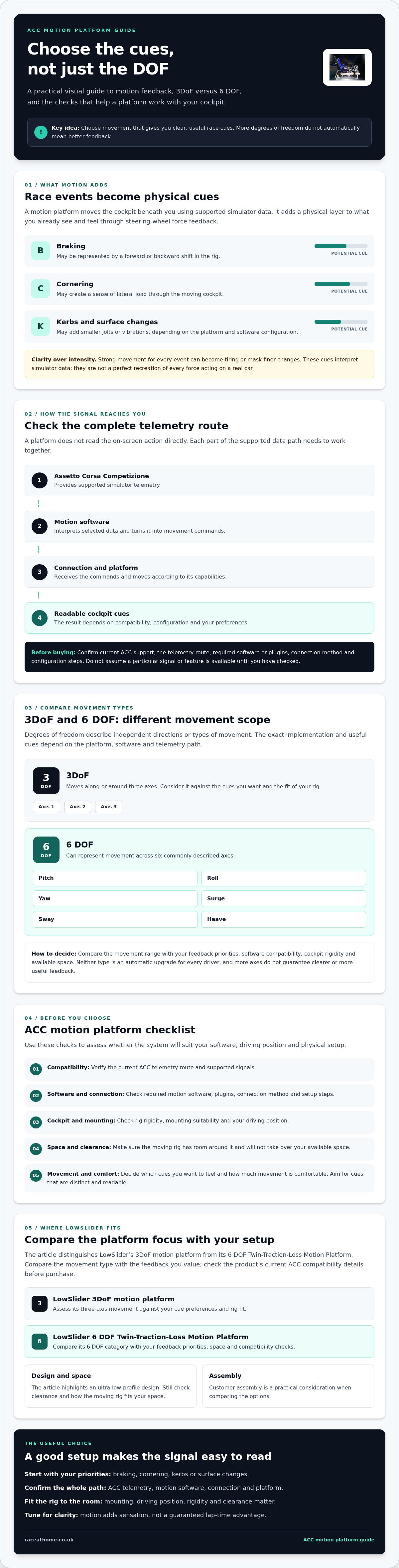
ACC motion platform buying checklist: compatibility, cockpit and setup
Before choosing a motion platform for ACC, check how it will work with your existing simulator and fit into your room. These practical checks can help you avoid compatibility surprises and get clear, controlled feedback once the rig is running.
How can you verify ACC and hardware compatibility?
Start with current documentation for ACC, the motion software and the specific platform. Compatibility depends on the complete route from simulator telemetry to physical movement, so confirm any required software, plugins, connection method and configuration. Then check that the platform is suitable for your cockpit. For broader planning advice, see this sim racing setup and compatibility guide.
- Confirm the telemetry path. Verify ACC support and the required motion software or plugins with the relevant manufacturers. Ask which connection method and setup steps apply to your system.
- Check the cockpit fit. Confirm the mounting requirements and whether your cockpit is suitable for the platform. Check the manufacturer’s documentation for load limits and other installation conditions.
- Plan your seated position. Consider how movement may affect your seat, wheel, pedals and display. If you use VR, check that your headset and viewing position remain comfortable during platform movement.
- Measure the whole space. Account for the platform and full rig footprint, movement, cables and safe access around the setup. A compact, ultra-low-profile design may help with home planning, but check the exact dimensions and clearance requirements for the model you’re considering.
- Confirm computer and peripheral requirements. Check whether your PC, telemetry connection and existing wheel, pedals, display or VR equipment meet the requirements stated by the relevant manufacturers.
What should you plan for at home?
Measure before ordering, including the route into the room and the space needed to get in and out of the seat. Check that cables and nearby furniture won’t obstruct movement, and that your screen or VR setup works with your normal driving position. The motion rig value guide can help you weigh the practical considerations against the feedback you want.
Once installed, begin with conservative motion settings. Drive a repeatable set of laps, change one setting at a time, then compare how clearly you can read braking, cornering and surface cues. If movement distracts you or feels excessive, reduce its intensity before adjusting further. You can review Race@Home’s motion platform options as part of your shortlist.
Choosing a motion platform for ACC: where LowSlider fits
Your decision should centre on the cues you want, the space available for your rig and whether the complete ACC telemetry and hardware path has been verified. Those practical checks matter more than choosing the largest DOF count. If a compact, ultra-low-profile design is relevant to your home setup, Race@Home’s LowSlider platforms are options to compare against those priorities.
Race@Home describes its LowSlider platforms as hand-built to order, with a compact footprint and ultra-low profile. These features may be useful when planning around room constraints, but check the current dimensions, mounting requirements and clearances for the specific platform before deciding. The right platform is one that fits your preferred feedback and can be confirmed to work with your cockpit and software configuration.
Which LowSlider option should ACC buyers investigate?
The LowSlider 3DoF motion platform and LowSlider 6 DOF Twin-Traction-Loss Motion Platform suit different priorities. Consider the 3DoF option if you want a more focused motion experience. Investigate the 6 DOF model if a broader range of movement and twin traction loss are central to what you want from a rig. Neither is automatically the better choice for every ACC driver.
Before selecting either, confirm current product specifications, cockpit fit and ACC integration through the relevant documentation. In particular, verify the required telemetry route and motion software rather than assuming compatibility from the platform category or product name.
What happens after you choose a platform?
Race@Home says its platforms ship worldwide in four pieces for customer assembly, which the company says can be completed in under an hour. Treat that as a planning detail, not a substitute for checking the supplied instructions and preparing a suitable space for assembly. Once the platform is in place, configure motion to match your preferences and make measured adjustments during driving tests.
If the design and feedback options suit your setup, review Race@Home’s motion platforms and confirm the current specifications and ACC requirements before making your choice.
Choose the feedback that fits your next ACC session
The best motion platform for Assetto Corsa Competizione turns supported telemetry into cues you can read comfortably, while fitting your cockpit and available space. Look beyond the DOF count: decide which sensations matter to you, then verify the complete ACC, software and hardware connection path before committing.
Race@Home’s LowSlider options offer different approaches, from the 3DoF platform to the 6 DOF Twin-Traction-Loss model. The platforms are hand-built to order with an ultra-low-profile design. According to Race@Home, they ship worldwide in four pieces for customer assembly, which can be completed in under an hour. Check the current specifications, mounting details and ACC integration for the model you’re considering.
Ready to compare the options against your rig and feedback priorities? Explore Race@Home motion platforms and check the current specifications and ACC requirements before choosing a setup.
Frequently Asked Questions
Is a motion platform compatible with Assetto Corsa Competizione?
It can be, when the simulator, motion software and hardware support the same telemetry and connection path. Compatibility isn’t guaranteed by the platform type alone. Before buying, check current documentation for ACC support, required software or plugins, the platform model and your computer setup. If any part of that chain is unclear, confirm the requirements with the relevant manufacturers before ordering.
What is the best motion platform for Assetto Corsa Competizione?
The best motion platform for Assetto Corsa Competizione is one that provides cues you value, fits your cockpit and has a verified ACC setup path. Race@Home offers the LowSlider 3DoF motion platform and LowSlider 6 DOF Twin-Traction-Loss Motion Platform as different options to investigate. Compare their current specifications and intended movement, then confirm telemetry compatibility, mounting and available space before choosing.
Is 3DoF or 6 DOF better for ACC?
Neither is automatically better for every ACC driver. A 3DoF platform offers movement across three degrees of freedom, which may suit someone seeking a more focused motion experience. A 6 DOF system provides a broader range of potential movement, but the cues depend on its implementation and software. Base your decision on desired feedback, verified compatibility, cockpit fit and how much movement you’ll find useful.
Can a motion platform simulate traction loss in ACC?
It can if the platform, motion software and ACC telemetry path support a traction-loss cue and it’s configured appropriately. Traction loss is intended to suggest the rear of the car moving out of line, but how that sensation is produced varies by system. Race@Home’s LowSlider 6 DOF platform is named as a Twin-Traction-Loss Motion Platform. Confirm its current ACC integration and cue requirements before purchase.
Will a motion platform make me faster in Assetto Corsa Competizione?
No motion platform can guarantee faster lap times. Its primary role is to add physical sensation and immersion, not replace practice, visual awareness or steering feedback. Clear, well-tuned movement may help you interpret certain events in a way that suits your driving, but excessive or poorly configured cues can distract. Treat motion as another layer of feedback, then judge its usefulness through consistent practice and careful tuning.
How much space does an ACC motion platform need?
The space required depends on the platform, cockpit and how the complete rig moves, so check the current model dimensions and clearance guidance rather than relying on a generic measurement. Measure the whole setup, including seat, wheel, pedals, display or VR equipment, cables and access around the rig. Race@Home describes its LowSlider design as compact and ultra-low-profile, but you should still confirm it fits your room.
How difficult is it to assemble a LowSlider motion platform?
Race@Home says its platforms ship worldwide in four pieces for customer assembly, with setup stated to take under an hour. That’s a useful planning estimate, though the time needed can depend on your circumstances. Read the current assembly instructions and prepare an appropriate space before starting. Also check the product documentation for any specific mounting or setup requirements for your cockpit.


