

What if the component with the biggest specification isn’t the one that makes your simulator feel most convincing? A no compromise racing simulator build is not just a stack of premium parts. It is a balanced system where the cockpit, wheelbase, pedals, visuals and motion work together. A high-torque wheelbase needs a rigid foundation, while consistent braking depends on pedals and a seating position that let you control your inputs.
If you’re weighing up high-end hardware, consider what will genuinely improve immersion, whether the components will work together and how much room a motion rig will need. Bigger specifications do not automatically make a better experience, particularly if the setup is awkward to use or does not suit the way you drive.
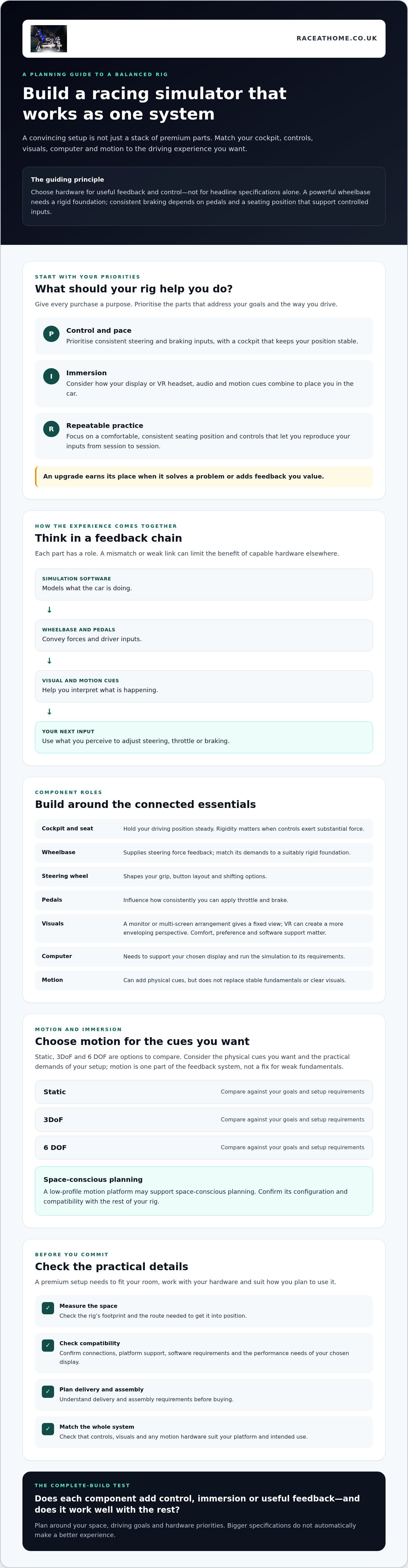
This guide will help you plan around your space, driving goals and hardware priorities before you buy. You’ll learn how the main components affect feel and control, what to consider when choosing motion, and which compatibility, footprint and assembly details to check. The aim is a premium rig that turns what’s happening on track into clear, useful feedback, without filling your room with expensive parts that do not work well together.
Key Takeaways
- Shape your no compromise racing simulator build around the driving experience you want, rather than choosing components by price or headline specifications alone.
- Understand how the cockpit, controls, visuals and computer contribute, so you can prioritise upgrades that matter to your driving.
- Compare static, 3DoF and 6 DOF motion by the cues you want and the practical demands of your setup.
- Before buying, measure the rig’s footprint and access route, then check hardware compatibility, delivery and assembly requirements.
- Consider how a low-profile motion platform may support space-conscious planning, and confirm its configuration and compatibility.
What makes a no-compromise racing simulator build feel complete?
Feel the brake load build as you approach a corner. Read the kerb through the controls, then sense grip beginning to fade before the car slides wide. A convincing simulator connects these cues to your actions, turning what the simulation calculates into feedback you can interpret and use.
A balanced racing simulator build is a coordinated set of hardware chosen for the driver’s priorities, with every component contributing to control, immersion or useful feedback. That is what makes a no compromise racing simulator build feel complete. It is not simply the most expensive wheelbase, the largest screen or the addition of motion. Sim racing aims to accurately simulate auto racing, so the experience depends on how well its parts work together.
Start with the driving experience you want
First, decide what you want your rig to do. Are you aiming for competitive pace, deeper immersion, repeatable practice, or a combination? Your answer gives each purchase a clear purpose and helps you judge whether a proposed upgrade addresses a real need.
- For control and pace, prioritise consistent steering and braking inputs, plus a cockpit that keeps your position stable.
- For immersion, consider how your display or VR headset, audio and motion cues combine to place you in the car.
- For repeatable practice, focus on a comfortable, consistent seating position and controls that let you reproduce your inputs from one session to the next.
A component earns its place when it solves a problem or adds feedback you value. If motion provides a physical cue you want, it may strengthen the experience. If it adds complexity without supporting your goals, another upgrade may be more useful.
Why premium parts need to work as one system
Simulation data reaches you through a chain of responses. The software models the car; the wheelbase and pedals convey forces and inputs; visual and motion cues help you interpret what is happening. Your perception then informs your next steering, throttle or braking adjustment. If one part of that chain is poorly matched, it can limit the benefit of capable hardware elsewhere. For example, a powerful wheelbase needs a cockpit that can handle its forces without unwanted flex.
Plan the whole system rather than comparing isolated specifications. Check that your controls, display and any motion hardware suit your platform and intended use. For a broader framework for planning these choices, see The Ultimate Sim Racing Setup Guide.
Which components shape a high-end racing simulator build?
A high-end rig is a chain of connected components. The cockpit and seat hold your driving position steady; the wheelbase creates steering feedback; the steering wheel provides the controls and layout you prefer; and the pedals translate braking and throttle inputs. Visuals show what the car is doing, computing hardware runs the simulation, and motion can add physical cues. A weak link or compatibility issue can undermine the experience of the rest.
Controls, visuals and computing: build around compatibility
Choose controls as a working set. The wheelbase supplies force feedback, while the steering wheel determines your grip, buttons and shifting options. Pedals affect how consistently you can apply throttle and brake. A rigid cockpit helps keep those inputs stable, particularly when the controls exert substantial force.
For visuals, a monitor or multi-screen arrangement gives you a fixed view, while VR can create a more enveloping perspective. Neither is universally better. Comfort, personal preference, software support and your computer’s ability to run the chosen display all matter. The University of Iowa’s most sophisticated research driving simulator offers a glimpse of how visual, physical and control systems can come together in a research setting. For a home rig, check the hardware manufacturers’ specifications and the simulation software’s requirements before choosing, including connections, platform support and performance needs.
What motion adds to the driving feedback
Motion can make vehicle movement and track events physically perceptible, adding cues to what you see and feel through the controls. It does not replace a stable cockpit, well-matched controls or clear visuals. Treat it as another part of the feedback system, not a fix for weak fundamentals. For a closer look at motion systems, explore 6 DOF motion simulators and consider how their role fits your build.
Use this checklist to audit your setup:
- Cockpit and seat: Do they support your driving position and chosen controls?
- Wheelbase, wheel and pedals: Are they compatible with each other and your platform?
- Display or VR: Does your preferred view suit your comfort and software?
- Computer: Does it meet the simulation and display requirements?
- Motion: Does it add feedback you want, and have you confirmed compatibility?
A no compromise racing simulator build starts with this system check, not a shopping list of premium parts. Race@Home supplies motion platforms, Pimax VR headsets and sim racing accessories. Compare the relevant options with your requirements before committing.
How should you choose motion and immersion for your racing simulator?
Motion and visuals can make a circuit feel more immediate, but the right combination depends on the cues you value and the room you have. For a no compromise racing simulator build, compare the experience each option adds with its practical demands, then confirm compatibility before buying.
3DoF or 6 DOF: match movement to your priorities
A static rig stays still, leaving steering, pedal, audio and visual feedback to communicate what the car is doing. A motion platform adds physical movement. The labels describe degrees of freedom, but the specific axes and effects can vary between systems. Check the manufacturer’s configuration rather than assuming every platform feels the same.
| Approach | Movement | May suit drivers who prioritise |
|---|---|---|
| Static | No platform movement | A simpler physical setup, with immersion focused on controls and visuals |
| 3DoF | Movement across three degrees of freedom; confirm which axes are used | Adding selected physical cues within a defined motion setup |
| 6 DOF | Movement across six degrees of freedom; confirm the system’s implementation | A broader range of movement cues, where space and compatibility allow |
Before choosing motion, measure the planned footprint and access route, check how the platform interfaces with your rig, and verify software support, connections and assembly requirements. These checks help you understand the practical demands before you buy. If you’re weighing the benefits against the extra complexity, Is a Sim Racing Motion Rig Worth It? offers a dedicated value assessment. For a closer comparison of movement options, consult a dedicated 6 DOF versus 3DoF guide.
VR or screens: choose the visual format that fits
VR can put the cockpit around you and make head movement part of looking through a corner. Screens offer a fixed view and can make it easier to see your surroundings or share the display. Comfort, visibility and personal preference matter as much as immersion. Neither format is right for every driver or room.
Research from the University of Leeds describes simulator work with Jaguar Land Rover that accurately reproduced real-world vehicle testing. In a home rig, realism still depends on the parts working together. Race@Home supplies Pimax VR headsets, but compatibility is not universal. Check the headset’s requirements against your computer, simulation software and motion setup. For practical planning, see Pimax VR Motion Simulator Set-up Guide.
What should you check before committing to a no-compromise build?
A premium setup needs to fit your room, connect to your chosen hardware and arrive in a form you can assemble. Work through these checks before ordering. Planning ahead can prevent an expensive component from being difficult to position or use.
- Measure the space and access route. Check the full planned footprint, including room for the seat, controls and any movement from a motion platform. Measure doorways, stairs, turns and the route from the delivery point to the setup area. Floor space alone does not tell you whether the equipment can get into the room.
- List your existing and planned hardware. Record the cockpit, seat, wheelbase, pedals, display or VR headset, computer and any motion platform. Note model names and connection types so you can check the whole system rather than relying on broad category descriptions.
- Confirm compatibility and requirements. Check the platform against your cockpit, controls and simulation software. Verify connection methods and any computer or software requirements using the relevant manufacturers’ information and documentation. Ask who handles questions about the platform, and contact other manufacturers about support for their components.
- Confirm delivery details. Ask the supplier to verify current packaging, delivery arrangements and what you should expect to receive. Worldwide Shipping: Getting Your Sim Rig Delivered is a useful topic to review as you plan the delivery route and receiving space.
- Plan assembly before dispatch. Confirm current product dimensions, included items, tools and assembly guidance. Make sure you have a suitable area and enough time to put the equipment together safely.
Check room, access and assembly requirements
Do not assume a compact footprint guarantees an easy fit. Ask for current dimensions and packaging details, then compare them with your measurements. Race@Home describes its LowSlider platforms as shipping in four pieces for customer assembly, which the company says can be completed in under an hour. Check the latest instructions for the specific configuration you’re considering. Customer assembly is not the same as a turnkey installation service.
Confirm compatibility and support boundaries
Get compatibility confirmed before checkout, especially where motion, cockpit mounting and software connections meet. Identify which supplier or manufacturer to contact for each component, since support for one product does not automatically cover other brands in your rig. For LowSlider assembly information, consult One-Hour Assembly: Setting Up Your LowSlider Simulator and verify that its guidance applies to the current product.
Ready to compare platform options with your room and hardware list? Explore Race@Home’s motion platforms and confirm current dimensions, configuration and compatibility before ordering.
How can a LowSlider platform complete a premium racing simulator build?
Once you’ve settled on your driving priorities and checked how the parts will work together, motion becomes a question of fit. A platform can translate simulation data into physical feedback, adding another layer to the experience. LowSlider’s low-profile design and compact footprint may be useful when planning around limited room, but measure your setup and confirm dimensions before deciding it will fit.
Race@Home hand-builds its LowSlider motion platforms to order, with 3DoF and 6 DOF options. The LowSlider 6 DOF Twin-Traction-Loss Motion Platform is one option to assess if its movement approach matches the cues you want. Compare it with the LowSlider 3DoF motion platform against your priorities. The degree-of-freedom label alone does not determine which option is right for you.
Assess the LowSlider options against your build
Before choosing, decide what physical feedback you’re looking for and how motion will fit alongside your cockpit, controls and visuals. Confirm the current configuration, dimensions, compatibility and included components for the specific platform. Check how it connects to your intended rig and simulation software, then compare the measurements with your planned footprint and access route.
Race@Home states that its products ship in four pieces for customer assembly, which the company says can be completed in under an hour. Treat this as company-provided guidance, not a substitute for checking the latest assembly instructions and packaging details for the platform you’re considering. The products are for customer assembly, which should not be confused with a turnkey installation service.
Take the next step with a considered build plan
Before making a decision, make sure you can answer these questions:
- Does the platform support the motion cues that matter to your driving goals?
- Have you checked compatibility with your cockpit and simulation software?
- Do the current dimensions suit your room, rig and access route?
- Have you confirmed what’s included, how delivery is arranged and what assembly involves?
If those checks are clear, motion can become an intentional part of your no compromise racing simulator build, rather than an expensive addition chosen in isolation. Race@Home specialises in hand-built motion platforms, alongside Pimax VR headsets and sim racing accessories. Explore the LowSlider platform range and check the current product details against your build plan before ordering.
Build your simulator around the drive you want
A convincing rig comes from components that work together, not simply the highest specifications. Start with your driving priorities, then check how your controls, visuals, computer and motion fit your space and each other. That is the foundation of a no compromise racing simulator build: deliberate choices that turn simulation data into feedback you can use.
If motion is part of your plan, Race@Home hand-builds LowSlider platforms to order. Their ultra-low profile and compact footprint can help with space-conscious planning, though you’ll still need to confirm dimensions and compatibility for your setup. Race@Home says its platforms ship in four pieces for customer assembly, which can be completed in under an hour. Check the current product details and assembly guidance before ordering.
Ready to assess whether a LowSlider platform suits your rig? Explore the LowSlider motion platforms and compare the options with your goals, hardware and room. Review the product details and confirm compatibility before you order.
Frequently Asked Questions
What is a no-compromise racing simulator build?
It is a simulator planned as one connected system, with each component chosen for a clear role. A no compromise racing simulator build may include a cockpit, controls, visuals, a computer and a motion platform. “No compromise” does not mean buying the most expensive option in every category. It means matching the hardware to your driving goals, checking that the components work together and making sure the setup suits the room where you’ll use it.
What do I need for a high-end sim racing setup?
Start with a stable cockpit and seat, then choose controls, a display or VR headset, a computer and any motion hardware to suit your priorities. Check physical fit and technical compatibility before ordering. The right sequence depends on the equipment you already own and how you plan to drive. Confirm requirements with the relevant hardware manufacturers and software documentation rather than assuming every combination will work together.
Is a motion platform worth adding to a racing simulator?
A motion platform may be worthwhile if you want physical movement cues and it fits your room and setup. It can add to the feedback you receive through visuals and controls, but it does not replace fundamentals such as a stable cockpit or compatible hardware. Before deciding, consider the cues you want, the available space and software compatibility. Then weigh those factors against the experience you want from your simulator.
What is the difference between a 3DoF and 6 DOF racing simulator?
3DoF and 6 DOF describe different motion capabilities, but the labels alone do not tell you exactly how a system will feel. Compare the movement each platform provides with the physical cues you want, and check how it works with your cockpit and simulation software. Configurations and supported features vary between manufacturers, so consult the specifications for the exact platform you’re considering before making a choice.
Can I fit a motion simulator in a home racing setup?
Possibly, but assess the complete setup rather than the platform alone. Measure the intended footprint, including the cockpit and space needed around it, then check the route through doors, stairs and turns. Ask the supplier to confirm current platform dimensions and packaging details. A compact, low-profile design may help with planning, but whether it fits depends on your room, access route and the rest of your rig.
How do I check whether simulator hardware is compatible?
Make a list of the exact cockpit, wheelbase, pedals, display or headset, computer and software you plan to use. Check connection types, physical fit and published requirements against manufacturers’ information and software documentation. If you’re adding motion or VR, verify those connections and requirements too. Do not assume components will work together just because they are designed for sim racing. Ask the relevant manufacturer to clarify anything uncertain.
How difficult is it to assemble a LowSlider motion platform?
Race@Home says its LowSlider products ship in four pieces for customer assembly, which the company states can be completed in under an hour. Treat this as company-provided guidance and check the current instructions for the platform configuration you’re considering. Plan enough space to unpack and assemble the components, and check the access route before delivery. Customer assembly is distinct from a turnkey installation service.


