

What if your next lap-time gain comes from changing how you practise, not buying a faster wheel? A racing simulator to improve lap times is most effective when every session gives you a clear question to answer and feedback you can act on.
If your pace has plateaued, simply adding more laps can make the same habits more familiar without showing where time is slipping away. Generic track guides can help, but your braking points, lines and throttle application need to be assessed against your own laps. The answer is a repeatable feedback loop: identify one opportunity, practise one skill, then compare the result.
This guide will help you turn that loop into a practical plan. You’ll learn how to spot lost time, use telemetry and lap comparisons to focus your practice, and track whether a change is making you more consistent. We’ll also look at where equipment fits: load-cell pedals can support repeatable braking, while motion feedback from a LowSlider 3DoF or 6 DOF platform can add physical cues to your practice environment. Neither replaces deliberate work. The aim is to make each session more purposeful, so progress becomes easier to recognise and repeat.
Key Takeaways
- Define progress by repeatable pace, not one unusually quick lap, and use consistent conditions to make comparisons meaningful.
- Work through each corner in sequence: choose a braking reference, refine your line and build acceleration on exit.
- Use telemetry to investigate a specific question, then interpret the data alongside what you felt and observed behind the wheel.
- Structure each session around a baseline, one driving focus, repeated runs and a review; change one variable at a time.
- Choose a racing simulator to improve lap times around your current bottleneck, with motion feedback adding physical cues rather than promising faster laps.
Why a racing simulator can help you improve lap times
A single brilliant lap is exciting, but it doesn’t necessarily show that your pace has improved. A more useful measure is whether you can approach that speed repeatedly, with fewer mistakes and a clearer understanding of how you achieved it. That distinction turns practice from chasing a personal best into building a dependable driving method.
A racing simulator creates a controlled environment where you can return to the same circuit, car and conditions, then review the choices that shaped each lap. The racing simulator has different forms, but for improving your driving, the value lies in being able to repeat a scenario and examine your response. Keep conditions consistent when comparing runs. If the car, fuel load or track state changes, it may be harder to tell whether a different result came from your driving or the conditions.
What does getting faster in sim racing actually mean?
Your personal best records what you managed once; repeatable pace shows what you can reproduce. Imagine completing several laps at similar speeds, then changing only your braking point for one corner. If the next set of laps is consistently quicker through that section, the comparison is more useful than a single faster lap surrounded by errors. Consistency makes the effect of a deliberate change easier to judge.
Why can repeated simulator practice reveal driving habits?
Repeat the same sequence and patterns become easier to spot: perhaps you brake earlier on each approach, turn in sharply, or hesitate before applying throttle. Simulator feedback can help you investigate those moments, but it can’t decide what to change for you. Focused practice still matters. Without a specific question, it’s easy to complete lap after lap without learning why one felt better.
It also helps to separate three influences on lap time:
- Driver skill: braking control, steering inputs, line choice and throttle timing.
- Setup choices: adjustments to the car that affect how it behaves and responds.
- Equipment: the controls and feedback available to you while driving.
These influences interact, but they aren’t interchangeable. If your braking varies from lap to lap, changing the car setup may not address the underlying habit. If your inputs are consistent but the car reacts unpredictably, a setup adjustment may be worth investigating. Equipment can make sensations and inputs clearer, but buying new hardware alone won’t identify the cause of lost time.
A useful practice loop is simple: repeat a lap, find one moment to improve, change one thing, then compare the result. That is the foundation of using a racing simulator to improve lap times: gather feedback, make a focused adjustment and assess whether you can reproduce the gain. Simulator practice supports learning in the virtual environment; it doesn’t guarantee faster performance in a real car.
Build faster laps by practising braking, cornering and exits
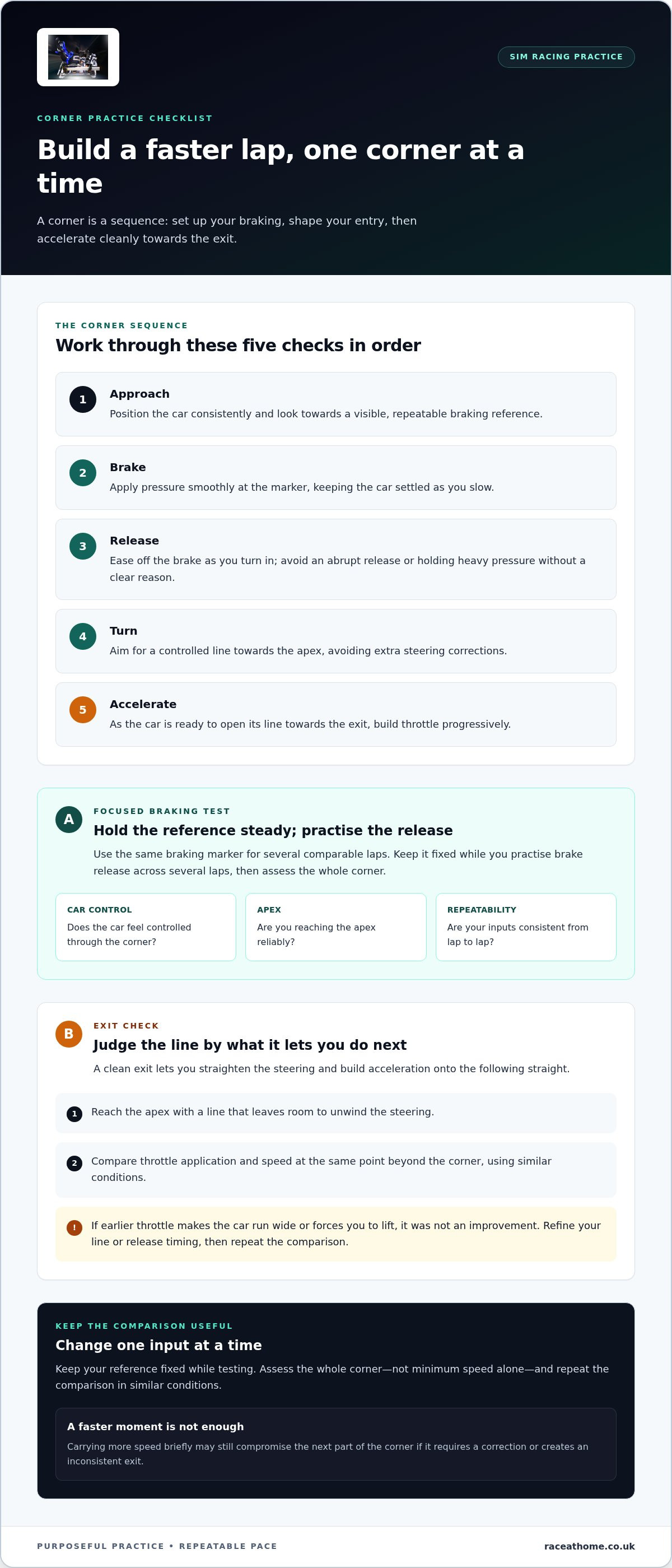
A corner is a sequence, not a single braking point or apex. The approach sets up your braking; braking shapes your entry; and your line determines how cleanly you can accelerate away. Practise the sequence in order, changing one input at a time so you can tell what helped.
How should you practise braking and corner entry?
Choose a visible, repeatable braking reference, such as a trackside board or a change in the barrier. Use it for several comparable laps before adjusting it. If you move the marker, do so cautiously and assess the whole corner: a later braking point isn’t useful if it causes a rushed turn-in or an inconsistent exit.
Work through the corner in this order:
- Approach: Position the car consistently and look towards your braking reference.
- Brake: Apply pressure smoothly at the marker, keeping the car settled as you slow.
- Release: Ease off the brake as you turn in, rather than abruptly releasing it or holding heavy pressure without a clear reason.
- Turn: Aim for a controlled line towards the apex, avoiding extra steering corrections.
- Accelerate: Begin applying throttle progressively as the car is ready to open its line towards the exit.
For a focused test, keep the reference fixed and practise your brake release across several laps. Then compare how controlled the car feels, whether you reach the apex reliably and how repeatable your inputs are. Don’t judge the attempt by minimum speed alone. A lap that carries more speed briefly but requires a correction may compromise the corner that follows.
How can corner exits help reduce lap time?
The exit matters because it determines how early and cleanly you can accelerate along the next straight. If you turn in too tightly or reach the apex before the car is ready to unwind, you may need to wait before adding throttle. Practise reaching the apex with a line that leaves room to straighten the steering and build acceleration progressively.
A clean corner exit carries speed onto the following straight, where every metre of controlled acceleration counts. To test your technique, compare your throttle application and speed at the same point beyond the corner, using similar conditions. If an earlier throttle input makes the car run wide or forces you to lift, it wasn’t an improvement. Refine your line or release timing, then repeat the comparison.
That focused approach gives your racing simulator to improve lap times a practical job: helping you rehearse a specific sequence and assess the result, rather than encouraging you to push harder everywhere. If you’re also considering physical cues in your practice environment, motion feedback for sim racing can be explored as a complement to deliberate driving practice, not a shortcut to better technique.
Compare driving practice, telemetry and motion feedback
Each kind of feedback answers a different question. Your own observations reveal what the car felt like and what you intended to do. Telemetry can show what your inputs and speed did. Motion adds physical cues to the experience. Used together, they can help you investigate a corner more precisely, but none of them makes the driving decision for you.
| Feedback source | Question it can answer | Strength | Limitation and useful stage |
|---|---|---|---|
| Driver observation | Where did the car feel unsettled, or where did I hesitate? | Connects your intention and sensations directly to the corner. | Memory can be imprecise. Useful from the start, especially when you focus on one moment at a time. |
| Telemetry | Where did braking, throttle or speed differ between laps? | Offers a visual comparison of specific inputs and parts of the lap. | Needs interpretation and context. Most useful when you have a clear question to investigate. |
| Motion feedback | What physical cues accompany the car’s movement? | Adds a physical layer alongside visual and audio information. | Doesn’t identify the correct input or replace lap review. It can complement practice at any stage. |
What can telemetry show that seat-of-the-pants impressions may miss?
Telemetry can help you compare where you began braking, how your throttle application built and how speed changed through a selected corner. Start with two laps completed in similar conditions, then ask one focused question, such as whether you released the brake earlier on the lap that felt smoother.
Data doesn’t explain itself. A trace can show that two laps differ, but you still need to consider your line, control and what happened next. Avoid changing braking, steering and throttle together based on one unusual lap. Otherwise, you won’t know which adjustment affected the result. For a racing simulator to improve lap times, telemetry is most useful as evidence to interpret, not an instruction to follow.
When might a motion simulator add useful feedback?
Motion feedback can bring additional physical cues into a practice environment, complementing what you see and hear. It may make changes in the car’s movement more tangible, but it won’t tell you whether to brake earlier, alter your line or apply throttle sooner. Use it alongside your observations and lap review, not instead of them.
Racers considering this layer can explore how a 6 DOF motion simulator works mechanically. The aim is to understand the role of physical feedback in the wider setup: it can enrich the sensations available during practice, while deliberate driving and thoughtful review remain central to finding what to improve.
Create a repeatable sim racing practice routine
A productive session doesn’t need to be long; it needs a clear purpose and a review you can use next time. Treat each run as a small test. Record what you’re trying, keep the conditions as consistent as possible, and you’ll build a useful picture of how your driving changes over time.
How do you choose one useful focus for a session?
Start with a corner or sector where you regularly lose confidence, miss your reference or need a correction. Turn that observation into a behaviour-based goal, such as using the same braking reference on every approach. Keep the target narrow enough to assess after a short run, rather than trying to fix braking, steering and throttle together.
Use this four-stage structure:
- Baseline: Drive a few clean laps without deliberately changing your technique. Record lap times and note where the car feels unsettled or your inputs vary.
- Choose one focus: Set a specific goal for the next run, such as holding a consistent braking point into one corner.
- Repeat the test: Complete several comparable laps while concentrating on that behaviour. Change only one driving variable, so the outcome remains interpretable.
- Review and decide: Compare your notes and lap data with the baseline. Keep the adjustment, refine it or return to your original approach before choosing the next focus.
Focused repetition teaches more than a longer session spent driving without a question. It helps make a racing simulator to improve lap times part of a deliberate routine, rather than simply a place to collect laps.
How should you review lap times without chasing a lucky lap?
Look at a group of clean laps, not just your personal best. A single quick lap may include a risky brake point or an unusually favourable exit that you can’t reproduce. If your times are slightly slower but close together, that’s useful evidence: your approach may be becoming more controlled, even if the fastest lap hasn’t moved yet.
Make comparisons fair by noting the circuit, car, track conditions, setup and driving assists whenever they affect the result. If one run uses different conditions or settings, mark it separately rather than treating it as a direct test. A simple log can include the session focus, the reference or input you changed, several clean lap times and one observation about control. These notes help you see whether a change is repeatable across sessions, not merely promising once.
Keep the next step practical. If a focus improves consistency, continue building it before adding another. If the results are mixed, repeat the test under comparable conditions and examine what happened on the laps that differed. For a physical-feedback element in your sim racing environment, explore LowSlider motion platforms as equipment to consider alongside a structured practice routine.
Choose a racing simulator setup that supports your improvement goals
Hardware is most useful when it addresses a specific need. Before upgrading, identify what currently limits your practice: inconsistent control, difficulty interpreting feedback, limited space or a goal of greater immersion. A racing simulator to improve lap times doesn’t need every available feature. It needs a setup that helps you practise effectively and that suits the room and goals you have.
Should you upgrade hardware or refine your practice first?
Look for a repeatable limitation before choosing new equipment. If your braking point varies from lap to lap, work on that behaviour and consider whether your current controls make consistent inputs difficult. If your technique is already consistent but you want more physical cues, motion may be relevant. A platform changes the feedback you feel; it doesn’t teach braking, steering or racing lines for you.
A static rig keeps the setup straightforward, with no motion layer to factor into your practice. A motion platform adds physical cues, which may make the experience feel more immersive, but also brings another consideration when planning the space and overall setup. Think about how often you’ll use those cues and whether they support the kind of practice you want to do. For an overview of compatibility considerations, use this sim racing setup guide.
Use this simple framework to compare your options:
- If your main issue is a driving habit, prioritise focused practice and feedback you can review.
- If space is limited, measure the area available and consider how the whole rig will fit before adding equipment.
- If you want more physical feedback, consider whether motion cues would complement the visual and audio information you already use.
- If you’re unsure an upgrade will help, keep your setup steady while you test the same practice routine, then assess what still feels limiting.
How can motion feedback fit into a performance-focused rig?
Race@Home’s LowSlider platforms are hand-built sim racing hardware designed to add physical feedback to a setup. The LowSlider 3DoF and LowSlider 6 DOF Twin-Traction-Loss platforms offer different motion experiences, so the choice is about the type of feedback you want in your environment, not a guaranteed reduction in lap time. The compact, low-profile design may also be relevant when considering how a motion platform fits into your available space.
For a separate assessment of the trade-offs involved, explore this sim racing motion rig buyer’s guide. Treat the decision as part of a wider practice plan: first identify what you want the equipment to add, then consider how it fits your routine and room.
If motion feedback suits your goals, explore Race@Home motion platforms as an option for building a more immersive sim racing environment.
Make your next session a deliberate step forward
Your next gain doesn’t need to come from a dramatic change. Choose one part of your driving to examine, set a clear goal and use your next session to test it. If you’re considering equipment, start with the question it should answer or the experience it should add. That keeps your setup decisions connected to your practice, rather than treating new hardware as a substitute for it.
For racers looking to bring physical feedback into a home rig, Race@Home’s LowSlider platforms are hand-built to order, with an ultra-low profile and compact footprint. They can add another dimension to your sim racing environment, whilst the work of improving your technique remains yours.
Explore the Race@Home motion platforms and consider whether motion feedback fits your goals and available space. Then take that intention back to the circuit: practise with purpose, learn from each run and let your racing simulator to improve lap times become part of a steady, rewarding process. Every focused lap is a chance to move forward.
Frequently Asked Questions
Can a racing simulator actually help you improve lap times?
Yes, a racing simulator to improve lap times can give you a repeatable place to practise and review your decisions. For example, replaying a corner may reveal that you turn in before finishing your braking, even if the lap felt smooth. Progress still depends on focused practice, useful feedback and your own circumstances, including experience and equipment. Better performance in a simulator doesn’t guarantee faster driving in a real car.
What is the quickest way to improve lap times in sim racing?
Start by identifying one recurring source of lost time, such as running wide at a particular corner or lifting unexpectedly on exit. Choose a behaviour to work on, then review several clean laps to see whether it changes. This gives you a more useful next step than pushing harder everywhere. There’s no instant fix, and the best adjustment depends on the car, circuit and driver.
How many laps should you practise before changing your driving technique?
There’s no universal lap count that suits every driver or corner. Continue until you have enough clean repetitions to judge whether a behaviour is consistent, rather than reacting to one mistake or one unusually good lap. Keep the car and track conditions comparable, and decide what you’re checking before you start. If each attempt feels different, settle on a more repeatable reference before testing a change.
Should you use telemetry to get faster in a racing simulator?
Telemetry can help if you know what you want to investigate. For instance, compare where you begin braking with how quickly you return to throttle, rather than studying every trace at once. It’s a review tool, not an automatic coach: a graph can show a difference but can’t decide whether it was caused by your line, timing or a mistake. Use only the data that helps answer your current question.
Does a motion simulator make you faster at sim racing?
Not by itself. A motion simulator adds physical feedback that can complement visual and audio cues, but it doesn’t choose a braking point or improve your technique automatically. Its usefulness depends on whether you can interpret those sensations alongside what you see and how the lap unfolded. If the added feedback distracts you from your driving goal, return to a simpler setup while you work on that specific skill.
Is consistency more important than a single fast lap in sim racing?
Consistency is usually more useful for judging progress because it helps show whether a change is repeatable. A personal best can be satisfying, but it might come from a riskier line or an unusually clean lap that you can’t reproduce. Compare a run of clean laps and note how the car behaved. If the pace is similar across them, you have stronger evidence that your approach is becoming dependable.
How can you tell whether a setup change has improved your lap time?
Test one change at a time and compare clean laps in similar conditions, keeping the car, track state and assists consistent. Record more than the quickest time: note whether your braking, turn-in or throttle application changed, and whether you could repeat the result. If the new setup produces one fast lap but makes the car harder to control on the next, the overall evidence may not support keeping it.


