

The rig with the highest degrees-of-freedom count isn’t automatically the one that makes you feel most connected to the track. When choosing a full motion racing simulator UK enthusiasts can enjoy at home, consider how the feedback feels and how the whole setup fits your space and equipment, not just the headline specification.
More axes can mean more ways to represent movement, but motion adds value when it turns braking, cornering and changes in grip into clear, useful cues rather than movement for its own sake. The platform also needs to work with your cockpit, wheelbase and available space.
This guide explains what motion feedback can add, how to compare complete systems beyond their DOF figures and what to plan before choosing a rig. We’ll look at practical differences between motion options, including Race@Home’s hand-built, low-profile LowSlider platforms, so you can match the experience you want to the space and hardware you have.
Key Takeaways
- Learn how motion platforms turn selected racing data into physical cues, without recreating every force acting on a real car.
- Compare a full motion racing simulator UK setup by feedback, what moves, footprint and ownership format, not axis count alone.
- Use a practical pre-order checklist to measure your space, review existing equipment and plan for delivery and assembly.
- See how Race@Home’s hand-built LowSlider range, including 3DoF and 6 DOF options, is designed around an ultra-low profile and compact footprint.
- Find out what to expect when a Race@Home simulator arrives in four pieces for customer assembly in under an hour.
What does a full motion racing simulator add to your driving experience?
A braking marker, speed readout and changing line on screen all tell you something about the car. A motion rig adds another channel: you can feel the simulator respond as the car slows, turns or crosses uneven ground. A full motion racing simulator UK buyers might consider uses motion hardware to translate selected events in the simulation into physical movement beneath the driver and cockpit.
That distinction matters. The rig doesn’t change the game’s vehicle physics, make the car behave differently or supply driving skill. It gives your body an additional cue to interpret alongside the visuals, sound and wheel feedback. For an introduction to the broader technology, Understanding Motion Simulators explains how motion simulation is used in different settings.
How does motion feedback make digital driving feel more physical?
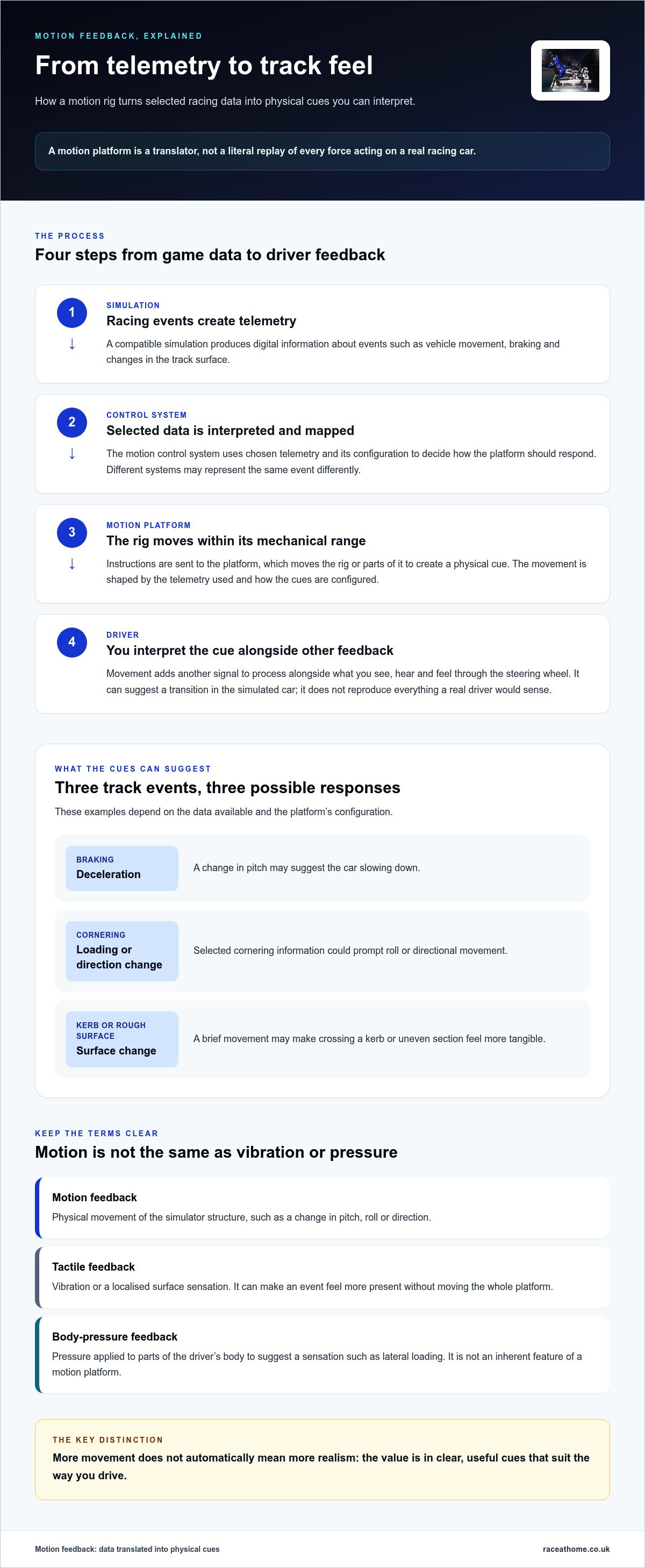
The basic relationship is cause and effect: the simulation registers an event, the motion system responds, and you feel movement through the rig. The response depends on the platform and its configuration, so two systems may represent the same event differently.
Under braking, a rig may use a change in pitch to suggest deceleration. Through a corner, movement can provide a physical cue that the car is loading up or changing direction. If the tyres cross a kerb or rough section of track, the platform may add a brief movement to make the surface change more tangible. These are cues, not exact reproductions of the forces acting on a real racing car.
Motion is also distinct from what you see on screen and from vibration alone. Visuals show the car’s position and surroundings. Vibration can provide tactile feedback without moving the cockpit through a broader range of motion. A motion platform physically moves the rig or parts of it in response to selected simulation data. These sensations can work together, but one doesn’t replace the others.
Who is likely to benefit from a full motion rig?
Motion may appeal if you race regularly and want the cockpit to respond more vividly to events on track. Feeling a change in movement as you brake or turn can make a session more involving, particularly when you’re focused on the relationship between your inputs and the car’s behaviour.
Experienced drivers may also value physical cues as another source of information. A movement can prompt you to notice a transition in the simulated car, then compare that impression with what you see, hear and feel through the wheel. Motion takes interpretation: it represents selected data, not everything a real driver would sense.
Set your expectations accordingly. A motion system can deepen immersion, but it doesn’t guarantee faster lap times or improve technique by itself. Its value is a more physical way to experience simulated driving. For a home setup, consider whether those cues suit the way you enjoy racing, as well as the space and equipment you plan to use.
How does a full motion simulator translate racing data into feedback?
A motion platform doesn’t read the track by itself. In a compatible setup, the racing simulation produces telemetry: digital information about events such as vehicle movement, braking and changes in the track surface. A motion control system interprets selected data, maps it to movement and sends instructions to the platform. The structure then moves, giving you a physical cue to process alongside the image, sound and steering feedback.
That chain is a translation, not a literal replay of every force. The platform represents selected aspects of the simulated drive within its mechanical range. Its movement is shaped by the telemetry used, the system’s configuration and the way cues are mapped. A full motion racing simulator UK buyer should treat the control approach as part of the experience, rather than assume that a particular axis count explains exactly what each movement will feel like.
Which driving events can a motion platform represent?
Consider a braking zone: a system using relevant data might create a pitch cue as the car decelerates. During a fast change of direction, selected cornering information could prompt a roll or directional movement. Crossing a kerb or uneven section might be represented with a brief response that suggests a change in surface.
These examples depend on the data and configuration available to the system. One platform may prioritise certain cues, while another may express them differently. The movement is a designed signal for the driver to interpret, not a precise recreation of the forces experienced in a real car. For a closer look at how axes and movement work together, Race@Home’s 6 DOF motion simulator guide explores the mechanics in more depth.
What is the difference between motion and other feedback?
The terms can sound interchangeable, but they describe distinct sensations. Motion feedback means physical movement of the simulator structure, such as a change in pitch, roll or direction. The platform moves the cockpit or seat assembly in response to selected cues.
Tactile feedback is vibration or a localised surface sensation. It may make a kerb strike or engine vibration feel more present, but it doesn’t mean the whole platform has moved. Body-pressure feedback is another category: a system applies pressure to parts of the driver’s body to suggest a sensation such as lateral loading. It isn’t an inherent feature of a motion platform, so don’t assume it is included just because a rig moves.
Separating these terms makes system comparisons clearer. Establish what moves, what vibrates and what creates pressure, then consider how each effect contributes to your preferred driving experience. Race@Home’s LowSlider motion platforms provide a practical reference point for understanding motion hardware as part of a home rig.
How to compare full motion racing simulators beyond the headline specifications
A degrees-of-freedom figure tells you something about a motion platform, but it doesn’t describe the complete driving experience. To compare a full motion racing simulator UK shortlist fairly, look at the feedback it provides, what moves, how the system fits your room and whether its ownership format suits your setup. Treat specifications as evidence, not a verdict.
Which specifications matter when comparing motion platforms?
Start with the manufacturer’s description of the movement configuration and the cues it is designed to represent. Then establish whether the seat, cockpit or wider rig moves. These distinctions affect how you interpret a system, so don’t infer them from a DOF label alone. Keep confirmed product details separate from assumptions based on other platforms in the category.
Use a simple comparison table to make gaps and differences visible:
| Comparison point | What to establish | Why it matters |
|---|---|---|
| Feedback type | Does the system provide physical movement, tactile vibration or another stated form of feedback? | Different sensations contribute differently to immersion. |
| Platform configuration | What movement configuration is specified, and what is it intended to represent? | The label alone doesn’t explain how cues are delivered. |
| Moving structure | Does the seat, cockpit or wider rig move? | This helps you understand what will physically respond around you. |
| Footprint | What are the system’s dimensions, and what clearance does its movement require? | The static footprint may not show the full space needed in use. |
| Ownership format | Is it a platform for an existing rig or a more complete system, and what assembly is involved? | You can account for hardware you already own and preparation at home. |
Race@Home’s range includes the LowSlider 3DoF motion platform and LowSlider 6 DOF Twin-Traction-Loss Motion Platform. These names identify distinct configurations. Compare the details of each with your priorities rather than assuming a higher number automatically means a better fit.
How should footprint and ownership format affect your shortlist?
Measure the area available for the simulator, including room for movement, access and your usual driving position. Then list your existing cockpit and sim racing equipment. A platform intended to work with an existing rig presents a different planning task from a more complete system, so compare like with like and use stated product details rather than category assumptions.
Match the intended use to your own habits, too. A setup for regular home racing has different practical demands from one intended for commercial use. Race@Home hand-builds its LowSlider simulators around an ultra-low profile and compact footprint. They ship in four pieces for customer assembly in under an hour. Include these ownership details in your planning and explore Race@Home motion simulator options as you refine your comparison.
What should UK buyers plan before ordering a full motion racing simulator?
A little preparation can make bringing a full motion racing simulator UK setup into your home much more straightforward. Think beyond the platform’s footprint: consider how it will reach its final position, work with your existing equipment and leave enough room to use the rig comfortably.
Work through this checklist before ordering:
- Measure the intended area. Note the available floor space and the dimensions of the assembled system. Allow for access around it, and use the platform’s stated movement and clearance details to plan its position.
- Review your equipment. List your cockpit, seat and sim racing hardware. Compare these with the platform format and product information to plan how the motion system will fit into your setup.
- Plan the delivery route. Think about how the packages will get from the delivery point to the room where you’ll assemble and use the simulator. Clear the route and make space to handle the components.
- Prepare an assembly area. Set aside enough room to lay out the delivered pieces and assemble the system before positioning it in your planned location.
How can you prepare your home for a moving rig?
Plan for the room as you’ll use it, not just an empty floor plan. Measure the area for the simulator and preserve access around the assembled rig. Compare your measurements with the chosen system’s footprint and movement information. If the platform moves during use, account for that movement rather than treating the static dimensions as the full space requirement.
Next, consider how the motion platform relates to your current cockpit and equipment. A platform added to an existing setup needs to suit the hardware you intend to keep. Note the space occupied by the complete arrangement, including the driver’s position, before settling on a location.
What should you expect from delivery and assembly?
Race@Home simulators ship in four pieces for customer assembly. Plan where the pieces can be received and laid out, and prepare the assembly area before you begin. Customer assembly can be completed in under an hour.
Allow time to organise the space and equipment around the simulator as well as assemble it. A clear route to the final position and a prepared area can help keep the process orderly. For broader guidance on planning a complete setup, use the sim racing setup guide alongside your measurements.
Ready to plan your home setup around a motion platform? Explore Race@Home motion simulators and consider how the LowSlider’s compact, low-profile design could suit your available space.
How does Race@Home’s LowSlider fit a full motion racing simulator setup?
For a full motion racing simulator UK setup, the platform’s design matters as well as its movement specification. Race@Home hand-builds its LowSlider range to order around its proprietary design for home and commercial use. Its ultra-low profile and compact footprint are practical details to weigh alongside the motion feedback you want and the space available for the complete rig.
What defines the LowSlider approach to motion simulation?
LowSlider is a motion platform. When planning your setup, consider how its footprint fits with your cockpit and surrounding space, and use the product details for the configuration you intend to choose.
Hand-built construction is another part of the range’s ownership context. Rather than choosing on a headline specification alone, consider how the platform fits your driving routine, current equipment and intended use. Bring the decision back to the whole experience: the physical feedback you want, the rig you’ll build around it and the room in which you’ll race.
Which LowSlider route matches your motion-simulation goals?
Race@Home offers two distinct LowSlider choices: the LowSlider 6 DOF Twin-Traction-Loss Motion Platform and the LowSlider 3DoF motion platform. Their configurations give you a starting point for narrowing your options, but the right route depends on your priorities and the complete setup you have in mind. Consider each specified configuration in relation to your goals rather than assuming that the larger DOF figure alone determines suitability.
To make the choice more concrete, write down what you want motion to add to your regular sessions, which equipment you plan to use and how much room you can allocate. Then compare those needs with the platform information and ownership considerations covered above. This keeps the decision grounded in your actual use, whether the simulator is for a home environment or a commercial setting.
Race@Home’s sim racing motion rig buyer’s guide can help you think through the value of motion in your own setup. For a more UK-focused look at choosing a system, the UK motion simulator buying guide offers a broader framework for assessing high-end rigs.
LowSlider’s compact, low-profile design makes footprint part of the product proposition, while its hand-built range gives you distinct 3DoF and 6 DOF options to consider. Match those attributes to your space, equipment and intended use to decide whether a LowSlider platform belongs in your simulator setup.
Make your next move towards a more immersive rig
Before choosing a full motion racing simulator UK setup, decide what you want your next sessions to feel like. Is your priority a more involving home experience, or a platform suited to regular use in a commercial setting? Let that goal guide your decision, alongside the equipment and room you have in mind.
Race@Home’s LowSlider platforms are hand-built to order around its proprietary design. Their low-profile, compact form is designed for home and commercial setups. Simulators are delivered in four pieces for customer assembly, which can be completed in under an hour. These details are a useful starting point as you picture how a motion platform could fit into your plans.
Ready to explore a platform designed around those considerations? Explore Race@Home’s LowSlider motion platforms and take the next step towards a more engaging sim racing experience.
Frequently Asked Questions
Can a full motion racing simulator work with an existing sim racing cockpit?
Yes, a motion platform can be used with an existing cockpit if the equipment and mounting arrangement are compatible. Before choosing one, identify your cockpit and seat configuration, then compare their dimensions and connection points with the platform’s stated requirements. Also consider which parts of your current setup you want to move with the platform. This helps you plan an integrated rig rather than assume every cockpit is a direct fit.
Does a full motion racing simulator need a VR headset?
No, a VR headset isn’t essential. You can use a motion simulator with a conventional display setup, with the platform providing physical movement while the screen shows the race. VR adds a head-tracked, immersive visual perspective, so it may suit drivers who want to feel inside the cockpit. Choose your display separately from the motion system, based on how you prefer to view the track and what your setup supports.
Can motion feedback work with any sim racing game?
No, compatibility depends on whether the game and motion system can exchange the relevant telemetry. A title may display a race perfectly yet not provide data in a form the motion hardware can use. Before building around a particular game, check for documented support for that title and the motion system’s required software or interface. If you race across several games, compare supported titles with the ones you play most often.
What does twin traction loss mean in a racing simulator?
Twin traction loss describes a motion configuration intended to represent the rear of a car losing grip and stepping sideways, a sensation associated with a slide. It adds a cue that can make oversteer feel more apparent in the simulator. The term describes the intended feedback, not a promise that every system will reproduce the same movement or sensation. How it feels depends on the platform and its configuration.
Is a full motion racing simulator suitable for a home setup?
It can be, provided the system suits your available room, existing equipment and regular use. Consider whether the assembled rig fits its intended position and whether you can use it without obstructing everyday access to the room. A compact platform design may be useful where space is limited, but the complete cockpit still needs to fit. A full motion racing simulator UK buyers choose should work practically at home as well as deliver the feedback they want.
How do I choose between a motion platform and a complete simulator?
Choose a motion platform if you already have a cockpit and want to add movement to that setup, provided the equipment is compatible. A complete simulator may suit you better if you’re starting without the core rig components and want a more unified system. Compare what each option includes, what you already own and how much setup work you’re prepared to take on. The right format depends on your starting point, not just the motion specification.
Does a full motion racing simulator make you faster?
Not automatically. Motion can add physical cues that you may learn to interpret alongside your usual visual and steering information, but it doesn’t replace practice, racecraft or consistent driving technique. Treat it as another way to experience the simulation, not a shortcut to lower lap times. To assess any effect on your driving, compare repeated sessions on the same track and car, and focus on consistency as well as your best lap.


