

What if your motion rig could deliver sharper, more immersive feedback without taking over the room? Choosing a compact motion racing rig isn’t just about its footprint: you’ll also need to account for its movement, access around the seat and the hardware you already own.
It’s sensible to compare more than product dimensions. A layout that doesn’t suit your wheel, pedals or preferred driving position can make the experience less natural, even if the rig fits neatly into your room. The right choice balances usable floor space with the sensations you want from the track.
This guide explains how to assess space and hardware requirements, compare different layouts and decide what high performance means for your home. Race@Home’s hand-built LowSlider platforms offer an ultra-low profile and compact footprint, with 3DoF and 6 DOF options. Each simulator ships in four pieces for customer assembly, which can be completed in under an hour. Use the steps below to match your room, equipment and driving priorities to a motion setup.
Key Takeaways
- Assess a compact motion racing rig by its usable footprint, operating clearance and fit with your home, not its marketing label alone.
- Understand how simulated vehicle behaviour is translated through telemetry into physical movement and driving feedback.
- Compare stationary cockpits, seat-moving platforms and full-motion layouts by what moves, setup demands and the experience you prioritise.
- Measure your space, map your wheel and pedals, review compatibility, and plan access routes and component placement before delivery.
- Consider how LowSlider’s ultra-low-profile design and compact footprint could suit your home setup. Customer assembly takes under an hour.
What makes a compact motion racing rig suitable for a home setup?
A compact motion racing rig is more than a cockpit with a small advertised footprint. It combines a space-conscious layout with the room needed for the driver, fitted hardware and platform movement. A frame may look compact on its own, but the complete setup can extend beyond it once you add the seat, wheel, pedals and display.
Definition: A compact motion racing rig combines a space-conscious cockpit and motion platform with a practical operating area for the driver and fitted hardware.
Which measurements matter before choosing a compact rig?
Measure the area the whole setup will occupy, not just the platform base. Include the seat in your usual driving position, wheel and pedal assemblies, and monitor or display arrangement. If a component sits on a separate stand, include its position too. Marking these out gives you a realistic picture of how the setup will fit.
Next, plan the space around the rig. You’ll need room to get in and out, adjust your position and reach your equipment. A moving platform also needs operating clearance. The amount depends on the design, so don’t assume the static base dimensions represent the full working area.
Check the route into the room before settling on a layout. Measure doorways and consider turns and steps between the delivery point and the intended setup area. A rig can fit the room but still be difficult to bring into position if its pieces can’t pass along the route. Checking access early helps you avoid choosing a layout that works only on paper.
Does compact mean a less immersive racing experience?
Not automatically. A rig’s physical size describes how it fits into your room; it doesn’t, by itself, determine how software-driven cues are translated into movement. A motion platform responds to simulated car behaviour, while haptic technology describes the use of physical sensations to convey information. What you feel depends on the platform design and how it represents driving data, not simply on the floor area it occupies.
A coherent layout can support immersion by keeping the seat, wheel, pedals and display aligned with your driving position. When the controls feel natural and motion cues are easy to interpret, you can focus on the car’s response instead of compensating for awkward placement. A compact arrangement can be a considered design choice, not automatically a compromise.
Compactness doesn’t mean every motion system feels the same. Different layouts move different parts of the rig and create distinct feedback. Start with the sensations and driving priorities you value, then assess the complete footprint, operating space and hardware arrangement together.
How rig layout turns racing telemetry into physical feedback
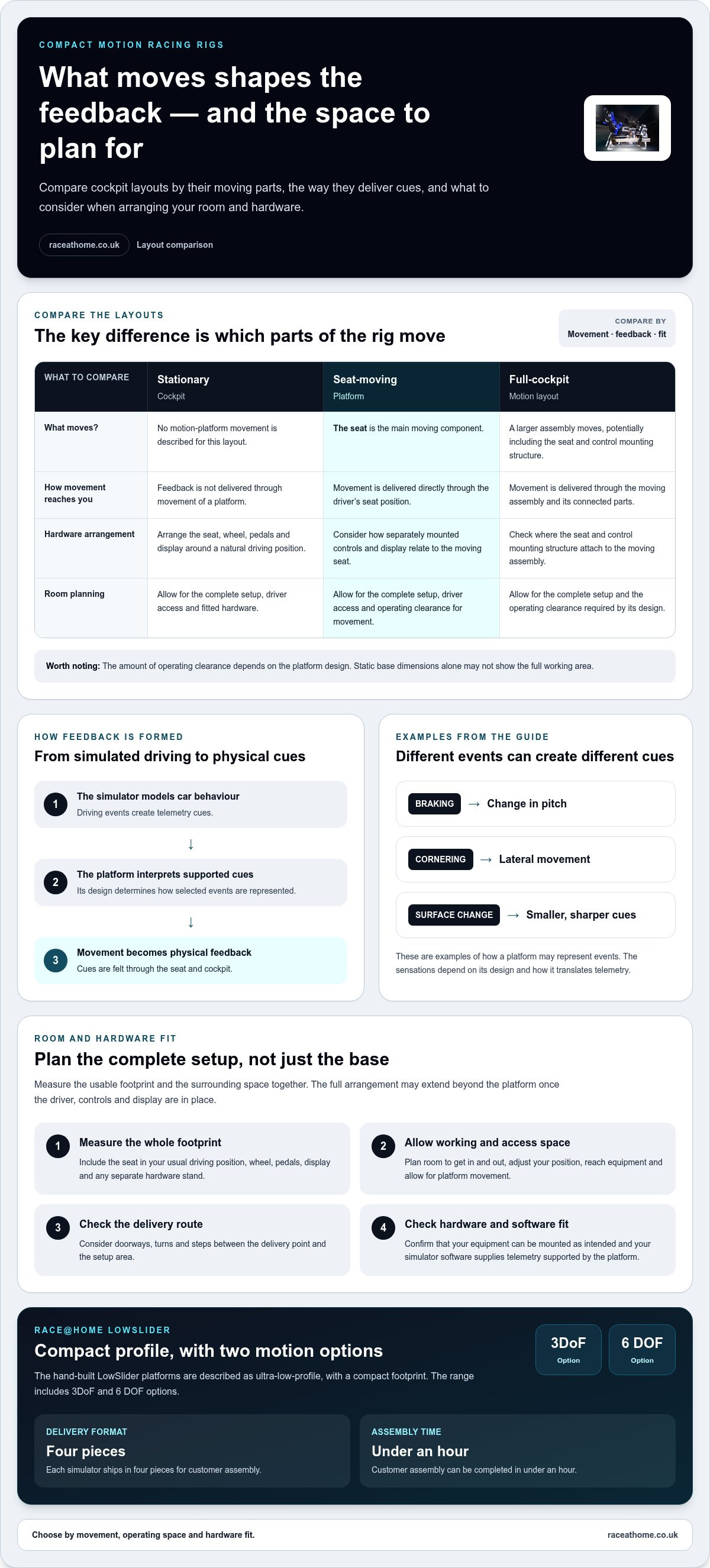
Motion starts with data. The simulator models the car’s behaviour, and the motion system interprets supported telemetry cues before moving its connected assembly to represent selected events. Depending on the platform and its configuration, braking might be conveyed through a change in pitch, cornering through lateral movement, and surface changes through smaller, sharper cues. This signal path turns on-screen events into sensations you can feel through the seat and cockpit.
Layout shapes the experience because it determines which parts of the rig move. Judge a compact motion racing rig by both its footprint and the relationship between its moving assembly, your body and your controls. For more detail on how platform designs differ, read this 6 DOF motion simulator guide.
What moves in a motion racing rig?
In a seat-moving arrangement, the seat is the main moving component, delivering feedback directly through the driver’s position. In a full-cockpit approach, a larger assembly moves, potentially including the seat and control mounting structure. Neither layout is right for everyone. The important distinction is how movement is delivered and whether that approach suits your room, equipment and preferred sensations.
Imagine braking for a corner. A platform may use movement to suggest deceleration, then shift to represent the car loading through the turn. A change in surface can be expressed as a distinct motion cue. The sensations depend on the platform design and how it translates telemetry, so different layouts won’t necessarily create identical feedback. For wider context on simulator types, the racing simulator market analysis offers an industry overview.
How should motion work with the rest of the cockpit?
The seat, wheel, pedals and display should form one coherent driving position. If your seat moves but your display or controls are mounted separately, consider how their relative positions will feel during movement. A full-cockpit layout has different requirements for where hardware is attached. Aim for a natural posture, secure control placement and a clear view, so motion adds information rather than distracting from driving.
Compatibility is part of the system. Assess whether your existing hardware can be mounted in the intended arrangement and whether your simulator software can provide telemetry supported by the motion platform. Check the requirements for your specific equipment and software combination rather than assuming every title or component behaves alike. The sim racing setup guide covers wider system compatibility and how cockpit and motion hardware can fit together.
Once you know which parts should move and how your controls will be arranged, compare platforms against the driving feedback you want. Race@Home’s LowSlider platforms have an ultra-low-profile design and compact footprint. Explore the LowSlider motion platform range as one option for balancing motion with home space.
Compare compact motion racing rig layouts by what you need
Compare layouts by what moves, how the system fits your room and what’s involved in integrating it with your cockpit. The table is a starting point, not a specification: footprints and setup requirements vary between designs. Assess the complete arrangement rather than relying on the category name alone.
| Layout | Footprint | What moves | Setup considerations | May suit you if… |
|---|---|---|---|---|
| Stationary cockpit | Based on the cockpit and attached equipment; no motion clearance is needed. | Nothing. The seat, wheel and frame remain stationary. | Usually the most straightforward arrangement, though hardware still needs to fit. | You prioritise a fixed driving position and simpler space planning. |
| Seat-moving platform | Depends on the cockpit and platform; allow for movement as well as the static base. | The seat or seat assembly, while the wider frame generally remains stationary. | Consider how the moving seat relates to fixed controls and display. | You want motion focused close to the driver without moving the whole cockpit. |
| Full-motion platform | Depends on the platform and cockpit; plan around the moving assembly and its operating space. | A larger section of the cockpit, potentially including the seat and control structure. | Plan the placement of mounted hardware and account for the complete moving rig. | You want movement to involve more of the cockpit structure. |
When might a seat-moving layout suit your priorities?
A seat-moving design can suit you if you want physical cues delivered directly through your seating position while the wider frame stays still. Movement is focused around the driver, but your wheel, pedals or display may be attached to parts that don’t move with the seat. Consider how that relationship will feel from your driving position. Designs differ, so assess each platform’s footprint and feedback rather than assuming all seat-moving systems are alike.
When might a full-cockpit motion layout be a better fit?
If you want movement to involve more of the cockpit, a full-motion arrangement may better match your preference. Its moving assembly can include more of the structure supporting your controls, changing the relationship between your body and equipment. You’ll need to plan for the complete setup in your room, not just the seat or platform. The sim racing motion rig value guide can help you think through the wider investment decision.
Use a simple decision rule: if room constraints and focused movement are your priorities, investigate a seat-moving layout. If you have space for the complete assembly and want motion across more of the cockpit, consider full-cockpit movement. If movement isn’t essential, a stationary cockpit may suit you better. For any compact motion racing rig, compare the actual footprint, operating clearance and hardware arrangement before deciding.
Check room fit and hardware compatibility before choosing
A good home setup starts with a plan. Before choosing a compact motion racing rig, work through these checks so the room, equipment and motion platform make sense as one system.
- Measure the space. Record the floor area you can dedicate to the rig, including room for the seat, wheel and pedals in your driving position. Allow for platform movement and practical access around it. Don’t treat the base dimensions as the complete footprint.
- Map your hardware. Sketch where the cockpit, seat, wheel, pedals, displays and PC-based equipment will sit. Note which items attach to the cockpit and which stand separately. This can reveal clashes, such as a display stand taking up space needed for access or movement.
- Review compatibility. Consider the motion platform, control hardware and simulator software together. Check compatibility information for your components and software, including how telemetry is provided to the platform. Compatibility is a system question, not just a matter of whether each item works on its own.
- Plan the access route. Measure the route from the delivery point to the room, including doorways, turns and steps. Check that the components can reach the intended space, and decide how you’ll get into the seat and reach controls once the rig is in place.
- Review assembly. Plan where you’ll assemble the rig and what you’ll need to put it together in its final position. Race@Home simulators ship worldwide in four pieces for customer assembly, which can be completed in under an hour. Choosing the assembly location in advance can help you avoid moving a partly assembled setup through a tight room.
How can you map the available space?
Use masking tape or a simple floor plan to mark the cockpit and display positions before delivery. Include surrounding equipment, cable routes and room to enter, exit and adjust the seat. There’s no single clearance figure that suits every layout: the moving assembly and room arrangement determine what feels workable. Review your plan from the driver’s viewpoint as well as from the doorway.
Which existing sim racing components should you assess?
Make an inventory of your cockpit or frame, seat, wheel, pedals, displays and PC-based equipment. For each item, note how it mounts, where it sits and what connection or software role it has. Compare those details with the relevant platform and software compatibility information. This helps you spot whether your current arrangement is a natural fit or whether component placement needs to change.
Once you’ve mapped measurements, access and hardware, you can make a more informed choice about the right platform layout. Race@Home’s LowSlider design pairs an ultra-low profile with a compact footprint. Explore Race@Home motion platforms as you compare your planned setup with the available motion options.
Choose a compact motion racing rig that fits your next racing step
Your choice comes down to four things: available space, which parts of the rig you want to move, whether your hardware and software suit the setup, and the driving feedback you’re looking for. Set those priorities before comparing platforms. A clear picture of your room and preferred experience will help you choose a motion system that feels purposeful, rather than simply compact on a product page.
Race@Home’s proprietary LowSlider design has an ultra-low profile and compact footprint, making it an option for sim racers balancing motion with home space. The platforms are hand-built to order, with 3DoF and 6 DOF configurations to consider.
Which LowSlider platform should readers explore?
The LowSlider 3DoF motion platform and the LowSlider 6 DOF Twin-Traction-Loss Motion Platform offer different configurations to consider as you define your next step in sim racing. Let your preferred layout and feedback guide the decision, alongside your cockpit arrangement and available space. Assess how the complete setup suits your room and equipment rather than relying on the product name alone.
Before choosing a platform, return to your practical checklist. Picture the assembled rig in its intended position, including the seat, wheel, pedals and display. Consider how you’ll access it and how its motion layout will work with your current arrangement. If a compact home footprint is a priority, the LowSlider design’s low profile and space-conscious form are relevant considerations. Compare the full setup rather than assuming all motion systems occupy the same area.
What should buyers expect from delivery and assembly?
Race@Home simulators ship worldwide in four easy-to-assemble pieces. Customer assembly can be completed in under an hour. Plan where the components will go and where you’ll assemble the setup. Clearing the route and preparing the assembly area beforehand can make the process more straightforward.
Choose a configuration that fits your room, suits your preferred movement, works with your planned hardware and delivers the feedback you value. Then factor delivery and customer assembly into your home setup. With those points aligned, you can move from comparing options to planning a rig that supports your next racing step.
Explore Race@Home’s LowSlider motion platforms to compare options for your compact motion racing rig.
Shape your next step in sim racing
The strongest setup is the one that makes you want to return to the grid. Before deciding, picture the driving experience you’re aiming for: the cues you want to feel, the position you want to race in and how the rig should sit within your home. Those priorities give your research a clear purpose and help you judge each option on its relevance to you, not on specifications alone.
A compact motion racing rig can be a meaningful next step when its design supports both your space and the way you want to drive. Turn your priorities into a practical plan, then explore how Race@Home’s motion platforms could fit it.
Explore Race@Home’s motion platforms and take the next step towards a more immersive sim racing experience.
Frequently Asked Questions
What is a compact motion racing rig?
A compact motion racing rig is a home sim racing setup designed to deliver movement without requiring an unnecessarily large room footprint. Compactness depends on the complete arrangement, including the driver’s seat, controls, display and space for operation. The term doesn’t identify one particular layout: some systems move the seat, while others move more of the cockpit. Consider how each design fits your driving habits and room.
How much space do you need for a motion racing rig?
There isn’t one space requirement that applies to every motion rig. The area you need depends on the platform layout, cockpit, seat, wheel and pedals, plus the position of your display and PC equipment. Measure the intended space with all components in place, then account for movement and access around the rig. A floor plan or tape marking can show whether the setup leaves enough room to use the rest of the space comfortably.
Can a motion racing rig fit in a spare room?
Yes, a motion rig can suit a spare room if the full setup fits without blocking essential access or making the room difficult to use. Consider how the room functions beyond sim racing: doors, storage and other furniture affect the practical space available. Mark out the cockpit and display positions before settling on a layout. A low-profile design may be worth considering if ceiling height or visual bulk is a concern.
Does a compact motion rig move the whole cockpit?
Not always. Some compact rigs move the seat or seat assembly, while other motion platforms move a larger part of the cockpit. “Compact” describes a space-conscious design, not which parts move. To understand the experience, look at the moving assembly and how your wheel, pedals and display relate to it. The platform configuration determines the movement approach, so don’t infer whole-cockpit motion from size alone.
Can you use a motion racing rig with an existing cockpit?
Compatibility depends on the cockpit and motion platform design, mounting arrangement, controls and software. Identify how your seat, wheel and pedals attach, then compare those details with the platform’s compatibility information. Consider whether your simulator software supplies the telemetry the platform uses too. If a component’s position or connection differs from the intended arrangement, you may need to rethink the setup rather than assume it will integrate as it is.
How long does it take to assemble a LowSlider motion simulator?
Customers can assemble a LowSlider motion simulator in under an hour. The simulator arrives in four pieces, so plan where you’ll put the components and assemble the setup. Clear the route to the room and prepare the intended assembly area before starting.
Can Race@Home ship a motion simulator internationally?
Yes. Race@Home ships its motion simulators worldwide, so customers outside the UK can also consider a LowSlider platform. The simulator is sent in four pieces for customer assembly, which is useful to factor into your delivery route and room preparation. Consider where the shipment will arrive and how you’ll move its pieces to the planned setup area, particularly if access involves narrow passages or stairs.


