

What if the platform fits, but the complete racing setup doesn’t? Choosing a motion simulator for small spaces UK homes can accommodate means looking beyond the platform’s footprint. Your cockpit, seat, wheel and pedals all need room, as does the platform’s movement during a session.
It’s understandable to worry that adding motion will make a carefully planned room feel cramped or impractical. But an immersive setup doesn’t have to dominate your space. Measure the usable area, plan around the complete rig and compare motion features against the kind of racing feedback you want.
This 2026 buyer’s guide explains how to assess your layout, compare 3DoF and 6 DOF motion, and plan for a complete setup. It also looks at the LowSlider’s ultra-low-profile design and compact footprint. Race@Home platforms are hand-built to order and ship in four pieces for customer assembly, with setup taking under an hour. Use the guidance below to assess what could work in your room and compare the options against your priorities.
Key Takeaways
- Plan around the complete rig, including the cockpit, displays, access space and platform movement, rather than judging fit by the platform alone.
- Choose motion capability to suit your racing priorities. 3DoF and 6 DOF offer different kinds of feedback, not a simple better-or-worse choice.
- Use a room-planning checklist to map the cockpit position, viewing setup, cables, doorways and delivery route before choosing a system.
- Compare a motion simulator for small spaces UK buyers can use by considering how its design and setup work with the whole room layout.
- Consider the LowSlider’s ultra-low profile and compact footprint, then weigh its motion options against your intended use and measured setup.
Can a motion simulator fit in a small UK home? Start with the whole setup
A small-space home motion simulator is a sim-racing setup planned to deliver physical vehicle feedback within the usable area of a domestic room. The key question isn’t simply whether the platform can sit on the floor. Account for the cockpit, seat, steering wheel, pedals and viewing equipment, as well as room to get in and out comfortably. A rig might fit on paper but be awkward to use if it blocks a doorway or leaves no clear route to the seat.
A home rig is arranged around your room, equipment and racing habits. The practical challenge is making the complete setup work in the space you have. Assess a motion simulator for small spaces UK homes can accommodate against your actual layout, rather than relying on a universal definition of “small” or an unverified footprint figure.
What counts as a small space for a home motion simulator?
Start by identifying the floor area you can genuinely use. Note fixed obstacles such as walls, doors, radiators, furniture and sockets. Then distinguish the rig’s footprint from the extra space needed to approach the seat and use the controls. A spare room with a clear floor may offer more practical space than a larger room divided by furniture. The useful test is whether the proposed arrangement suits your equipment and everyday access.
Why the complete rig matters more than the platform alone
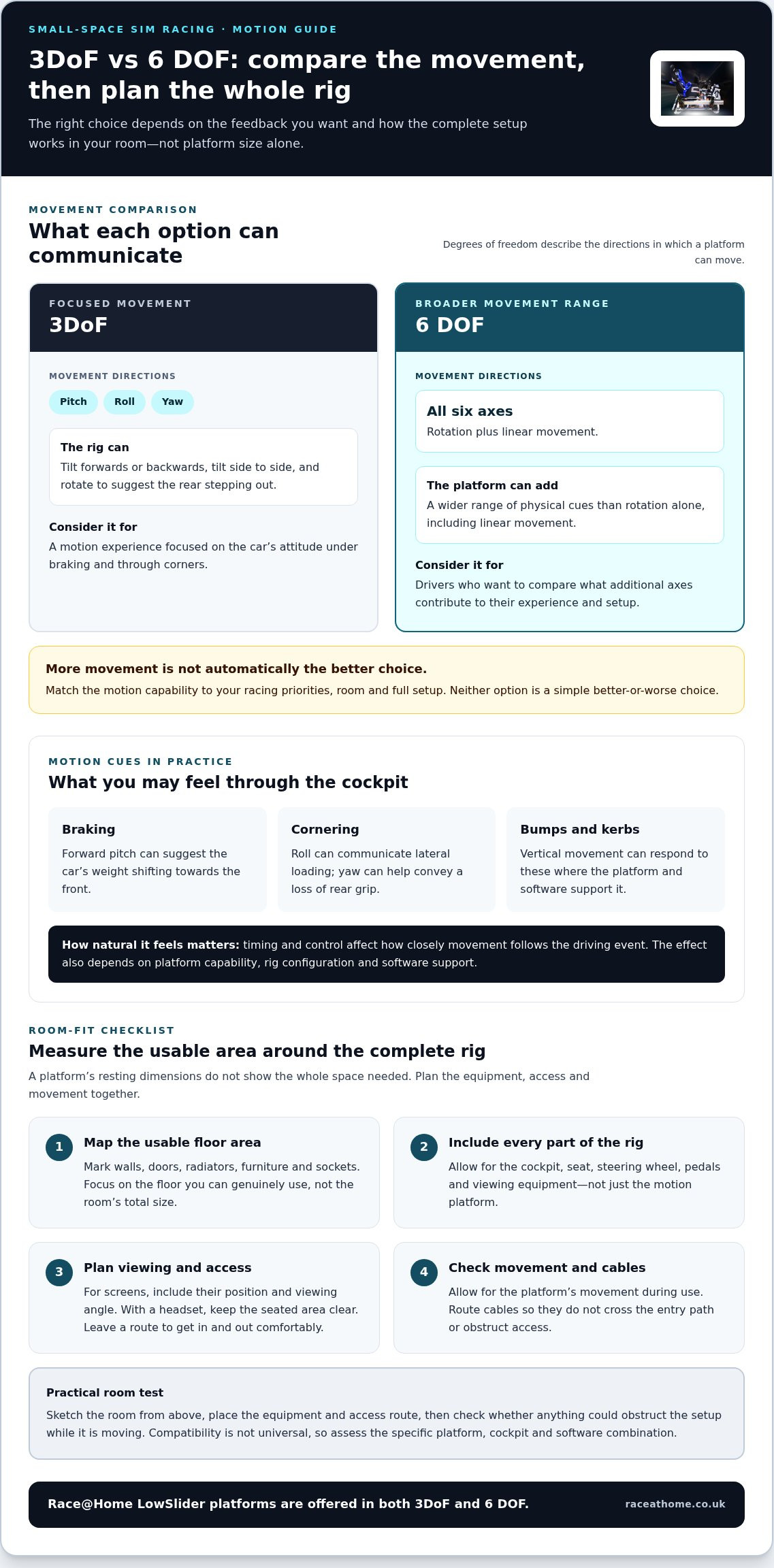
Map every part of the setup: cockpit and seat, steering wheel and pedals, plus either screens and their stands or a headset. For screens, include their position and viewing angle. With a headset, keep the seated area clear. Plan cable routes too, so leads don’t cross your entry path or get in the way when you get in and out.
Allow for the platform’s movement as well as its resting position. The space needed depends on the system and how it moves, so the platform’s listed dimensions won’t necessarily tell the whole story. Sketch the room from above, mark the equipment and access route, then check whether anything could obstruct the setup during use. For background on how motion systems reproduce movement, see this overview of the motion simulator.
For a deeper look at platform movement, read the 6 DOF motion simulator guide. Planning around the complete rig in your actual room gives you a more useful basis for comparison than platform size alone.
How motion platforms deliver racing feedback without demanding a venue-sized room
Motion adds another layer to sim racing by turning digital vehicle behaviour into movement you can feel through the cockpit. As the car brakes, loads up through a corner or crosses an uneven surface, the platform moves the rig to create a physical cue that complements what you see and hear. A compact design describes how the hardware fits into your layout, not whether it can deliver meaningful feedback. The experience depends on how the movement is generated and delivered, not on occupying a venue-sized space.
A motion platform translates simulation cues into controlled physical movement at the cockpit, helping your body sense changes such as braking, cornering and track texture. The effect depends on the platform’s capabilities, how it’s configured with the rig, and whether the simulator software supports the setup. Compatibility isn’t universal, so consider the specific combination of platform, cockpit and software rather than assuming every system works together.
What 3DoF and 6 DOF movement mean in practical terms
Degrees of freedom describe the directions in which a platform can move. In a common racing setup, 3DoF covers pitch, roll and yaw: the rig can tilt forwards or backwards, tilt side to side, and rotate to suggest the rear stepping out. A 6 DOF platform can move across all six axes, adding linear movement as well as rotation. That offers a broader range of physical cues, but more movement isn’t automatically the right choice for every driver, room or racing style.
Think about the sensations you want to prioritise. If you’re most interested in the car’s attitude under braking and through corners, consider how those cues are represented. If you want a wider range of movement, compare what the additional axes contribute to your experience and setup. For a closer look at the distinction, read this 6 DOF and 3DoF simulator comparison.
How movement turns simulation data into physical sensation
Under braking, a forward pitch can suggest the car’s weight shifting towards the front. Through a fast corner, roll can communicate lateral loading, whilst yaw can help convey a loss of rear grip. Vertical movement can respond to bumps and kerbs where the platform and software support it. Timing and control matter: movement that follows the driving event closely can feel more connected to the car, while poorly matched cues may feel less natural.
Choosing a motion simulator for small spaces UK drivers can enjoy involves more than judging its size. Focus on the motion features that suit your driving, then consider how they work with the rest of your system. Race@Home offers both 3DoF and 6 DOF LowSlider platforms. Explore the LowSlider motion platform options as you compare the feedback you want with your home setup.
Which compact motion simulator should you choose for your room and racing style?
The right system balances the sensations you want with the space available for your complete rig. Three degrees of freedom can deliver a focused motion experience, whilst six degrees of freedom offer a broader range of movement cues. Neither is automatically the better choice. Consider your preferred style of racing, the cockpit and equipment you plan to use, and how the full setup will sit in your room.
A low-profile platform can be useful where overall height, access or the feel of a room matters. It doesn’t remove the need to plan for the cockpit, displays, cables or movement. The LowSlider range has an ultra-low profile and compact footprint, but those features don’t determine whether the whole rig will fit. Assess the platform alongside your actual equipment and layout.
| Option | Motion capability | May suit | Footprint and setup considerations |
|---|---|---|---|
| LowSlider 3DoF motion platform | Three degrees of freedom for a focused range of movement cues. | Drivers prioritising a considered home layout and the motion features most relevant to their racing. | Low-profile, compact-footprint design. Plan for the complete cockpit and access, and consider the specific rig and supported software. |
| LowSlider 6 DOF Twin-Traction-Loss Motion Platform | Six degrees of freedom, with twin traction loss as part of its motion capability. | Enthusiasts seeking a broader range of movement cues in sim racing. | Also designed with an ultra-low profile and compact footprint. Assess the full arrangement and movement needs rather than assuming the platform alone determines fit. |
When a 3DoF platform may suit a compact home rig
If you want motion without prioritising the widest range of movement, a 3DoF system may be a considered choice. Start with the feedback you value in your favourite racing disciplines, then see how much room remains once the cockpit, controls and viewing setup are in place. Race@Home’s 3DoF option is the LowSlider 3DoF motion platform.
When a 6 DOF platform may be the better fit
If you’re seeking a broader set of physical cues, a 6 DOF system may better match your ambitions. Its capabilities still need to suit your cockpit, intended use and available layout; more axes don’t guarantee a better fit for every driver. Race@Home’s option is the LowSlider 6 DOF Twin-Traction-Loss Motion Platform.
When comparing a motion simulator for small spaces UK buyers should weigh motion priorities and practical room fit together. First decide which feedback matters most, then map the chosen configuration against the complete setup.
How to measure and plan a small-space motion simulator setup
A good room plan starts with measurements, then tests how the rig will work in everyday use. Before choosing a motion simulator for small spaces UK homes can accommodate, map the delivery route, the complete equipment arrangement and the space you’ll need to sit down, adjust your controls and move around comfortably.
- Measure the usable floor area. Record the room’s length and width, then note fixed obstacles such as doors, radiators, built-in furniture and sockets. Measure door openings and the route from the delivery point to the intended setup location, including any tight turns.
- Mark out the complete rig. Use masking tape or a floor plan to indicate the platform, cockpit and seat, steering wheel, pedals and display stands. If you use a headset, include the seated area and any space needed to move comfortably. Use confirmed dimensions for the specific equipment you’re considering rather than relying on a general footprint estimate.
- Allow for access and adjustment. Try the proposed cockpit position and consider how you’ll get into the seat, adjust controls and reach equipment. A layout that fits tightly may still be awkward if you can’t use it comfortably day to day.
- Plan the viewing position and cables. Place screens where they can be viewed from the driving position, or account for the headset and its lead. Route cables away from entry paths and moving parts, and leave access to connections you may need to reach.
- Consider delivery and assembly. Race@Home platforms ship in four pieces for customer assembly, with setup taking under an hour. Plan where you’ll assemble the parts and position the completed rig, as well as how you’ll organise cables and surrounding equipment afterwards.
Clearance needs depend on the platform’s dimensions and the configuration of your cockpit, displays and other equipment. Include room for platform movement, not just its resting position. If the tape outline blocks a doorway or makes the seat difficult to reach, adjust the layout before settling on a system.
For more ideas on organising a complete rig, see the professional home sim racing setup guide. Once you’ve mapped your space, include the LowSlider motion platforms in your comparison.
Why the LowSlider is worth considering for a small-space UK sim rig
A good choice brings together four considerations: the room you’ve measured, the motion cues you want, your intended racing use and the practicalities of getting the rig into place. The LowSlider is worth considering if a low-profile design matters to your home layout, but its compact footprint doesn’t guarantee a fit in every room. Compare its dimensions with your cockpit, displays, access route and the space needed for movement before deciding.
How the LowSlider design addresses home-layout constraints
An ultra-low profile can matter when you’re planning around overall height or want the platform to sit beneath a separate cockpit frame. A compact footprint may also help make efficient use of available floor space. These are design attributes, not a substitute for checking measurements: the usable setup still depends on the platform, cockpit and equipment together.
Race@Home’s LowSlider platforms are hand-built to order for sim racing. They ship in four pieces for customer assembly, with setup taking under an hour. Factor assembly into your room plan, then position the rig and organise your home setup around it.
Choose your next step with confidence
Before choosing, revisit your room plan. Check the route from the delivery point, the intended cockpit position, viewing setup, cables and comfortable access. Then match the platform’s motion capability to the racing feedback you want. The LowSlider 3DoF motion platform offers a three-degree-of-freedom option for focused movement cues. If you’re looking for a broader range of movement, compare the LowSlider 6 DOF Twin-Traction-Loss Motion Platform against your priorities and the layout of the complete rig.
There isn’t one configuration that suits every driver or room. When choosing a motion simulator for small spaces UK sim racers should weigh the measured setup and intended use together, rather than choosing on platform profile alone. For broader buying guidance, read the LowSlider buying guide for UK buyers.
Ready to compare motion options with your room plan? Explore the LowSlider motion platforms and find the configuration that fits your racing priorities.
Plan your space, then choose your motion
A convincing home motion setup starts with the whole room plan, not the platform footprint alone. Measure the complete rig, access route and space needed to use it comfortably. Then match 3DoF or 6 DOF capability to the racing feedback you want, rather than assuming more movement is always the right choice.
If you’re considering a motion simulator for small spaces UK homes can accommodate, the LowSlider’s ultra-low-profile design and compact footprint make it worth including in your measured comparison. Race@Home is a UK-based specialist, and its motion platforms are hand-built to order. They arrive in four pieces for customer assembly, with setup taking under an hour.
Your room and racing priorities are unique. Use your measurements to compare the LowSlider options, then explore the LowSlider motion platforms and take the next step towards more immersive laps at home.
Frequently Asked Questions
Can you fit a motion simulator in a small room?
Yes, a motion simulator can fit in a small room if the complete setup works with the available layout. Measure the platform, cockpit, seat, controls and viewing equipment, then account for access and platform movement during use. The phrase “motion simulator for small spaces UK” covers a range of room layouts, so there’s no universal room size that guarantees a fit. Assess your actual equipment and usable floor area.
What is the best motion simulator for a small space?
The right option depends on your room, cockpit and preferred racing feedback. Compare motion capability alongside the whole rig’s footprint, access and setup requirements, rather than choosing by platform size alone. Race@Home’s LowSlider range includes a 3DoF motion platform and a 6 DOF Twin-Traction-Loss Motion Platform. Both have an ultra-low-profile design and compact footprint, but you’ll still need to plan around the dimensions of your chosen setup.
Is a 6 DOF motion simulator too big for a home setup?
Not necessarily. Six degrees of freedom describe the platform’s movement capabilities, not whether it can fit in a particular home. Fit depends on the platform dimensions, cockpit configuration, surrounding equipment and room for movement and access. Measure the complete arrangement before choosing. Race@Home’s LowSlider 6 DOF Twin-Traction-Loss Motion Platform has an ultra-low profile and compact footprint, but those design attributes don’t guarantee that it will suit every room.
How much space do you need for a home motion simulator?
There isn’t one reliable measurement for every home rig. The required space varies with the platform, cockpit, seat, controls, displays or headset, and how the system moves. Measure the usable floor area, door openings and delivery route, then mark out the equipment layout and leave room to get in, adjust controls and use the rig comfortably. Use dimensions for the specific equipment rather than relying on a general estimate.
Can a motion simulator be assembled at home?
Yes. Race@Home motion platforms ship in four pieces for customer assembly, and setup can be completed by the customer in under an hour. Plan where you’ll bring the pieces in and assemble them, then consider the final cockpit position and cable routes. Assembly is only one part of the plan: organise the surrounding equipment and ensure there’s suitable access for everyday use.
What is the difference between 3DoF and 6 DOF motion simulators?
Degrees of freedom describe the directions in which a platform can move. In sim racing, 3DoF commonly provides pitch, roll and yaw, which can suggest braking, cornering and traction-loss cues. Six degrees of freedom adds movement across all six axes for a broader range of physical feedback. The extra capability isn’t automatically better for every driver. Choose according to your racing priorities, setup and available space.
Does a compact motion simulator compromise on realism?
Not simply because it has a compact layout. Realism depends on how the platform translates supported simulation cues into controlled movement, as well as the rig configuration and software support. A low-profile design describes the hardware’s physical form, not an absence of motion. If braking, cornering or surface feedback matters to you, compare the system’s movement capabilities and intended use rather than treating size alone as a measure of immersion.


