

Can you build a serious motion sim racing setup yourself without turning your room into a workshop? A self-assembly motion cockpit can make that goal more practical, but first it helps to understand what you’re assembling. The cockpit frame supports your seat, wheel and pedals, while a motion platform adds physical movement to a separate, rigid rig.
It’s natural to wonder how much work setup involves, how much space the system needs and whether it suits the hardware and software you already use. Race@Home’s LowSlider platforms have a compact, ultra-low-profile design and arrive in four pieces for customer assembly. Setup can be completed in under an hour. That makes it easier to plan the practical details while keeping the focus on the feedback that brings corners, bumps and loss of traction to life.
This 2026 buyer’s guide explains what self-assembly involves, what to compare before you buy, and how to plan for space and compatibility. You’ll also see how the LowSlider 3DoF and 6 DOF Twin-Traction-Loss platforms can fit into a setup with a separate cockpit, helping you move from choosing a motion system to planning a home rig.
Key Takeaways
- Separate the cockpit frame from the motion platform so you know which part supports your hardware and which adds movement.
- A self-assembly motion cockpit can bring motion feedback into your setup without requiring a ready-to-run simulator.
- Plan your available space, assembly access and cockpit position before choosing a motion platform.
- List your existing wheel, pedals, seat, display and other hardware to assess how a platform could fit your setup.
- Race@Home’s LowSlider platforms are hand-built to order, with a compact, ultra-low-profile design and a four-piece assembly format.
What a self-assembly motion cockpit means for your sim racing setup
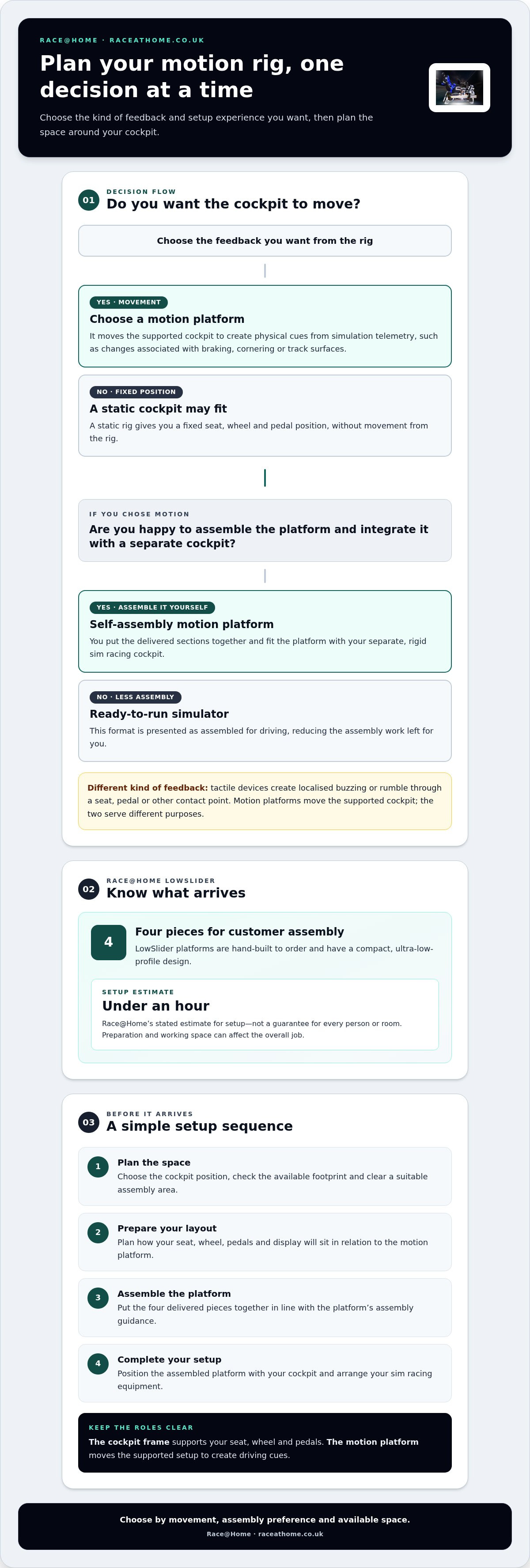
A self-assembly motion cockpit is a motion platform delivered in sections for you to assemble and integrate with a separate, rigid sim racing cockpit. The term describes how the motion system is delivered and set up, not a lower-performance class of equipment. You handle the assembly, while the platform adds physical movement to your driving experience.
This distinction matters when planning a rig. The cockpit frame holds your seat, wheel and pedals; the motion platform moves the supported setup to create driving cues. It isn’t necessarily a complete cockpit kit or a ready-to-drive simulator. For a general introduction to the technology and different simulator types, see Motion simulator.
How motion feedback changes the cockpit experience
A motion platform adds movement to the visual and audio feedback you already get from a sim. It uses telemetry, the data describing what’s happening in the simulation, to produce physical cues. Depending on the platform and its configuration, changes associated with braking, cornering or track surfaces can become movement you feel through the rig. Your body interprets those cues alongside what you see and hear, adding another dimension to each lap.
This differs from vibration-only tactile feedback, which creates localised buzzing or rumble through a seat, pedal or other contact point. Motion platforms move the supported cockpit; tactile devices vibrate a component. They can serve different purposes, so don’t treat one as another name for the other.
Self-assembly versus ready-to-run delivery
With a self-assembly motion platform, you put the delivered sections together and integrate the system with your cockpit. A ready-to-run simulator is presented as assembled for driving, reducing the assembly work left for you. Delivery arrangements can vary, so the key distinction is who completes the physical assembly.
Think about where you’ll assemble the sections, how the platform will fit with your existing rig, and how much time to allow for the complete setup. Delivery format doesn’t, by itself, determine the intended driving experience or performance. Some buyers value a hands-on build and control over their setup; others prefer a system that arrives ready to drive. Neither preference makes the resulting sim racing experience inherently more serious.
Race@Home’s LowSlider platforms are shipped in four pieces for customer assembly, and setup can be completed in under an hour. The platform is hand-built to order, so assembly is part of the delivery format, not an indication that engineering quality has been traded away.
How self-assembly works with the LowSlider motion cockpit
LowSlider platforms are shipped in four pieces designed for customer assembly. This makes it easier to plan how the platform will reach and fit into your sim racing space, while leaving you to complete the assembly and final setup.
What to plan before the platform arrives
Choose where your cockpit will sit and clear enough working room to assemble the delivered pieces. Plan for the complete layout, not just the platform: your seat, wheel, pedals and display all need to work together in the finished setup. Measure the intended area and compare it with the platform footprint and surrounding equipment. This helps you choose a position that suits both assembly and driving.
A simple setup sequence
Use this high-level sequence to organise the job. Follow the guidance provided for the platform rather than assuming particular tools or assembly steps.
- 1. Plan the space. Select the cockpit position, check the available footprint and clear a suitable assembly area.
- 2. Prepare your layout. Consider where the seat, wheel, pedals and display will sit in relation to the motion platform.
- 3. Assemble the platform. Put the four delivered pieces together in line with the platform’s assembly guidance.
- 4. Complete your setup. Position the assembled platform with your cockpit and finish arranging your sim racing equipment.
What the under-an-hour estimate means
The under-an-hour timeframe is Race@Home’s stated setup estimate for its LowSlider platforms. Treat it as a guide, not a guarantee for every person or room. Your preparation, available working space and wider cockpit setup can affect the overall job, so plan the area before the platform arrives.
For more detailed setup guidance, look for Race@Home’s dedicated one-hour assembly article. If you’re assessing whether this format suits your home rig, explore Race@Home’s LowSlider motion platforms and consider how customer assembly fits your space and preferred approach to building a cockpit. A little preparation can make the process from delivery to a carefully arranged motion setup more straightforward.
Self-assembly motion cockpit versus ready-to-run and static rigs
These formats differ in how much setup you take on and whether the rig moves, not in a simple ranking from better to worse. A self-assembly motion cockpit pairs a customer-assembled motion platform with a separate cockpit. A ready-to-run simulator prioritises arriving prepared for driving, whilst a static cockpit provides a fixed seat, wheel and pedal position without movement from the rig.
| Format | Assembly responsibility | Movement feedback | Delivery and space planning |
|---|---|---|---|
| Self-assembly motion platform | You assemble the platform and plan how it fits with your cockpit. | Adds physical movement, depending on the platform. | Plan for assembly access and the combined footprint of the platform and rig. A compact, ultra-low-profile design can be useful where home space matters. |
| Ready-to-run simulator | Designed to minimise the assembly left for you, although the delivery arrangement can vary. | Depends on the simulator; ready-to-run describes the delivery format, not a specific type of feedback. | Consider the space needed for the delivered system and its final position in your room. |
| Static cockpit | Assembly depends on the cockpit format you choose. | The rig itself remains stationary rather than adding physical motion. | Plan around the frame and attached equipment, without allocating space for a motion platform. |
When a self-assembly motion platform makes sense
This route may suit you if you’re comfortable following an assembly process and organising your own rig layout. It also gives you a way to add physical movement while keeping the home footprint in view. Race@Home’s LowSlider platforms have a compact, ultra-low-profile design, with 3DoF and 6 DOF Twin-Traction-Loss options. Consider the kind of motion experience you want, then account for how the platform fits your cockpit and room.
When ready-to-run or static may suit better
If you’d rather minimise hands-on setup, a ready-to-run format may better match your priorities. If physical movement isn’t important to your driving experience, a static cockpit may be more suitable. Focus on how much assembly you want to take on, what feedback you value and what your space can accommodate.
For a closer look at full-motion concepts, see the dedicated 6 DOF motion simulator guide. It can help you understand the broader idea behind six-degree-of-freedom movement before comparing it with other rig formats.
What to check before buying a self-assembly motion cockpit
A confident choice starts with your room and the equipment you already own. A self-assembly motion cockpit needs to work as part of a complete setup, so consider the assembled footprint and the space you’ll need to position your cockpit and access its components. Then compare those practical limits with the motion experience you want.
Check your room and existing sim racing hardware
Measure the planned area and note nearby walls, furniture and equipment. Leave practical access around the cockpit for getting in and out, arranging your setup and carrying out assembly. A simple sketch of the intended position can help you check that your display, seat and controls will sit comfortably together.
Make an inventory before selecting a platform. Include your wheel and wheelbase, pedals, seat, display or displays, cockpit frame and any other equipment you rely on. Use this list to identify what the platform needs to fit with, and which hardware or software compatibility questions matter for your configuration. For wider rig-planning context, consult an ultimate sim racing setup guide.
- Room: Record the available footprint and the space around it for access.
- Position: Decide where the cockpit will sit in relation to your displays and the rest of the room.
- Equipment: List your existing hardware and note the connections, mounting arrangements or software considerations relevant to your setup.
Choose the motion experience that suits your goals
Race@Home offers LowSlider 3DoF and 6 DOF Twin-Traction-Loss motion platforms. “Degrees of freedom” describes the number of directions in which a system can move: 3DoF refers to three, whilst 6 DOF refers to six. The figure describes movement axes, not a simple score of overall quality. Consider the cues you want to feel and how each option fits the experience you’re building. For a more focused comparison, read the 6 DOF versus 3DoF comparison article.
Think about your priorities before deciding. You may want physical cues that help bring simulated braking, cornering and track changes into the cockpit, or have a particular interest in the movement associated with a 6 DOF Twin-Traction-Loss system. Match the platform to your goals, available room and existing equipment rather than choosing by the number alone.
Ready to compare the options against your rig? Explore Race@Home’s motion platform range and use your room measurements and hardware inventory to guide your choice.
Choosing Race@Home’s LowSlider for a self-assembly motion cockpit
A considered home setup needs more than an exciting motion specification. The platform must suit your available room, work with the cockpit and equipment you plan to use, and match the physical feedback you want from a lap. Race@Home’s LowSlider platforms are hand-built to order, with a compact footprint and ultra-low profile to help you plan how motion fits into a home rig.
Why the LowSlider format suits considered home setups
The ultra-low profile and compact design are practical considerations if room is limited or you’re integrating a motion platform with an existing cockpit. Measure your intended position and include the surrounding equipment in your plan, rather than judging fit from the platform alone. The LowSlider arrives in four pieces for customer assembly, making assembly part of the delivery approach. Treat this as Race@Home’s stated setup timeframe, not a universal guarantee for every buyer or room.
There are two distinct LowSlider options: the 3DoF motion platform and the 6 DOF Twin-Traction-Loss motion platform. The names indicate different motion configurations, not interchangeable labels. Focus on the type of motion experience you want and how that option aligns with your rig plans, rather than assuming the higher number alone decides what’s right for you.
From buying decision to first drive
Before choosing, bring your planning together. Check the available floor space and assembly access; review your seat, wheel, pedals, display and other hardware; decide which motion format fits your driving goals; and organise the final setup. This helps turn a product decision into a practical plan for your room and equipment.
To understand the customer setup process in more detail, consult Race@Home’s one-hour assembly guide as you plan the build. It can help you consider how the delivered pieces will fit into your space and how the platform will sit with your cockpit. With those details in mind, you can plan a motion setup around your sim racing priorities.
Explore the LowSlider motion platform range to compare the 3DoF and 6 DOF Twin-Traction-Loss options for your setup.
Plan your next step towards motion
Choosing a self-assembly motion cockpit is about finding the right fit between your room, existing sim racing hardware and the physical feedback you want. Check the space and assembly access, then compare the LowSlider 3DoF and 6 DOF Twin-Traction-Loss options against your driving goals. Self-assembly describes how the platform is delivered, not a compromise in its purpose.
Race@Home’s LowSlider platforms are hand-built to order, with an ultra-low profile and compact footprint designed with home setups in mind. They arrive in four pieces for customer assembly, and This gives you a clear starting point as you plan the move from delivery to first drive.
Ready to explore the options? Explore Race@Home’s LowSlider motion platforms and take the next step towards a more immersive sim racing setup. With your space, hardware and preferred motion experience in mind, you can make an informed choice.
Frequently Asked Questions
Can I assemble a motion cockpit myself?
Yes. Race@Home’s LowSlider platforms are designed for customer assembly and arrive in four pieces. Treat this as the stated timeframe, not a guarantee for every person or setup. Planning your space beforehand gives you a clear area to work in and helps you decide where your cockpit will sit.
How long does it take to assemble the LowSlider motion platform?
LowSlider This is Race@Home’s stated timeframe, not a promise that every individual, room or hardware configuration will take exactly the same time. Before assembly, prepare the area where your cockpit will sit and leave room to work with the delivered pieces. Follow the product’s assembly instructions as you set up your platform.
Is a self-assembly motion cockpit difficult to set up?
The LowSlider is delivered in four pieces for customer assembly, and How straightforward it feels will depend on your space and preparation. Clear the intended area, consider how the platform will sit with your cockpit, and follow the provided assembly guidance. This gives you a practical way to prepare without assuming particular tools or technical experience.
Does a motion cockpit need to be compatible with my existing sim racing equipment?
Yes, consider how the platform will fit into your complete setup before choosing. Make a list of your wheel, pedals, seat, display and other hardware, then consider the relevant mounting, connection and software requirements for your configuration. Compatibility can vary between equipment and setups, so don’t assume every combination works in the same way. Use the setup guidance for your LowSlider platform as you plan how it fits your rig.
What is the difference between a 3DoF and a 6 DOF motion cockpit?
3DoF and 6 DOF describe the platform’s degrees of freedom, or the directions in which it can move. Race@Home offers the LowSlider 3DoF motion platform and the LowSlider 6 DOF Twin-Traction-Loss Motion Platform. The labels describe different motion configurations, not a simple quality ranking. Consider the kind of physical feedback you want from your sim racing setup, then read the dedicated 6 DOF versus 3DoF comparison article for a fuller decision framework.
Will a self-assembly motion cockpit fit in a home sim racing space?
Fit depends on your available room, the position you choose for the cockpit and the surrounding equipment. The LowSlider design has an ultra-low profile and compact footprint, which can help with home setup planning, but measure your intended space rather than relying on general descriptions. Include the cockpit and nearby hardware in your layout, and leave practical access for assembling the delivered pieces before deciding where the platform will sit.
Is self-assembly a compromise on motion performance?
No. Self-assembly describes how you set up the platform after delivery; it doesn’t define its motion category. Race@Home hand-builds LowSlider platforms to order and offers both 3DoF and 6 DOF options. Choose between them according to the motion experience you want and how the platform will fit your rig. Assembly responsibility is a delivery consideration, not by itself a measure of the experience the platform is designed to provide.


