

What if the best motion simulator isn’t the one that moves the most, but the one that makes every movement meaningful? Choosing a bespoke racing simulator manufacturer can be difficult when custom-built platforms and complete systems are described in similar terms. A good build also needs to fit your room, suit its intended use and be practical to assemble.
Look beyond headline features. The engineering determines how simulation data becomes physical feedback, while the platform shapes the sensations you feel. Footprint and assembly affect how easily the system fits your space. This guide explains how to compare motion priorities, plan for space and setup, and match hardware to your goals at home or in a business. Race@Home hand-builds its LowSlider range to order, with 6 DOF twin-traction-loss and 3DoF platforms in an ultra-low-profile, compact design. The platforms arrive in four pieces for customer assembly, which can be completed in under an hour. Use the points below to decide what matters in your simulator.
Key Takeaways
- See what distinguishes a specialist bespoke racing simulator manufacturer from a catalogue-led collection of separate components.
- Learn how motion cues such as pitch, roll, heave and traction loss translate selected telemetry into physical feedback.
- Compare hand-built and turnkey approaches by engineering, footprint, assembly, intended use and hardware, without treating either as an automatic mark of quality.
- Use a practical decision path to match your intended use, available space, motion priorities and wider setup.
- Explore how Race@Home’s 3DoF and 6 DOF twin-traction-loss platforms serve different motion priorities.
What makes a bespoke racing simulator manufacturer different?
A bespoke racing simulator manufacturer focuses on how the simulator’s design serves its intended use, rather than simply grouping popular components into a package. This distinction is especially important with motion: the platform’s engineering affects how simulation data becomes physical cues, while the rest of the setup determines how you interact with the virtual car. Sim racing covers a wide range of hardware and uses, so assess a build by the experience you want, not just its feature list.
Bespoke doesn’t necessarily mean every component, measurement or detail can be individually customised. Compare the platform’s design and motion priorities, the equipment supplied, how the system is assembled, and what you’ll need to do yourself. These details give you a clearer picture of what you’re buying than headline specifications alone.
What does bespoke mean when buying a racing simulator?
Hand-built to order describes how a simulator is made; a fully customised specification suggests the buyer can define particular components or engineering changes. They aren’t the same thing. Race@Home hand-builds LowSlider platforms to order around a proprietary design, with an ultra-low profile and compact footprint. The bespoke element is the specialist platform design, not a claim that every component or dimension is individually configurable.
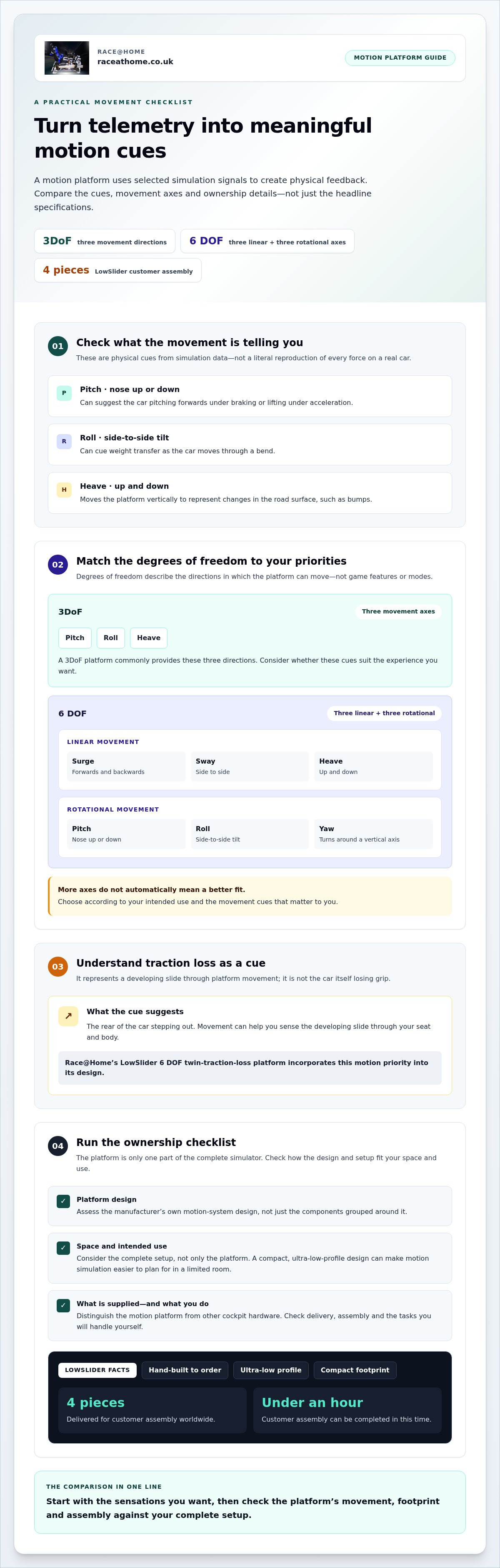
Assembly is another part of ownership to consider. LowSlider simulators are delivered worldwide in four pieces for customer assembly, which can be completed in under an hour. This makes the setup process clear: you receive a hand-built motion platform for customer assembly, rather than an assembled installation.
Who benefits most from a specialist motion simulator manufacturer?
A home racer may want physical feedback but have limited room for a large rig. A compact, ultra-low-profile platform can make motion simulation easier to plan for, although the complete setup still needs to fit the space and suit the driver. For commercial use, the priority may be creating an immersive driving experience that works in the intended environment.
Start with the experience you want. If your priority is movement across three axes, Race@Home offers a LowSlider 3DoF platform. If twin traction loss is central to your motion priorities, its 6 DOF twin-traction-loss platform offers a different configuration. Neither is automatically right for everyone. Choose according to how you plan to use the simulator and which cues matter to you.
- Assess the platform: Look at the manufacturer’s own motion-system design, not just the components grouped around it.
- Plan ownership: Consider footprint, delivery and assembly alongside the driving experience.
- Define the boundary: Distinguish the motion platform from other cockpit hardware and identify the tasks you’ll handle yourself.
How motion-platform engineering turns telemetry into physical feedback
A motion platform doesn’t recreate every force acting on a real car. Instead, it uses selected signals from the simulation to create physical cues, helping you sense events such as braking, cornering, bumps or a developing slide. The experience depends on how the system translates those signals into movement, not simply on how many directions the rig can move.
For a bespoke racing simulator manufacturer, motion design is central to the build. Pitch can suggest the car pitching forwards under braking or lifting under acceleration. Roll can cue weight transfer through a bend, while heave moves the platform vertically to represent changes in the road surface. These are cues, not a literal reproduction of every force acting on the vehicle.
What do 3DoF and 6 DOF mean in a racing simulator?
“Degrees of freedom” describes the directions in which a platform can move. In a simulator, these are platform movement axes, not features or modes within the racing game. A 3DoF platform commonly provides movement in three directions, often pitch, roll and heave. A 6 DOF system can move along three linear axes and rotate around three axes:
- Linear: surge (forwards and backwards), sway (side to side) and heave (up and down).
- Rotational: pitch (nose up or down), roll (side to side tilt) and yaw (turning around a vertical axis).
Six degrees of freedom means movement along three linear axes, surge, sway and heave, plus rotation around three axes, pitch, roll and yaw.
More axes can create additional types of movement cues, but they don’t automatically make a system right for every driver. Decide which sensations matter for your intended use. For more detail, read this 6 DOF motion simulator guide.
| Platform type | Movement concept | What to consider |
|---|---|---|
| 3DoF | Three movement axes, commonly pitch, roll and heave | Whether these cues match your motion priorities |
| 6 DOF | Three linear and three rotational axes | Whether the added movement cues suit your intended experience |
How does traction loss contribute to racing feedback?
Traction loss is a cue that can suggest the rear of the car stepping out. As the simulation reports that behaviour, platform movement can help you sense the developing slide through your seat and body. It’s a physical prompt, not the car itself losing grip.
Race@Home’s LowSlider 6 DOF twin-traction-loss platform incorporates that motion priority into its design. Explore the LowSlider motion platforms and compare the movement cues with the driving experience you want.
Bespoke versus turnkey simulators: what should buyers compare?
“Bespoke” and “turnkey” describe different aspects of a simulator, not a simple ranking from better to worse. Bespoke can refer to a build designed around a specialist platform and intended experience; turnkey describes a complete, pre-configured system intended to be ready to use. A hand-built-to-order platform isn’t automatically a fully customised, installed package. Compare how each approach fits your space, priorities and role in assembly.
Use these criteria to look beyond branding and headline features:
| What to compare | Specialist, hand-built platform | Turnkey package |
|---|---|---|
| Engineering ownership | Consider whether the manufacturer designs its own motion platform and explains its principles. | Understand which parts are integrated into the complete system and who designs them. |
| Footprint | Check the platform’s form and how it fits the room and wider rig. | Consider the space needed for the assembled system and its surrounding equipment. |
| Assembly | Find out what arrives assembled and what the owner puts together. | Clarify what “ready to use” means for delivery and setup. |
| Intended use | Match the motion design to your driving or commercial priorities. | Assess whether the configured system suits its planned use. |
| Included hardware | Distinguish the motion platform from other cockpit components. | Identify which components are part of the package. |
Which manufacturer criteria matter beyond brand reputation?
A specialist manufacturer should make its engineering approach understandable: what the platform is designed to do, what movement cues it provides and how it fits into ownership. Endorsements can offer context, but they don’t tell you the platform’s footprint, assembly format or whether its motion priorities suit your use. For a wider perspective on the decision, read this motion rig value buyer’s guide.
Does a compact motion simulator mean compromising on experience?
Not necessarily. Compactness is a design choice, not proof of reduced immersion. A low-profile platform can make a simulator easier to fit into a home or business space, while the sensations depend on the motion cues the system is designed to deliver. Race@Home’s LowSlider range has an ultra-low-profile design and compact footprint. Its 3DoF and 6 DOF twin-traction-loss platforms offer different motion priorities, and the right fit depends on your use. See the compact motion simulator guide for more on balancing footprint and function.
LowSlider platforms are delivered in four pieces for customer assembly, which can be completed in under an hour. Explore Race@Home’s motion simulator platforms to see the range.
How to choose a bespoke racing simulator for your space and goals
Turn your priorities into a practical buying plan before settling on a platform. Consider how the motion system fits your intended setup, then account for the room, access and equipment around it.
- Define the use. Decide whether the simulator is for home driving or a commercial setting. Think about who will use it and what experience you want to create.
- Assess the space. Measure the intended position and access route, including doorways and turns along the way. Allow clearance around the rig and room to get in and out of the seat.
- Choose motion priorities. Consider whether a 3DoF platform or 6 DOF twin-traction-loss system better suits the physical cues you want to feel.
- Plan the wider setup. Account for controls, display or VR, and any other accessories. Check how each part fits your space and intended use.
How should you assess space and assembly before buying?
Measure the room and the route the simulator will take to reach it before making a decision. Include the intended position, access for assembly and clearance around the rig, rather than judging fit by floor space alone. A low-profile design and compact footprint can make placement easier to plan, but the complete setup still needs room for the driver and surrounding equipment.
Race@Home simulators arrive in four pieces for customer assembly, which can be completed in under an hour. Include the delivery format in your access plan, then allow space to assemble the platform and position it within the wider rig.
How do you match motion and accessories to your setup?
Start with your main priority. If physical feedback is central, compare the motion options with the cues you want from driving. If visual immersion matters, consider how a Pimax VR headset could fit into the wider setup. Sim racing accessories can also complement your rig. Plan these alongside the platform so each part supports your intended use.
For broader component and setup context, read the sim racing setup guide. Once you’ve mapped your use, room and priorities, explore Race@Home’s motion simulator options as you shape your build.
Why choose Race@Home as your bespoke racing simulator manufacturer?
If you’re looking for a motion platform shaped by specialist engineering, Race@Home’s LowSlider simulators offer a clear design focus: they’re hand-built to order around a proprietary design. The ultra-low profile and compact footprint make space a practical part of the decision, while the platform range gives you distinct motion priorities to consider for private or commercial use.
Race@Home is a bespoke racing simulator manufacturer with a dedicated platform range. Assess the motion system as the central element of your build, then plan the wider cockpit and hardware around the experience you want.
What distinguishes the LowSlider approach?
LowSlider’s ultra-low-profile, compact design addresses a practical question early: how might a motion simulator fit into your space? Race@Home hand-builds each platform to order around its proprietary design. The range includes a 3DoF motion platform and a 6 DOF twin-traction-loss motion platform, with different movement configurations for different priorities. Neither option is automatically right for every driver. Consider which physical cues matter most and how you plan to use the simulator.
Ownership logistics are part of the decision too. Simulators are delivered worldwide in four pieces for customer assembly, which can be completed in under an hour. This gives you a clear picture of the delivery format and setup involved.
What should you do next if you are ready to buy?
Bring your decisions together before choosing: define whether the simulator is for home or commercial use, identify your motion priorities, measure the intended space and access route, and plan the wider hardware setup. If visual immersion is also important, Race@Home supplies Pimax VR headsets, and sim racing accessories can complement your rig. Include these in your setup plan alongside the motion platform.
With those priorities clear, compare the platform options against your actual requirements rather than choosing by headline features alone. Explore Race@Home motion simulators to review the range and take the next step towards a build that fits your space and driving goals.
Choose a build that fits your driving goals
The right simulator is more than a list of impressive features. Start with the physical feedback you want, then weigh the platform’s engineering, movement priorities and footprint against your intended use and available space. Motion is most meaningful when its cues suit the way you plan to drive, whether at home or in a commercial setting.
Race@Home hand-builds LowSlider platforms to order around its proprietary design. Their ultra-low-profile, compact design helps with space planning, and customer assembly can be completed in under an hour. The range includes 3DoF and 6 DOF twin-traction-loss platforms, giving you different motion priorities to consider as you shape your setup.
Ready to compare the options with your space and goals in mind? Explore Race@Home motion simulators and take the next step towards a build that brings your racing experience to life.
Frequently Asked Questions
How do I choose a bespoke racing simulator manufacturer?
Choose a bespoke racing simulator manufacturer by assessing its engineering, motion options and practical ownership details, not just headline features. Consider whether it designs its own motion platform, explains the physical cues it produces, and offers a footprint and assembly approach that suit your space. Then match the platform to your intended use and plan the wider hardware, including controls and display or VR.
Is a 6 DOF simulator better than a 3DoF simulator?
Not automatically. A 6 DOF platform can move along three linear axes and rotate around three axes, whilst a 3DoF platform provides movement across three axes. The additional directions offer different possible cues, but the best choice depends on the sensations you prioritise and how you’ll use the simulator. Race@Home offers a 3DoF platform and a 6 DOF twin-traction-loss platform for different motion priorities.
Can a motion racing simulator fit in a home setup?
Yes, a motion simulator can suit a home setup if the platform and wider rig fit the room and access route. Measure the intended position, route through the property and space around the simulator for use. Race@Home’s LowSlider design has an ultra-low profile and compact footprint, which can help with space planning. Remember to allow for the seat, controls and display or VR equipment too.
How long does it take to assemble a Race@Home LowSlider simulator?
Customer assembly of a Race@Home LowSlider simulator can be completed in under an hour. The simulator is delivered worldwide in four pieces for assembly by the customer. Before delivery, consider how the pieces will reach the intended room and where you’ll set up the platform. Allow suitable space for assembly, then plan how the completed simulator will sit within your wider rig.
What is twin traction loss on a motion simulator?
Twin traction loss is a motion cue that can suggest the rear of a virtual car stepping out, helping you sense a developing slide through physical movement. It’s a representation of selected simulation feedback, not a recreation of every force acting on a real car. Race@Home’s LowSlider 6 DOF twin-traction-loss motion platform combines this cue with its six-axis movement design.
Can I use VR with a bespoke motion racing simulator?
Yes, VR can be part of a motion simulator setup: the headset provides the visual environment, whilst the motion platform supplies physical movement cues. The complete experience depends on how the headset, computer, simulation software and platform work together. Race@Home supplies Pimax VR headsets alongside its motion platforms, so VR can be considered as part of your wider sim racing setup.


