

The upgrade that shakes your seat more isn’t necessarily the one that makes your sim feel more realistic. If you’re weighing motion simulator vs haptic seat, the key difference is what the hardware moves: haptics deliver local vibration and tactile cues, while a motion platform moves the cockpit to express broader forces such as braking and cornering.
Both can add intensity, but they don’t communicate the same information. A haptic seat can bring road texture, kerb strikes and engine vibration closer to your body; a moving platform can make the rig pitch, roll or surge in response to the car’s behaviour. The right choice depends on the sensations you want, the rigidity of your cockpit, the space available and how much setup complexity you’re prepared to take on.
This guide compares what each system tells you as a driver, how their experiences and practical demands differ, and which upgrade makes sense for your priorities. It also explains where Race@Home’s LowSlider 3DoF and 6 DOF platforms fit, so you can plan a coherent upgrade rather than adding hardware that contributes little to your rig.
Key Takeaways
- In the motion simulator vs haptic seat comparison, decide whether you want local tactile cues or movement through the cockpit.
- Understand how game telemetry, compatible software and hardware work together to turn sim-racing events into physical feedback.
- Compare the immersive effect and practical demands of haptics and motion before choosing your next upgrade.
- Use a checklist to assess your rig, space, intended use and comfort with added mechanical movement.
- See how Race@Home’s hand-built LowSlider 3DoF and 6 DOF platforms fit the motion-platform path.
Motion Simulator vs Haptic Seat: What Does Each One Actually Do?
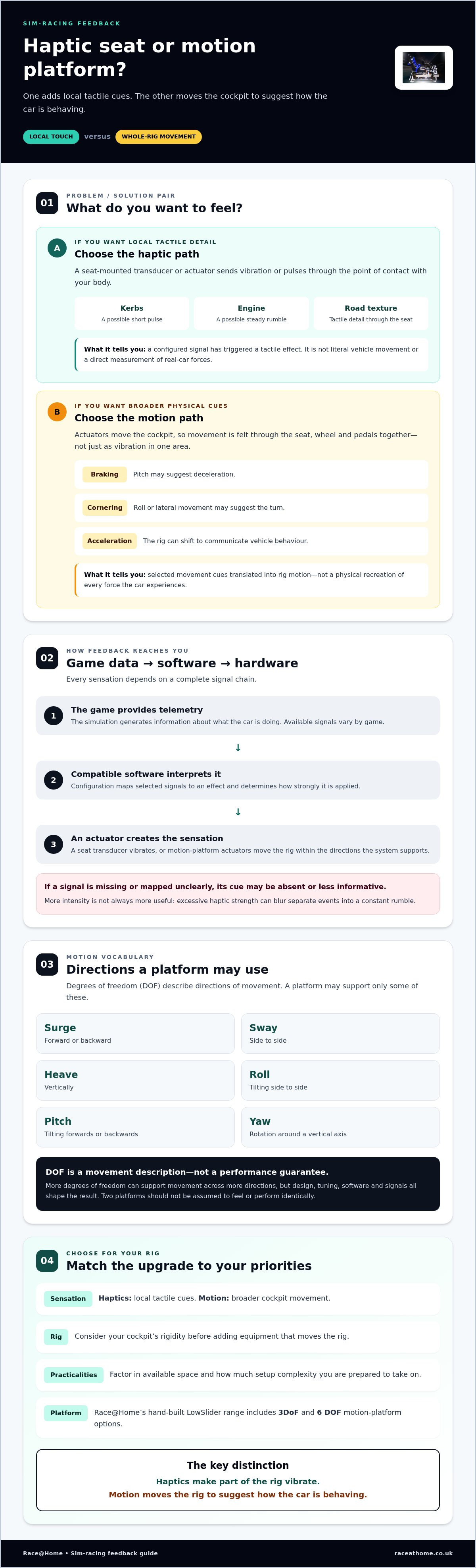
A haptic seat vibrates against your body; a motion platform moves the cockpit beneath you. Both turn digital driving information into physical sensation, but they deliver it in different ways. That distinction is the starting point for the motion simulator vs haptic seat decision: one adds local tactile signals, while the other changes the position and movement of the rig.
Haptic feedback is tactile vibration or pulses produced in response to signals from a game or its telemetry. Small transducers or other actuators can create distinct sensations through a seat, such as a rumble over kerbs or a vibration linked to engine activity. For a broader explanation of the technology behind these sensations, see What is Haptic Technology?
What does a haptic seat communicate to the driver?
Haptic effects are localised: you feel the signal where the hardware makes contact with your body, rather than sensing the entire cockpit change position. Depending on the system, software setup and telemetry available from the game, a pulse might indicate a kerb strike, while a lower-frequency rumble could represent engine vibration. These cues can add texture and help you notice events, but they aren’t literal vehicle movement or a direct measurement of the forces acting on a real car.
The result depends on the complete signal chain. The game must provide relevant data, compatible software must interpret and map it, and the hardware must produce the chosen effect. If a game doesn’t expose a particular signal, or the configuration doesn’t assign it clearly, the corresponding sensation may be absent or less informative. Haptics are best understood as an added tactile layer, not a guaranteed reproduction of every sensation in the car.
What does a motion simulator add beyond vibration?
A motion simulator uses actuators to move the rig and communicate selected changes in vehicle attitude and movement. Depending on its design and configuration, the cockpit may pitch, roll or shift to suggest events such as braking, cornering or acceleration. The driver feels movement through the seat, wheel and pedals together, creating a broader physical cue than vibration concentrated in one area.
Degrees of freedom, often shortened to DOF, describe the directions in which a motion system can move. A system with more degrees of freedom can support movement across more directions, but that label alone doesn’t mean two platforms will feel or perform identically. Mechanical design, tuning, software and the signals used all shape the sensation. Race@Home’s LowSlider range, for example, includes 3DoF and 6 DOF motion-platform options, both designed to move the cockpit.
In short, haptics make a part of the rig vibrate; a motion platform moves the rig to suggest how the car is behaving. Neither is automatically the better choice. Decide whether you want more detail through touch, broader movement through the cockpit, or a carefully planned combination of both.
How Haptic Feedback and Motion Turn Sim-Racing Data into Sensation
A signal has to travel from the simulation to the hardware before you feel anything. The game generates data about what the car is doing; compatible software interprets selected signals and maps them to an output. That output might be a vibration from a seat-mounted transducer or movement from a motion platform. Sim-racing hardware turns selected game data into sensation by interpreting a signal and sending it to an actuator.
This process isn’t identical across every game or setup. A title may provide some telemetry signals but not others, while software configuration determines which events trigger feedback and how strongly. The connected hardware also sets practical limits on the type and range of sensation it can produce. No system should be assumed to reproduce every force of real driving.
From telemetry to a haptic seat sensation
With seat haptics, configured signals activate a vibration device attached to or integrated into the seat. If a game and setup support the relevant data, a kerb event might prompt a short, sharp pulse, while an engine-related signal could create a steadier vibration. These are examples, not guaranteed effects: the available telemetry and the way the software maps it determine what reaches the seat.
Tuning matters. If intensity is too high, different events can blur into a constant rumble; a more restrained setting may make individual cues easier to distinguish. Aim for useful information, not maximum vibration. A haptic effect indicates that a configured signal has triggered a response. It doesn’t mean the seat is measuring the real-world force acting on the car or driver.
From motion cues to whole-rig movement
A motion system processes selected cues and coordinates its actuators to move the platform. Common movement concepts include surge, forward or backward; sway, side to side; heave, vertically; roll, tilting from side to side; pitch, tilting forwards or backwards; and yaw, rotation around a vertical axis. A particular platform may support only some of these directions, and the terms don’t guarantee a specific sensation or level of performance.
When a suitable braking cue is mapped to movement, the cockpit may pitch to suggest deceleration. A cornering cue may prompt roll or lateral movement, while changes in surface data could influence how the rig responds if the game, software and system support that use. These are motion cues, not a physical recreation of every force the vehicle experiences. The platform translates selected information into movement for the driver to interpret.
That distinction clarifies the motion simulator vs haptic seat decision: haptics can add tactile detail, while motion cueing makes vehicle behaviour perceptible through coordinated cockpit movement. For drivers exploring the latter approach, Race@Home’s LowSlider motion platforms are designed to move the rig, rather than simply increase seat vibration.
Haptic Seat vs Motion Simulator: Compare the Experience and Trade-Offs
The useful comparison isn’t which upgrade sounds more advanced. It’s which sensation you want your rig to deliver, and whether your existing cockpit can support it effectively. Haptics add a focused tactile layer; a motion platform introduces broader movement through the cockpit. Setup, space and compatibility depend on the specific hardware, software and rig.
| Factor | Haptic seat | Motion simulator |
|---|---|---|
| Sensation | Localised vibration or pulses, potentially mapped to selected events. | Whole-cockpit movement, cued to selected changes in vehicle behaviour. |
| Feedback location | Felt through the seat or another fitted tactile device. | Experienced through the moving rig, including seat, wheel and pedals. |
| Hardware role | Adds tactile feedback to a cockpit that may otherwise remain stationary. | Uses actuators and a platform to move the cockpit. |
| Practical considerations | Mounting, software setup and game support vary by system. | Space, rig compatibility, mechanical movement and setup needs vary by platform. |
Neither option automatically gives a more useful or realistic experience. “Immersion” might mean feeling subtle surface detail, sensing a distinct alert, or having the cockpit shift as the car changes direction. Naming the sensation you’re seeking is more useful than choosing by broad marketing claims alone.
Which upgrade gives you the sensation you want?
If you want to notice tactile details, such as a kerb signal or a vibration cue, a haptic-focused setup may suit your priority. If you want the cockpit itself to move in response to selected driving cues, consider a motion platform. Then check your rig: mounting arrangements, frame rigidity and available space can affect how well either approach fits. Match the output to your goal, not just the feature list.
Can a haptic seat and motion platform complement each other?
They can, if the hardware and software support a compatible setup. Motion can provide broader movement cues while haptics add separate tactile detail. But layering effects without a clear plan can make signals overlap or become distracting. For instance, duplicating one event as both strong seat vibration and pronounced platform movement may muddy its meaning. Combining systems is an option, not a requirement.
Give each effect a job. Assign different information to movement and vibration where possible, then tune their intensity so one doesn’t drown out the other. If the signals feel cluttered, simplify the configuration and assess whether each sensation helps you interpret what the car is doing. A coherent single upgrade can be more satisfying than a complex setup that sends unclear feedback.
Choose Between a Haptic Seat and Motion Simulator with This Checklist
Make the decision from the driver’s seat, not from a feature list. The right choice depends on the sensation you want, the rig you already own and what your room can accommodate. Use this checklist to make the motion simulator vs haptic seat decision fit your priorities, rather than adding hardware that doesn’t meaningfully improve your experience.
- Name the sensation you want. Are you looking for tactile detail through the seat, such as a subtle alert or surface cue, or movement that changes how the cockpit feels under braking and cornering? Be specific. “More realism” is too broad to guide a purchase; naming a physical sensation gives you a more useful starting point.
- Assess the complete rig. Check whether the cockpit feels stable during hard braking and whether the seat, wheel and pedals are securely mounted. Consider how an upgrade will connect with the structure and whether movement or vibration might be absorbed by frame flex. Measure usable floor space around the rig, including room for its intended movement and access for getting in and out.
- Check compatibility and practical fit. Review whether your games provide relevant telemetry, whether compatible software can map the signals you want, and whether the hardware supports that output. Then weigh your intended use: a setup for frequent racing may have different priorities from one used occasionally. Consider how comfortable you are with extra wiring, configuration or mechanical movement before settling on a system.
Start with your feedback priority and current setup
Use the checklist to identify your main goal before comparing hardware. If your cockpit already flexes or has limited mounting options, account for those constraints in your upgrade plan. Think through the whole chain: steering wheel, pedals, seat and frame all affect how feedback reaches you. This sim-racing accessories guide provides broader context for fitting a feedback system alongside the rest of your equipment.
Plan the motion-platform upgrade around your rig
A motion platform changes more than the feel of one seat. It moves the cockpit, so consider how that movement fits your space and the arrangement of your wheel and pedals. If whole-rig movement is your priority, the 6 DOF motion simulator guide explains how platform design shapes a motion setup. A considered plan helps each component work as part of one coherent rig.
For drivers exploring a physical movement upgrade, Race@Home motion platforms offer a motion-platform approach to consider alongside your rig requirements.
Where Race@Home LowSlider Platforms Fit in the Motion Simulator Choice
If you’ve decided that you want the cockpit itself to move, a motion platform is the relevant upgrade category. Race@Home specialises in hand-built LowSlider motion platforms, rather than haptic seats. The range includes the LowSlider 3DoF motion platform and the LowSlider 6 DOF Twin-Traction-Loss Motion Platform. Both belong on the motion side of the motion simulator vs haptic seat comparison: the focus is physical rig movement, not simply adding vibration through the seat.
The “DOF” in 3DoF and 6 DOF means degrees of freedom, or directions in which a system can move. “Traction loss” describes a simulated loss of tyre grip, commonly associated with the rear of a car stepping out. The product name identifies that configuration, but it doesn’t describe exactly how every effect will feel in a particular game or setup. Software, telemetry and configuration all influence the experience.
When a LowSlider motion platform matches your priority
A LowSlider platform is worth considering if your goal is to feel movement through the cockpit, rather than stronger tactile feedback alone. Its low-profile design and compact footprint are relevant when planning a moving rig in a home space, though you’ll still need to account for the platform, cockpit and space around them. The 3DoF and 6 DOF options give drivers distinct motion-platform configurations to explore, with haptics remaining a separate form of feedback.
Plan the platform as part of the complete cockpit. Consider how your seat, wheel and pedals are arranged, how the rig will fit its intended space, and how the chosen hardware works with your sim-racing setup. The sim-racing setup guide offers broader context for building a motion-ready rig.
Take the next step towards a moving sim-racing rig
Keep the core distinction in view: choose haptics when you want tactile feedback through the seat; consider motion when you want physical movement through the cockpit. LowSlider platforms are hand-built to order, with a compact, low-profile design. They ship worldwide in four pieces for customer assembly in under an hour, a practical format to consider as you plan your rig.
If physical cockpit movement is the upgrade you’re working towards, Race@Home LowSlider motion platforms show the motion-platform options for your sim-racing setup.
Make Your Next Upgrade Count
Before adding hardware, picture the moment you want your rig to bring closer. Is it a subtle tactile cue, or the sensation of the cockpit responding beneath you? That clear priority can guide your next step and help keep your setup focused as it grows. In the motion simulator vs haptic seat choice, the right upgrade is the one that supports the experience you want to build.
If physical cockpit movement is your goal, Race@Home’s hand-built-to-order LowSlider platforms offer 3DoF and 6 DOF options. Their low-profile, compact-footprint design gives you practical details to weigh as you plan the space around your rig. Consider how the upgrade will fit your setup, then explore the options.
Explore Race@Home LowSlider motion platforms and take the next step towards a sim-racing rig that feels more connected to every drive. Choose with purpose, build around your priorities, and enjoy where your setup can take you.
Frequently Asked Questions
Can a haptic seat work with any sim-racing game?
No, a haptic seat won’t necessarily work with every sim-racing game in the same way. The game, feedback software and seat hardware need to support a compatible signal path. Some setups can use telemetry provided by the game; others may rely on audio or a more limited set of inputs. Before choosing, look at which titles you play and whether your preferred effects can be configured for them.
Does a motion simulator need a special sim-racing cockpit?
Not always, but the cockpit must be suitable for the platform and its movement. Check the platform’s mounting requirements, the rig’s rigidity and whether attached equipment has enough clearance to move safely. A frame that flexes or components that obstruct movement can affect how the setup behaves. Treat compatibility as a complete-rig question, including the seat, wheel, pedals and any cables or accessories attached to them.
Can I upgrade from a haptic seat to a motion platform later?
Yes, you can plan a move from seat haptics to a motion platform later, provided the platform can work with your cockpit and the equipment you intend to retain. Think ahead about mounting, available floor space and how wheel and pedal positions will relate to a moving rig. Check software and signal compatibility too. Planning around those points can help you avoid buying hardware that has to be replaced during the next upgrade.
Will a haptic seat or motion platform make me faster?
Neither upgrade automatically makes you faster. Feedback may help you notice a cue, but lap times still depend on decisions such as braking points, steering inputs and consistency. Treat either system as a way to shape your driving experience, not as a performance shortcut. If you’re practising, make one setup change at a time and compare your driving over familiar sessions, rather than assuming a stronger sensation means better results.
Can motion feedback cause discomfort during sim racing?
It can feel uncomfortable for some drivers, particularly if motion is too intense, unexpected or poorly suited to their preferences. Start with restrained settings and short sessions, then adjust one effect at a time as you learn how it feels. If you experience discomfort, pause and reduce or disable the relevant feedback. A controlled, predictable response is more useful than running every effect at maximum intensity.
Do I need VR to use a motion simulator or haptic seat?
No, VR isn’t required for either type of feedback. You can use motion or haptics with a single display or a multi-screen setup, as long as the other hardware and software are compatible. VR is a separate visual choice: it can change how you perceive the cockpit and track, but it doesn’t create the physical feedback. Choose it for your preferred way to see the simulation, not as a prerequisite.
Is haptic feedback the same as a bass shaker?
Not exactly. A bass shaker is one type of transducer that turns an audio signal into physical vibration, often felt through the seat or rig. Haptic feedback is a broader term for tactile sensations produced by hardware, which may use different devices and signals. A bass shaker can provide haptic feedback, but not every haptic system is a bass shaker. The input signal and tuning affect the sensation you feel.


