

What if the motion platform is only the beginning of your sim racing budget? The headline price can be compelling, but the hidden costs of a motion sim rig often lie in the components and practicalities that turn movement into a usable setup: a compatible cockpit, wheel and pedals, mounting hardware, delivery and enough room to operate it.
It’s sensible to want a clear figure before committing, especially if you plan to reuse equipment or fit the rig into an existing space. This guide helps you map likely cost categories, separate compatibility essentials from optional upgrades and compare complete setups rather than platform prices alone. We’ll cover hardware, software, shipping, assembly, space and power. If you’re considering a LowSlider platform, its compact, low-profile design and four-piece shipment for customer assembly are useful details to include in your plan. The aim is a realistic budget, with fewer surprises between the first purchase and your first lap.
Key Takeaways
- The hidden costs of a motion sim rig depend on what you already own, the experience you want and where the equipment will be delivered.
- Sort possible expenses into essential, setup-dependent and optional categories before comparing platforms.
- Inventory your cockpit, seat, wheel, pedals and software first, so your budget reflects genuine gaps rather than duplicate purchases.
- Compare a static setup, a staged motion upgrade and a motion-centred build against your space, compatibility needs and preferred feedback.
- Factor delivery and customer assembly into your plan. A compact, low-profile platform may suit rooms where footprint matters.
Hidden costs of a motion sim rig: why the platform price is only the starting point
A motion platform adds physical movement to your sim racing experience, translating simulated forces into cues you can feel through the seat and cockpit. It isn’t automatically a complete rig. Depending on what you already own, a usable setup may also need a supporting cockpit, seat, wheel, pedals, display and computer. For context on how motion simulators work and the different forms they take, see this overview of the motion simulator.
The hidden costs of a motion sim rig are the necessary or optional expenses beyond the platform’s stated price. They vary from buyer to buyer: your current equipment, preferred level of immersion and delivery destination all affect the final budget. Compare complete, usable setups, not isolated platform prices.
What counts as a hidden cost when buying a motion sim rig?
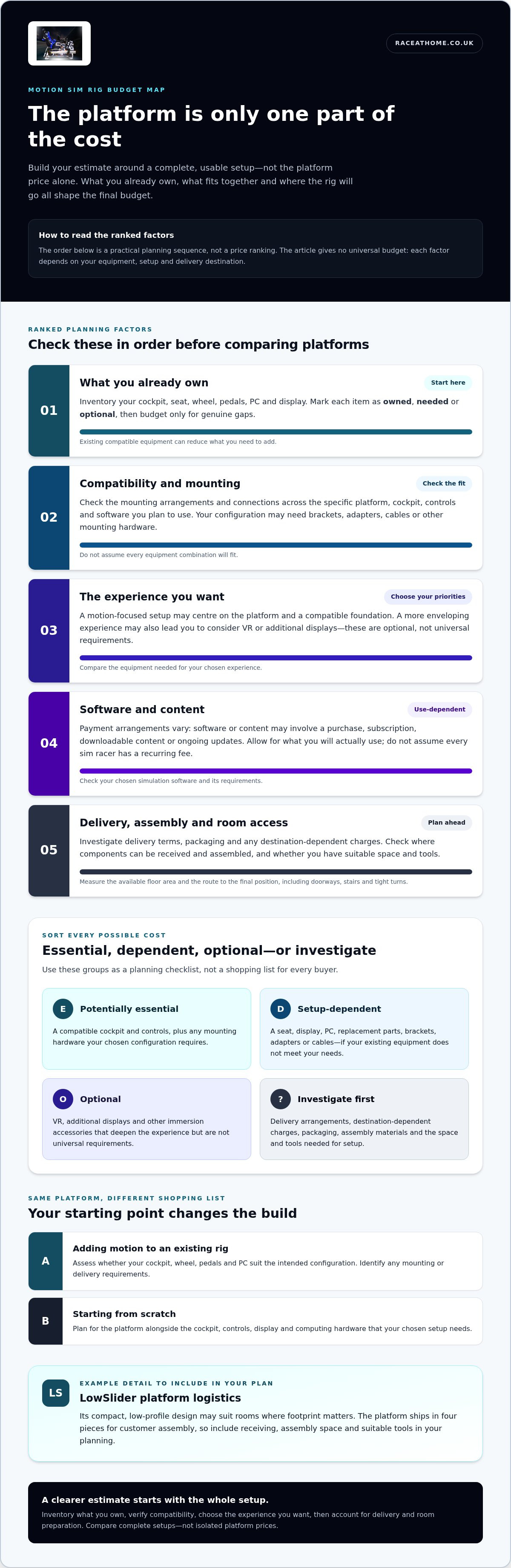
Separate what’s needed to make your chosen configuration work from what would enhance it. If you already have compatible controls and a cockpit, you may not need to replace them. If you’re starting from scratch, supporting hardware becomes part of the build. Check the mounting arrangements and connections for the specific equipment you plan to use. Don’t assume every combination will fit.
- Potentially essential: a compatible cockpit and controls, plus any mounting hardware your configuration requires.
- Setup-dependent: a seat, display, PC, cables or adapters, if your existing equipment doesn’t meet your needs.
- Optional: VR, additional displays or other immersion accessories that deepen the experience but aren’t universal requirements.
- Investigate before ordering: delivery, destination-dependent charges and any materials needed to assemble or prepare your setup.
This is a planning checklist, not a shopping list for every buyer. Mark each item as owned, needed or optional, then budget only for genuine gaps.
Why the same motion platform can lead to different budgets
Imagine one driver adding motion to an existing static rig. They already own a cockpit, wheel, pedals and PC, so they need to assess whether those components suit the intended configuration and identify any mounting or delivery requirements. Another buyer starting afresh must plan for the platform alongside the cockpit, controls, display and computing hardware. The platform may be the same, but the rest of the shopping list is not.
Your intended use shapes that list, too. A driver seeking clear motion cues may prioritise the platform and a compatible foundation. Someone aiming for a more enveloping setup might also consider VR or additional visual hardware. Neither approach creates a universal minimum budget; each reflects different priorities. For international orders, delivery arrangements and destination-dependent charges can also change the total. Account for them separately rather than treating the advertised platform price as the landed cost.
Build your estimate around the experience you want, then subtract what you already own. That simple step turns a headline figure into a more useful comparison of complete setups.
Which motion sim rig costs sit outside the platform?
Think in five categories: hardware, software, delivery, room preparation and ongoing care. The hidden costs of a motion sim rig aren’t a fixed checklist of purchases. They’re prompts to identify what your particular setup needs. A complete motion rig is a system of compatible components, not a platform considered in isolation.
The difference between a home racing setup and a research simulator can be substantial in complexity. NASA’s NASA Vertical Motion Simulator, for example, is used for aerospace research and training. It’s a useful reminder that motion systems serve varied purposes, but professional facilities aren’t a template for what a home rig requires.
Hardware, compatibility and software to include in the calculation
Start with your cockpit, seat, wheelbase and pedals. Essential: the components required to make your chosen configuration usable. Setup-dependent: replacement parts, brackets, adapters or cables, if your existing hardware doesn’t suit the planned arrangement. Check compatibility across the specific equipment and software you intend to combine before adding items to your budget.
Your PC and display also depend on the experience you want. Compare your computer with the requirements of your chosen simulation software, then decide whether your existing screen is sufficient or whether VR or additional displays are priorities. Treat these as conditional choices, not automatic extras.
Software costs vary, too. Some titles may involve a purchase, subscription, downloadable content or ongoing updates; others may have different payment arrangements. Optional or use-dependent: allow for the software and content you’ll actually use, but don’t assume every sim racer faces a universal recurring fee.
Delivery, room preparation and ownership considerations
Delivery planning goes beyond the shipping charge. Investigate: what the delivery terms cover, how packaging will be handled and whether charges depend on the destination. For a platform shipped in separate pieces for customer assembly, plan where the components can be received and assembled, and make sure you have suitable space and tools. Assembly is part of setup, not the same as a turnkey installation.
Measure the available floor area, but also consider the route from the entrance to the final position. Doorways, stairs and tight turns can affect how equipment reaches the room. Plan safe cable routes around moving components, and consider whether the floor and surrounding area can accommodate the rig without obstructing access.
- Essential: enough space for safe positioning, access and cable management.
- Setup-dependent: tools or materials needed for assembly and room preparation.
- Ongoing care: leave room in your plan for routine inspection and, when needed, replacement of wear items. The timing and requirements depend on the equipment and how it’s used.
Once you’ve mapped these categories, assess hand-built LowSlider motion platforms against your space, hardware and intended experience, rather than comparing platform prices alone.
Are hidden costs a reason to avoid a motion sim rig?
Not by themselves. The hidden costs of a motion sim rig vary with what you own and the experience you’re aiming for, but you can map them before buying. That makes the decision less about an unpredictable extra bill and more about choosing a setup whose components, space and assembly requirements suit you.
There are three broad routes. A static rig keeps the setup simpler and avoids motion-platform costs, but doesn’t add physical movement. A staged upgrade can reuse a suitable cockpit and controls, then add motion when you’re ready. A new motion-centred build lets you plan the components together from the outset, though you’ll need to account for every core item you don’t already have. Research at the University of Leeds on driving simulators illustrates how motion feedback can contribute to realistic vehicle testing. Your home setup, of course, should be based on your own priorities.
Motion upgrade or complete rig: which spending pattern fits?
If you have a static rig, don’t assume its frame or mounting points are suitable for a motion platform. Assess whether the cockpit, seat and controls can work with the intended configuration. If they can, reusing them may reduce the number of purchases. If you’re starting fresh, write down every core component before comparing packages, so you can see what’s included and what you’d still need.
A staged approach can spread purchases over time and preserve upgrade flexibility. The trade-off is that choosing each component separately can require more compatibility research, and a later change may make an earlier purchase less suitable. A complete build can make planning more joined-up, but compare like with like: check which components are included and which remain your responsibility.
Essential, optional and destination-dependent costs
Use the table as a starting point, then replace each status with the facts of your own setup. “Required” means required only if you don’t already own a suitable component. Optional additions depend on the immersion you want, not on a universal motion-rig checklist.
| Cost category | Static rig | Motion upgrade | New motion-centred setup |
|---|---|---|---|
| Cockpit, seat and controls | Already owned or required | Already owned if suitable; otherwise required | Required if not owned |
| Motion platform | Not required | Required for the upgrade | Required |
| Mounting parts and adapters | Setup-dependent | Required if existing fittings don’t suit | Setup-dependent |
| VR, extra displays and accessories | Optional | Optional | Optional |
| Shipping and destination charges | Destination-dependent | Destination-dependent | Destination-dependent |
Shipping terms and any applicable taxes or import charges depend on the delivery destination and purchase terms. Record them separately rather than treating them as universal. The best route is the one that meets your needs without counting suitable equipment twice or overlooking components you’ll still have to source.
How to estimate your motion sim rig budget before ordering
A useful estimate starts with your setup, not a generic price range. Work through the same steps whether you’re adding motion to an existing cockpit or planning a complete build. The result is a personalised total that separates confirmed requirements from choices you can defer.
Build a like-for-like setup checklist
First, define the experience you want, including your preferred controls, display and simulation software. Then inventory what you own before pricing replacements. A working wheel or PC shouldn’t appear in your shopping total unless it needs an upgrade or isn’t suitable for the configuration you have in mind.
Create a worksheet with one line for each item. Mark it owned, compatible, to buy or optional. Include:
- Motion platform, cockpit and seat
- Wheelbase, wheel and pedals
- PC or console, display or VR headset
- Simulation software and any paid content you plan to use
- Mounts, adapters, cables and other accessories
For each item marked “to buy”, record the supplier’s current price and what the purchase includes. Don’t compare a platform-only listing with a package that includes other components as though they were equivalent. Note delivery charges and terms beside each quote, and check whether accessories or mounting parts are included or priced separately. This is where the hidden costs of a motion sim rig become visible as specific gaps, rather than a vague allowance.
Check space, delivery and assembly before committing
Next, measure the intended position and the access route into it. Consider not only the rig’s footprint, but also the room needed for movement, getting in and out, and operating it safely. Check doorways, stairs and turning space against the dimensions of the packaged components, not just the assembled setup.
Use current supplier and carrier information for delivery estimates and terms. If the equipment is travelling internationally, record any destination-specific charges separately and verify how they apply to your order. Add packaging disposal to your practical checklist, too. It may not be a purchase cost, but it can affect the space and setup needed on delivery day.
Write down who will assemble the rig and what tools, clear floor space or room preparation may be needed. For example, Race@Home’s LowSlider platforms ship in four pieces for customer assembly and can be fully set up in under an hour. Include the assembly plan alongside delivery in your worksheet. This keeps the practical work visible without assuming a turnkey installation.
Finally, total the items you need to buy, then add a separate contingency line for uncertain or destination-dependent items. Don’t assign it an arbitrary percentage. Note what remains uncertain and update it as current information becomes available. Compare totals only once each option covers the same intended setup.
If a LowSlider platform is part of your shortlist, explore Race@Home motion platforms as you complete your whole-system comparison.
Choose a motion sim rig around the full setup, not just the headline cost
A sensible decision starts with the system you want to use, not the platform in isolation. Before ordering, check five things: whether the rig fits your space, whether your hardware and software are compatible, what delivery involves, how assembly will work and what physical sensations you want from your setup. This turns the hidden costs of a motion sim rig into practical questions you can answer before committing.
- Fit: Does the platform and cockpit suit the available floor space and access route?
- Compatibility: Can your planned controls and software work with the configuration?
- Delivery: Have you accounted for the delivery terms and any charges tied to the destination?
- Assembly: Do you have the space, time and tools to assemble the equipment?
- Experience: Are you seeking focused motion cues or a broader, more immersive setup?
Answering these questions helps you compare complete options on the same basis. It also clarifies which existing components you can retain and which choices are enhancements rather than necessities.
How LowSlider fits into a considered purchase
Once you’ve mapped your whole setup, LowSlider is one motion platform option to consider. The range includes hand-built 6 DOF and 3DoF platforms, designed with a compact, low-profile footprint that can be useful when planning around limited room. Measure the space you have, including access and operating room, rather than judging suitability by the platform alone.
LowSlider platforms ship in four pieces for customer assembly and can be fully set up in under an hour. Build that assembly step into your delivery-day plan: prepare a clear area and decide who will put the components together. This is a customer-assembly approach, so plan for it as part of ownership rather than assuming a turnkey installation.
Your final pre-purchase review
Before placing an order, go back through your equipment inventory. Check that the cockpit, seat, wheelbase, pedals and computer suit the planned configuration, and account for the software you intend to use. If a component’s compatibility affects your decision, verify the current requirements for that exact combination instead of relying on a general assumption.
Then revisit the practical details. Review delivery terms for your destination, make sure the packaged equipment can reach the assembly area, and set aside the space and tools your plan requires. If you’re considering a six-axis setup, the 6 DOF motion simulator guide can help you understand that platform type as you weigh your options.
When your compatibility, space, delivery and assembly plans are clear, compare the complete setup against the sensations you want from the drive. If a LowSlider platform fits that plan, explore Race@Home motion platforms as your next step.
Turn your budget into a setup you’re excited to drive
Use your budget to make a confident choice, not simply to find the lowest headline figure. Decide which parts of the experience matter most to you, then make those your priorities. If a feature is appealing but not essential to your first sessions, leave it out of the initial build and revisit it later. That gives you room to invest in the driving experience you value without committing to every possible upgrade at once.
The hidden costs of a motion sim rig are easier to manage when your next step is guided by a clear picture of the setup you want. Keep your requirements and preferred sensations in view as you compare options, and choose a platform that feels like a considered part of the whole rig. Ready to explore what could suit your build? Explore Race@Home motion platforms and take the next step towards a more immersive drive.
Frequently Asked Questions
Can I add a motion platform to my existing sim racing rig?
Yes, if your existing rig is suitable for the platform and intended configuration. Check the frame’s mounting points, available clearance and whether the seat and controls will remain correctly positioned as the rig moves. For example, a cockpit designed around fixed mounting may need adaptation before it can be used with motion. These checks help reveal compatibility issues among the hidden costs of a motion sim rig.
Do I need a separate PC for a motion sim rig?
Not necessarily. Whether you need another computer depends on the requirements of your racing simulation and the motion system’s control setup. Start by checking the recommended operating system, available connections and performance requirements for the software you plan to run. If your current PC meets them, a second machine may not be needed. If it doesn’t, an upgrade could be more appropriate than adding another computer.
Can a motion sim rig be used without a VR headset?
Yes. You can use a motion rig with a monitor or other supported display; VR isn’t a prerequisite for physical motion feedback. A conventional screen may suit longer sessions or make it easier to see your controls and room between races. If you later choose VR, consider how you’ll put on or remove the headset safely around moving equipment, and make sure your chosen software supports the display setup.
Does a motion sim rig need special room flooring?
There isn’t one flooring type that every motion rig requires. Focus on a stable, level position and follow the platform’s guidance for placement and operation. If you’re concerned about marking the floor or transmitting vibration, consider a suitable protective layer, but don’t assume any mat is appropriate without checking that it won’t interfere with stability or movement. Also keep cables clear of the moving assembly and walkways.
Can I assemble a motion sim rig myself?
Yes, if the platform is designed for customer assembly and you’re comfortable following its instructions. Before unpacking, clear a work area, check that the components are present and identify any tools the instructions call for. Allow enough room to handle parts safely, and avoid improvising with fasteners or mounting methods. LowSlider platforms are shipped in four pieces for customer assembly and can be fully set up in under an hour. Follow the supplied instructions for your specific unit.
What should I check about shipping before ordering a motion sim rig?
Check the current delivery terms for your address, including the delivery method, package dimensions and whether the shipment can reach your assembly area. For international orders, verify how destination-specific taxes or import charges are handled rather than assuming they’re included. Also plan for receiving and moving the packages indoors, and decide how you’ll manage the packaging. These practical details can affect your setup day even when they don’t change the platform itself.


