

A racing school training simulator can help you practise skills used by professional drivers, but it is not automatically equivalent to a professional team’s setup or a real car. Racing teams use simulators to learn circuits, explore car setups and practise race strategies. Even a full-motion simulator cannot fully recreate real-world G-forces, subtle road-surface feedback or the risk of serious injury in a crash.
Simulator practice is not a substitute for track time, but it can give you a controlled space to learn layouts, repeat laps and sharpen your responses. This guide compares simulator equipment with professional setups, explains which skills can transfer to driving and highlights where the differences matter. It also shows how focused practice can build track knowledge and racecraft, helping you judge what a simulator can realistically add to your preparation.
Key Takeaways
- Professional teams use simulators to learn circuits and practise strategies, but equipment and purpose can differ from setup to setup.
- Use simulator sessions to practise visual coordination and reactions, while recognising that real cars provide sensations a simulator can’t fully reproduce.
- Repeat virtual laps and explore different cars, setups and track conditions to build familiarity before track time.
- Practise judging distances, anticipating other cars and choosing your position to develop more consistent racecraft.
Are these simulators the same as those used by professional drivers?
A racing school training simulator is not automatically the same as a professional team’s system. Both can combine steering wheels, pedals and simulation software to recreate driving physics and dynamics. Professional teams use simulators to learn circuits, test car setups and rehearse race strategies, but the equipment and purpose can differ.
Formula 1 teams use simulators to test car designs, analyse track data and familiarise drivers with upcoming circuits. Formula and GT drivers can also use simulation to prepare for a particular track or practise strategic decisions. The useful comparison is what a session lets you practise, not whether its hardware exactly matches a team’s.
For Florida schools, simulator-based driver education can offer a controlled setting to practise driving skills and hazardous situations. It can supplement traditional instruction, but not replace experience in a real car. Teenagers preparing for permit-related driving can use simulated scenarios to practise observation and responses, while permit requirements depend on the applicable rules.
When choosing a racing school, look for sessions that link simulator practice to specific skills, such as track familiarisation, car setup or race strategy. Find out how instruction and feedback are built into the session so that each practice has a clear purpose.
Training costs depend on the school’s session format, coaching and simulator equipment. Session and course lengths also vary by format, including how much time is set aside for briefings, repeated practice and feedback.
Equipment may include a steering wheel, pedals, simulation software and, in some setups, a full-motion simulator. Configurations vary between schools, so find out what the session includes and whether beginners can take part without previous simulator experience. Sim racing can supplement driver education by offering a controlled environment to rehearse skills.
Differences between real-car and simulator feedback
A simulator turns software inputs into steering, pedal and visual feedback. A force-feedback wheel can convey resistance as the front tyres load through a corner, while the screen shows your line and speed. Motion systems can add physical cues, but a virtual lap cannot reproduce real driving’s G-forces or the fine vibrations of changing road surfaces. It also cannot recreate the risk of serious injury in a crash.
Some skills can still transfer. A simulator lets you repeatedly practise coordinating your hands and eyes, reacting to changes and making measured steering inputs. For example, you can look towards an apex while adjusting your line, rather than fixating on the car immediately ahead. Those habits can support real-world driving, but you still need to learn grip, braking feel and a car’s response in the real vehicle.
Racecraft develops through decisions you can repeat and review. Practise leaving space beside another car, anticipating its movement and choosing when to defend or overtake. A simulator lets you revisit the same corner and compare your approach. This can build spatial awareness and decision-making, but it does not guarantee every virtual manoeuvre will work on track.
When a simulation records telemetry, the data can help explain why a lap felt different. Compare speed, braking points, steering inputs and throttle application across laps. If you brake earlier but carry less speed through a corner, the data highlights a specific point to investigate. Pair the traces with what you saw and felt, since numbers alone cannot explain every driving choice.
For a more tactile control setup, explore sim racing equipment that brings steering and pedal inputs into sharper focus. Simulator training is realistic enough to rehearse visual coordination and race decisions, while remaining distinct from driving a real car.
Learning tracks, cars, setups, and conditions
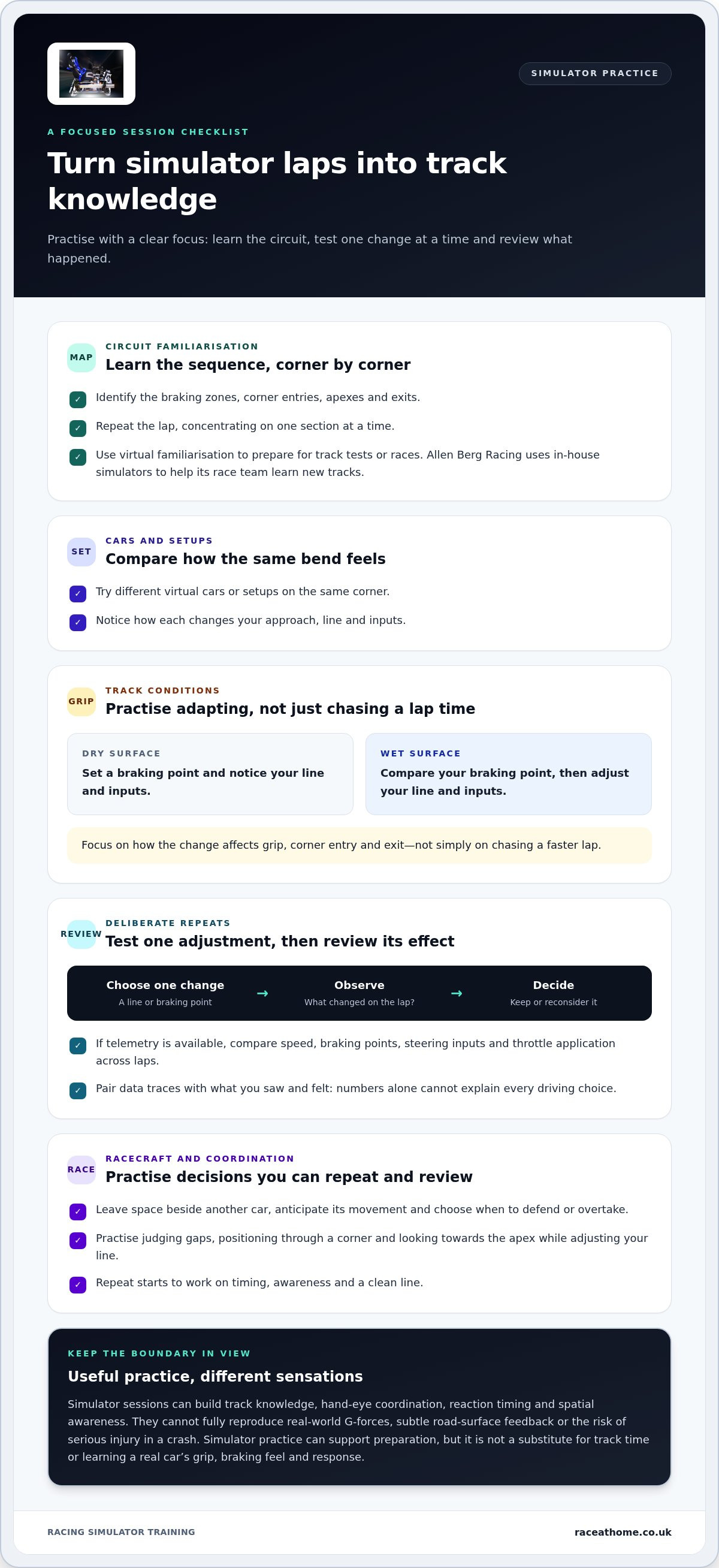
A simulator offers a repeatable way to explore virtual circuits, cars and track conditions. Give each session a specific focus, then review what changed.
Learning tracks, cars and setups
Start by learning a circuit’s sequence: identify braking zones, corner entries, apexes and exits. Repeat the lap, concentrating on one section at a time. Try different virtual cars or setups to see how each changes your approach to the same bend. Allen Berg Racing uses in-house simulators to help its race team learn new tracks before tests or races, illustrating how virtual familiarisation can support preparation.
Practising different conditions
Track conditions affect driving decisions, so use simulator settings to practise different scenarios in a controlled environment. For example, compare your braking point on a dry surface with your approach on a wet one, then adjust your line and inputs. Rehearsing these differences can build confidence before unfamiliar conditions arise. Focus on how each change affects grip, corner entry and your exit, rather than simply chasing a faster lap.
Hands-on learning and performance analysis
Active practice connects what you see with your steering and pedal inputs. Choose a corner, drive it repeatedly and note where your line or braking point changes. If lap data is available, compare speed and inputs between attempts to identify a specific adjustment. Give each repeat a clear purpose: test one change, observe its effect, then decide whether to keep it. This makes practice more deliberate than driving laps without a focus.
Skills developed through simulator training
A programme can develop track knowledge, hand-eye coordination, reaction timing and spatial awareness. Practise judging the gap to another car, anticipating its movement and positioning your vehicle through a corner. You can also rehearse starts, where timing, awareness and a clean line matter. These exercises help you make more considered decisions in simulated races and become familiar with race situations before applying what you learn on track.
Building consistency and racecraft
Consistency means repeating sound decisions, not chasing one exceptional lap. Choose a corner and keep your braking marker, turn-in point and exit line consistent. If you brake later on one attempt, compare your speed and position at the exit. This helps distinguish a genuine improvement from a faster entry that compromises the next section.
Use a simple review routine after each run: identify one mistake, choose one adjustment, then practise the same section again. For example, if your car runs wide at the exit, focus on a smoother turn-in instead of changing several inputs at once. Repeatable practice makes it easier to see which adjustment helped and assess progress across sessions.
Racecraft involves making decisions around other cars. In a simulated championship race, practise approaching a rival while leaving enough space to respond if their line changes. Consider where you can safely position your car, when to hold position and when an overtake makes sense. These scenarios help develop anticipation and judgement, rather than speed alone.
Concentration matters across a full run. A driver described struggling to stay focused during 25-minute simulator races, so practise maintaining attention from the opening lap to the finish. Set a specific goal, such as keeping your chosen line through a difficult sequence, and review whether you sustained it. To refine your simulator setup for focused practice, explore simulator setup options.
Race@Home: LowSlider 6 DOF Twin-Traction-Loss Motion Platform
Race@Home offers the LowSlider 6 DOF Twin-Traction-Loss Motion Platform for sim racers seeking a more physical, immersive practice setup. Motion can add tangible cues to virtual driving, helping connect what you see on screen with sensations from the simulator. It supports repeated practice at home, where you can work on track familiarity and consistent inputs.
Race@Home also offers a LowSlider 3DoF motion platform, Pimax VR Headsets and sim racing accessories. Choose equipment around the experience you want to build, whether that means adding motion, virtual reality or supporting accessories to your sim racing setup. These products enhance simulation; they don’t reproduce every sensation or risk of driving a real car.
If you’re ready to explore motion simulation for your practice setup, contact Race@Home or visit raceathome.co.uk.
Make your next practice session count
Set a clear objective before your next session. You might focus on maintaining a steady racing line, improving awareness around other cars or learning a circuit. A racing school training simulator gives you a structured place to work towards that goal, lap by lap. Focus on one skill at a time, then use what you learn to guide your next practice session.
As you plan your setup, consider which sensations and visual cues help you stay engaged. Race@Home offers motion platforms, Pimax VR headsets and sim racing accessories for drivers creating a more immersive practice environment. The right equipment depends on the experience you want and the space available.
Ready to explore the hardware? Contact Race@Home about simulator equipment and take the next step towards purposeful practice.
Frequently Asked Questions
What is SIM racing?
Sim racing is motorsport simulation using driving software and physical controls such as a steering wheel and pedals. You control a virtual car on a digital circuit, often competing against computer-controlled or human drivers. A session might involve learning a circuit alone, practising overtakes in traffic or taking part in an online race. The experience depends on the software and equipment.
What makes simulation more effective than traditional teaching?
Simulation makes repeated practice easier to structure: you can revisit a corner, test an alternative line and compare the outcome without arranging another track session. Instructors can also introduce scenarios in a controlled setting. Traditional teaching remains essential for learning how a real car responds. The strongest approach combines simulation for repetition and focused practice with applying what you learn in the car.
What types of racing simulators and cars do schools use?
Schools may use anything from a stationary wheel-and-pedal station to a cockpit with a seat and motion platform. The software determines which virtual circuits and vehicles are available, so sessions might focus on a single-seater, GT car or another racing class. Before choosing a programme, consider whether its simulated vehicle and controls match the skills you want to practise.
How does simulator training compare with on-track racing school instruction?
Simulator sessions provide a repeatable way to practise decisions, while on-track instruction lets you feel a real car’s forces, grip and changing surface beneath the tyres. A virtual session can help you become familiar with a circuit or scenario before arriving at the track. Track tuition then develops your response to physical feedback and real driving conditions, which a screen and controls cannot fully reproduce.
Are there age, licensing, or safety requirements for racing simulator programmes?
Taking part in a simulator session and driving a real car are different activities, so don’t treat simulator practice as a driving licence or permit. Entry conditions can depend on the school, the participant’s age and how the session is supervised. For a simulator-only session, follow the venue’s instructions for using the seat, pedals and controls, and take a break if you feel unwell.


