

The best games for a 6DOF motion simulator are those that translate a vehicle’s movement into clear, responsive physical cues. A 6DOF platform moves across six axes: surge, sway and heave, alongside pitch, roll and yaw. The most immersive match depends on how well a game’s motion data suits the platform, not graphics alone.
It’s natural to expect more movement to mean more realism, but the quality and timing of each cue matter just as much. A sharp response can make braking, cornering or turbulence feel connected to what you see, while poorly matched motion can distract from the experience. This comparison explains how games differ in immersion and responsiveness, what the six axes contribute, and how realism and precision shape the sensation from the seat. You’ll come away with a clearer way to judge which titles suit your simulation style and what to look for when matching a game to a motion platform.
Key Takeaways
- Compare how clearly and quickly each game turns vehicle behaviour into physical feedback, rather than judging immersion by visuals alone.
- Use motion quality and cue precision to assess realism; more movement does not automatically mean a more convincing experience.
- Learn what surge, sway, heave, pitch, roll and yaw each contribute, then consider which sensations matter most for your preferred simulation.
- Match your choice of game and motion platform to the experience you want, whether that means focused racing feedback or broader movement across all six axes.
Comparisons of immersion and responsiveness
Motion feels convincing when a game’s telemetry produces cues that match what you see. In racing, braking can pitch the platform forwards, while cornering can create roll and sway. If those signals arrive late, the movement feels detached from the car. The best games for a 6DOF motion simulator therefore combine useful vehicle data with responsive motion software, rather than relying on dramatic movement alone.
How do motion cues and telemetry compatibility differ between games? Motion cues describe the physical effects, such as a braking pitch or kerb impact; telemetry is the game data used to trigger them. Assetto Corsa, iRacing and Automobilista 2 are examples to compare for the data their supported motion software can use and how that data is mapped.
Compatibility depends on the connection between three parts: the game, the motion software and the platform controller. A title may run smoothly on a PC yet provide limited motion cues if its telemetry feed or software integration differs. Before choosing a racing simulation, compare supported titles and the signals available for acceleration, braking and track effects.
How much do 6DOF motion simulators and compatible games cost? There’s no single combined cost: platform, game licensing and any required motion software each affect the total. For a simulator sold by the business hosting this article, pricing is a product-specific matter, so this comparison focuses on compatibility and performance rather than quoting figures.
What PC hardware is needed to run games on a 6DOF simulator? The game’s own PC requirements set the baseline, while VR adds graphics demands and motion software runs alongside the simulation. Compare the requirements for your chosen title, display or headset, and motion software; then prioritise a PC that can maintain smooth gameplay while processing telemetry.
For a practical comparison, test the same racing scenario across compatible titles. Notice whether braking, steering and surface changes produce distinct, well-timed feedback. A smooth cornering cue in iRacing, for example, is more useful than extra movement that arrives out of sync.
Realism and precision in motion simulation
Realism depends on how accurately a platform reproduces the forces a driver expects. In a racing simulation, a controlled pitch under braking can feel more convincing than a sudden jolt. The cue should match the car’s behaviour and arrive at the right moment. If movement is too strong or mistimed, it competes with visual information instead of reinforcing it.
University of Leeds research reported a 70% realism rating from drivers using professional-grade motion simulators. That figure highlights the value of physical feedback, not a guarantee that every game or setup will feel equally lifelike. Titles differ in vehicle physics, track detail and telemetry. For example, a game with clear braking and cornering data gives motion software more useful signals to translate into movement.
Precision also depends on how the motion profile is tuned. In a fast corner, a driver should feel a consistent lateral cue, while a kerb strike should register as a brief surface event. If both effects are exaggerated, the platform can blur their differences. Compare one repeatable sequence, such as braking into a corner, across supported titles. Note whether movement begins with the event, stays controlled and settles naturally afterwards.
What safety risks and setup steps should users consider with a 6DOF motion simulator? Moving components can create pinch or impact hazards, so keep hands, loose cables and objects clear of the platform’s travel area. Set it up on a stable surface, secure peripherals, follow the manufacturer’s instructions, and begin with restrained motion settings.
For a useful realism check, focus on cause and effect rather than intensity. In Assetto Corsa, for instance, judge whether braking, steering and kerb feedback remain distinct and timely. Repeat the same manoeuvre with the same settings before changing anything. This helps show whether a change improves precision or simply makes the movement stronger. A convincing result supports your perception of grip, load transfer and track texture without pulling attention away from the racing line.
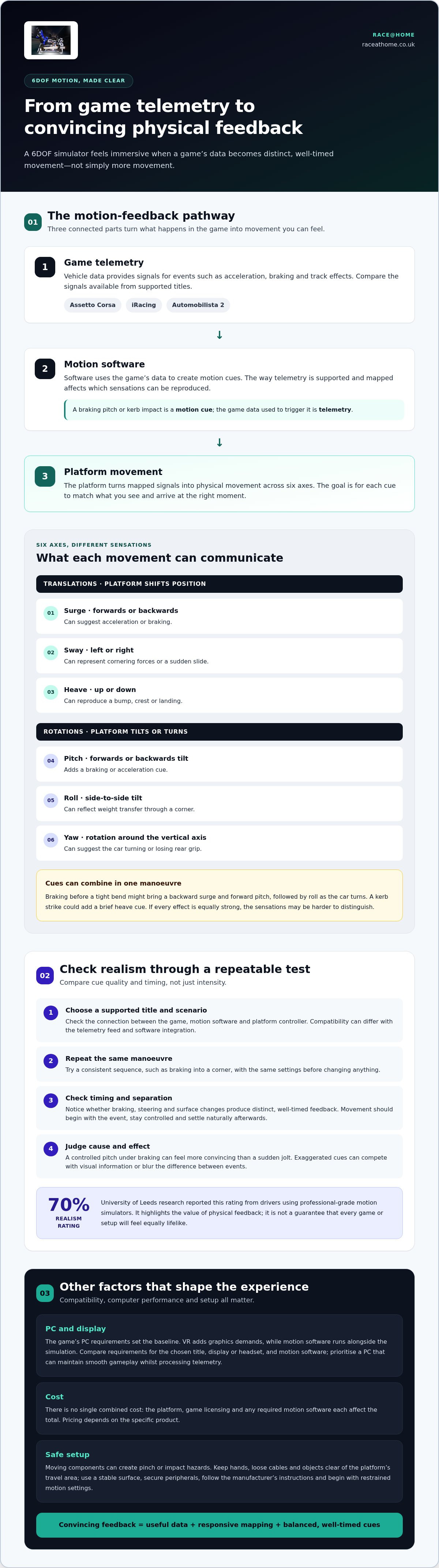
Surge, sway, heave, pitch, roll, and yaw
A 6DOF platform reproduces movement across six axes: three translations and three rotations. Surge moves forwards or backwards; sway shifts left or right; heave travels up or down. The rotational axes are pitch, roll and yaw. Together, these cues turn game telemetry into physical movement, but each axis communicates a different part of a vehicle’s behaviour.
- Surge: forward or backward movement can suggest acceleration or braking.
- Sway: lateral movement can represent cornering forces or a sudden slide.
- Heave: vertical movement can reproduce a bump, crest or landing.
- Pitch: the platform tilts forwards or backwards, adding a braking or acceleration cue.
- Roll: a side-to-side tilt can reflect weight transfer through a corner.
- Yaw: rotation around the vertical axis can suggest the car turning or losing rear grip.
These axes can work together. When braking before a tight bend, for example, you might feel a backward surge and forward pitch, followed by roll as the car turns. A kerb strike could add a brief heave cue. If every effect is equally strong, the sensations can become difficult to distinguish. Carefully balanced movement helps each event read clearly.
Flight simulation may call for a different motion profile. One simulator builder considered surge and sway unnecessary for flight, while finding a small amount of yaw beneficial and larger pitch important. Greater heave movement was also considered useful for conveying the sensation of air. This contrast shows why the activity matters: a racing profile should reflect road and vehicle forces, not simply imitate an aircraft’s movement.
When comparing racing titles, look at how each uses all six axes rather than simply counting movements. A game with detailed acceleration, braking and cornering telemetry may produce distinct cues, while another may emphasise only a few events. Try a repeatable sequence, such as a straight, a braking zone and a corner, and notice which axes respond. This reveals whether movement adds useful context to the driving experience.
What are the best games for a 6DOF motion simulator?
The best choice depends on whether you want circuit racing, rally stages or flight. For sim racing, compare titles by driving style, vehicle feedback and the motion software you use. Assetto Corsa, Assetto Corsa Competizione, iRacing and Dirt Rally 2.0 offer distinct experiences to assess. Their names alone don’t establish platform compatibility, so match each game to your motion setup.
- Assetto Corsa: consider it for varied cars and circuits, then assess how clearly your setup conveys braking and cornering.
- Assetto Corsa Competizione: its focus on GT racing makes it a candidate for evaluating sustained cornering and kerb feedback.
- iRacing: compare its racing sessions for the cues you value during traffic, braking zones and changes of direction.
- Dirt Rally 2.0: use its rally stages to judge how your motion profile handles uneven surfaces and rapid direction changes.
These examples are starting points, not a universal ranking. A circuit racer may value stable, repeatable cornering cues; a rally driver may prefer varied surface sensations. If you fly, Microsoft Flight Simulator offers a different test: assess whether pitch, roll and heave suit the aircraft and manoeuvres you enjoy. The best match is the title that makes its movements clear without overwhelming your control.
Before settling on a game, compare its available telemetry with the motion software and controller in your system. Then select a familiar scenario, keep the motion profile consistent, and assess whether each event feels distinct. A braking zone in Assetto Corsa and a rough rally section in Dirt Rally 2.0 reveal different strengths. This gives you a practical shortlist based on your own priorities, rather than a generic “best” label.
Choose a title for its driving or flying style first, then assess how it translates through your setup. If you’re planning a dedicated racing experience, explore a 6DOF motion platform as part of your comparison.
Race@Home: LowSlider 6 DOF Twin-Traction-Loss Motion Platform
Race@Home’s LowSlider 6 DOF Twin-Traction-Loss Motion Platform is a natural option if you want racing feedback across six axes. It’s designed to provide a realistic racing experience whilst keeping the simulator’s physical footprint small. That makes it relevant when you’ve chosen compatible games and want their telemetry translated into movement without dedicating a large area to the platform.
The LowSlider design has an ultra-low profile and compact footprint. Each simulator is hand-built to order and ships in four pieces for customer assembly, with setup possible in under an hour. If you’re comparing a full-motion platform with a simpler configuration, Race@Home also offers a LowSlider 3DoF motion platform.
To explore how the LowSlider could suit your racing setup, visit Race@Home.
Shape your next simulator setup
Choosing the best games for a 6DOF motion simulator is a chance to define the experience you want, not just pick a title. Decide whether your priority is close racing feedback, a broader sense of movement, or the added presence of virtual reality. Then consider how your chosen game and motion software can work with the setup.
Race@Home offers the LowSlider 6 DOF Twin-Traction-Loss Motion Platform and LowSlider 3DoF motion platform, alongside Pimax VR Headsets. These options give you different elements to consider as you plan a simulator around your space and preferred style of play. The right next step is to discuss how the available hardware could fit your intended experience.
Contact Race@Home about simulator games and explore the setup that suits your goals. Your next session can bring the virtual track closer to the real sensation of driving.
Frequently Asked Questions
Which PC games natively support 6DOF motion platforms?
Native support depends on whether a game sends motion data directly to your platform system. Many setups instead use motion software to interpret telemetry and pass movement commands to the platform. For a title such as Assetto Corsa, distinguish direct game integration from support provided through that software layer. The difference affects setup and available cues, so check the connection path before choosing a game.
Which racing simulators work best with 6DOF motion rigs?
The strongest match is the simulator that suits your racing style and works with your motion software. For example, a circuit-focused driver might compare Assetto Corsa Competizione with iRacing, whilst rally fans may prefer Dirt Rally 2.0. Use a familiar race or stage to assess consistency across sessions. If braking, cornering or surface changes feel clear and repeatable, the title is a practical fit for your rig.
Which VR games are compatible with 6DOF motion simulators?
VR compatibility requires both a headset that runs the game and a motion setup able to receive its telemetry. A title may display correctly in a headset yet provide no usable movement data to the platform. Check the game, headset runtime and motion software as one chain. Pimax VR headsets are an option for visual immersion, while motion output still depends on the game and software combination.
How much do 6DOF motion simulators and compatible games cost?
Game licensing and any required motion software also affect the total.


