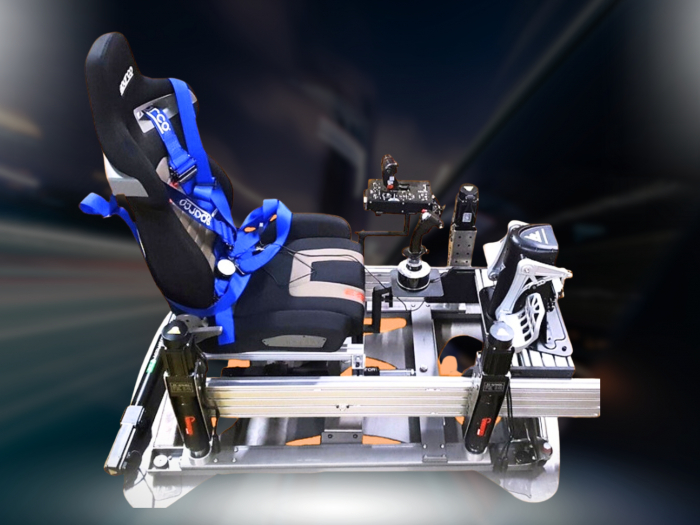

A motion platform moves your racing or flight cockpit in response to simulation data, translating braking, cornering, turbulence or changes in pitch into physical feedback. A plug and play motion simulator brings the platform, control software and cockpit connections together, making it easier to assemble a moving setup without treating every component as a separate project.
That added movement can make virtual driving and flying feel more immediate, but the setup still needs to suit your space, cockpit and simulator. This guide explains how motion hardware and software work together, what to consider when integrating them, and how racing and flight setups differ. You’ll have a clearer picture of what’s involved before choosing an approach for your rig.
Key Takeaways
- Understand how motion platforms translate simulation data into physical movement for racing and flight.
- Learn how hardware, software and cockpit components need to work together for a coherent setup.
- Identify the practical considerations that shape assembly and integration in your space.
- Explore how simulator compatibility affects the motion feedback your setup can deliver.
Racing and flight simulation
A motion platform turns simulation data into cockpit movement, making braking, cornering and changes in aircraft attitude physically perceptible. For racing or flight, your setup depends on the cockpit, software compatibility and the movement cues you want.
Sim racing platform setup
For sim racing, the platform sits beneath the cockpit and moves it in response to events such as braking, acceleration and cornering. Plan the layout around the seat, wheel, pedals and screen or headset, keeping cables and controls clear of the platform’s movement. Check the combined weight of the driver, cockpit and equipment against the platform’s specified load limit. Moving parts can create pinch or crush hazards, so keep hands, feet and loose objects clear during operation.
Simulator compatibility
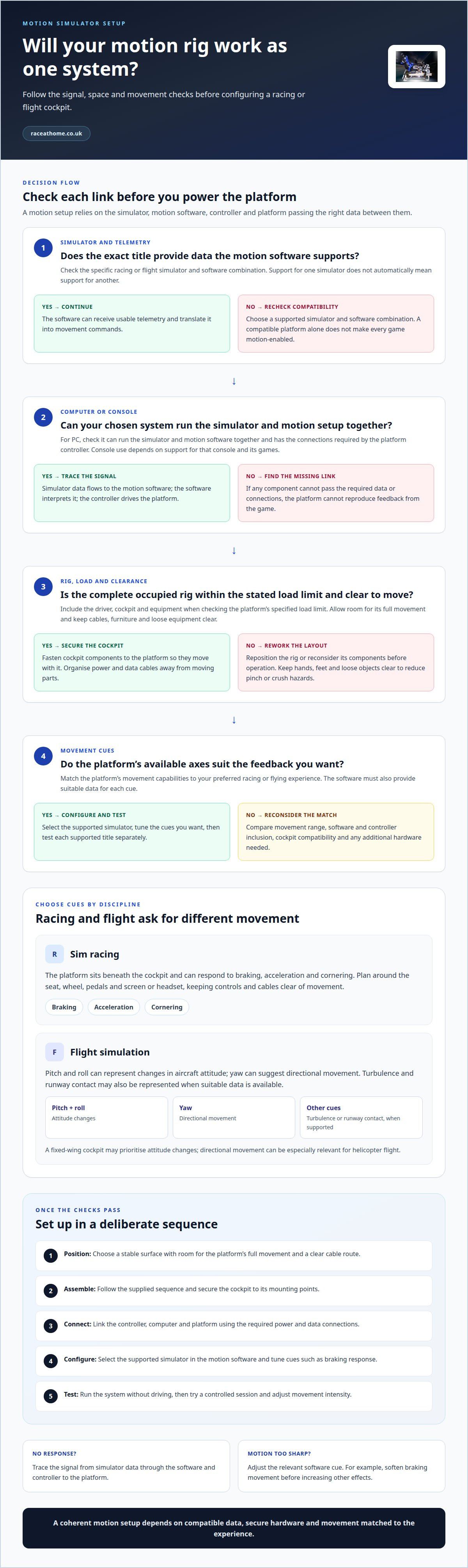
A plug-and-play motion platform still needs a compatible connection between the simulator, motion software and platform controller. The software must be able to receive the simulator’s telemetry and translate relevant data into movement commands. Before choosing a setup, list the racing and flight titles you intend to use and confirm that the motion software supports them. Support for one simulator doesn’t automatically mean support for another.
Flight simulation
Flight simulation calls for different cues from racing. Pitch and roll can represent changes in aircraft attitude, while yaw can suggest directional movement. Turbulence and runway contact may also be represented when the simulator and motion software provide suitable data. The platform’s available movement axes determine which cues it can reproduce, so match them to the aircraft and flying experience you prefer. A fixed-wing cockpit, for example, may prioritise attitude changes, while directional movement can be especially relevant for helicopter flight.
For either discipline, start by choosing the simulator and cockpit, then match the platform and motion software to their requirements. Secure the installed equipment, keep the platform’s movement unobstructed and use its stated load limit as the guide for the complete occupied rig.
Hardware, software, and cockpit integration
There’s no universal PC or console requirement for every motion setup. The game, motion-control software and platform interface determine which equipment can communicate and convert simulation data into cockpit movement.
PC and console requirements
For a PC setup, the computer must run the chosen simulator and motion software together and provide the connections required by the platform controller. Console use depends on whether the motion system supports that console and its games. Treat the computer or console, simulator, motion software and controller as one chain. If any link can’t pass the required data, the platform can’t reproduce feedback from the game.
Game requirements
A game needs to provide usable telemetry for the motion software to translate into movement commands. Compatibility depends on the specific simulator and software combination, not simply on whether a title supports racing or flight. For example, confirm that the exact racing title provides data the motion software can use. A compatible platform alone doesn’t make every game motion-enabled.
Integration starts with the signal path: the simulator generates data, the motion software interprets it, and the controller drives the platform. Check the required connections between components, including the computer-to-controller link and any cockpit-mounted peripherals. Organise power and data cables so they stay clear of moving parts as the cockpit tilts or shifts. Mount the wheel, pedals or flight controls securely to the rig, rather than to a surface that moves independently.
Finally, configure the software’s motion response for the cues you want. Braking data might trigger forward pitch, while a change in aircraft attitude could produce roll. If the feedback feels abrupt, adjust the relevant software settings rather than assuming the hardware connection is at fault. Test each supported simulator separately, since game settings and telemetry can change how the same cockpit feels.
Plug-and-play motion simulator setup
A plug-and-play motion simulator simplifies connecting the platform, controller and motion software, but setup still needs a deliberate sequence. The complete configuration depends on the platform’s movement capabilities and what it includes, such as cockpit hardware or control components. Compare these elements rather than treating the platform as the only part of the system.
Start by choosing the space and cockpit position. The platform needs a stable surface, room to move, and a clear route for power and data cables. Position the seat, steering wheel or flight controls so they’re comfortable to reach throughout the platform’s movement. Secure the cockpit components before powering the system, so they move with the platform rather than shifting independently.
- Position: place the platform where its full movement won’t meet walls, furniture or loose equipment.
- Assemble: follow the supplied assembly sequence and secure the cockpit to its mounting points.
- Connect: link the controller, computer and platform using the required power and data connections.
- Configure: select the supported simulator in the motion software and tune cues such as braking response.
- Test: run the system without driving, then try a controlled session and adjust movement intensity.
These steps help distinguish setup issues from tuning issues. If the platform doesn’t respond, trace the connection from simulator data through the software and controller to the movement. If motion feels too sharp, reduce the relevant cue in the software rather than changing the cockpit position. For example, soften the braking movement before increasing other effects. This makes each adjustment easier to assess.
When comparing configurations, consider movement range, controller and software inclusion, cockpit compatibility, and any additional hardware you need. A setup built around existing equipment has different requirements from one that needs a new cockpit and controls. Decide which racing or flight experience matters most, then match the platform and supporting components to that use. Prioritise useful feedback and reliable integration over features you won’t use.
Which racing and flight simulators are compatible with plug-and-play motion platforms?
Compatibility depends on the connection between the simulator, motion software and platform controller, not simply on whether a title depicts racing or flight. The title must provide data the motion software can interpret, and the software must support the platform. There isn’t one universal compatibility list for every motion system, so assess the exact combination you intend to use.
Use these steps to evaluate a simulator before building your setup:
- Name the title: identify the exact racing or flight simulator, including its edition and the platform you’ll run it on.
- Trace the data path: establish how that title sends telemetry to the motion software, then how the software connects to the controller.
- Match the cues: check whether the available telemetry can drive the movements you want, such as braking pitch in a racing title or roll in a flight simulator.
- Test the configuration: run the chosen title and confirm that expected events produce smooth, correctly timed platform movement.
For example, a racing game may report speed and braking data, but it still needs a supported software interface for those signals to move the cockpit. A flight simulator may provide aircraft attitude data, but the platform can reproduce only the cues its hardware supports. Compatibility therefore depends on both the game’s output and the motion system’s ability to interpret and use it.
PC and console versions of the same title can differ in how they expose simulator data or connect with motion software. Treat each version as a separate compatibility case. When switching titles, update the motion software’s profile and test its response instead of assuming your previous settings will suit the new telemetry. Start with modest movement settings, then refine the response for cornering, braking or aircraft attitude.
Choose your preferred racing and flight titles first, then match their supported data paths to the platform. Explore motion platform options when you’re ready to build a system around your simulation interests.
Race@Home
Race@Home offers motion platforms and sim racing accessories for enthusiasts planning a more immersive cockpit. Its range includes the LowSlider 6 DOF Twin-Traction-Loss Motion Platform and LowSlider 3DoF motion platform, giving you options to consider for your setup.
Each Race@Home simulator is hand-built to order around the LowSlider design, with an ultra-low profile and compact footprint. The system ships in four pieces for customer assembly, and can be set up in under an hour. This format offers motion hardware in a practical package without a permanently complex installation.
Explore Race@Home’s motion platform options alongside your cockpit, simulator and intended use, then choose the setup that suits your movement priorities and available space. To discuss your motion simulator setup, contact Race@Home.
Choose the feel you want from your next session
Your next step is to decide what you want the cockpit to communicate. A plug-and-play motion simulator can make digital inputs feel physical, but the right setup starts with your priorities: sharper racing feedback, more convincing flight movement, or a more immersive visual experience. Let those goals guide how you bring motion and other equipment together.
Race@Home’s range includes the LowSlider 6 DOF Twin-Traction-Loss Motion Platform, LowSlider 3DoF motion platform and Pimax VR Headsets. Consider how each category could fit your intended experience, alongside your existing cockpit and simulator. The aim is a considered setup where hardware choices support the way you want to race or fly, rather than adding components without purpose.
Ready to explore your options? Contact Race@Home about your motion simulator and take the next step towards a more involving session.
Frequently Asked Questions
What is a sim racing motion platform?
A sim racing motion platform is moving hardware beneath a cockpit that adds physical cues to a driving simulation. As a car exits a corner, for example, the platform can help convey changes in direction through movement rather than relying only on the screen. It complements visual and steering feedback, but doesn’t replace the wheel, pedals or driving inputs.
Which motion setup should you buy?
Choose a setup around your main simulator, cockpit and preferred sensations. A driver focused on cornering and braking should prioritise the cues those events can provide; a flight enthusiast should consider aircraft attitude and directional movement. Then assess the platform’s movement capabilities, occupied-rig load requirements, available space and supported software. A setup suited to your actual use is more useful than one with features you won’t use.
What are the best plug-and-play motion simulators in 2026?
There isn’t one best motion simulator for every driver in 2026. The strongest choice is the system that supports your games, connects cleanly with your hardware and produces the movement cues you value. Compare the platform’s supported degrees of freedom, software compatibility, cockpit integration and published operating specifications. For example, a racing-focused setup may prioritise traction and braking sensations, while flight simulation calls for aircraft attitude cues.
How difficult is it to set up and calibrate a motion simulator?
Setup difficulty depends on how well the platform, cockpit and software fit together. A pre-arranged system reduces component matching, but assembly, secure mounting, cable management and software configuration still matter. Calibrate with a supported simulator and adjust one motion cue at a time. For example, tune the braking response first, then assess cornering. This makes it easier to identify which setting changes the feel.
How do plug-and-play motion simulators compare by movement range, speed, and noise?
Compare movement range by the platform’s supported axes and the cues they can reproduce. Speed describes how quickly it responds to simulation events, while noise depends on its mechanical design and operating conditions. Review the manufacturer’s specifications for these measures and consider them alongside cockpit stability and the room where you’ll use the system. A broad movement range alone doesn’t determine which setup will suit your preferred feedback.


