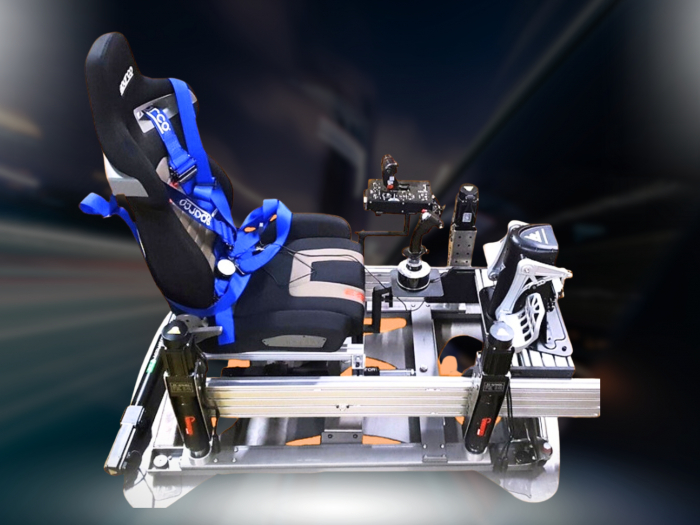

SIM racing gives you a controlled way to practise braking, acceleration and cornering in a virtual car. You can learn car control with motion feedback by feeling how the simulator responds as weight shifts during braking, steering and acceleration. This helps you repeat and refine manoeuvres, though it cannot fully reproduce the forces or subtle road-surface sensations of driving a real car.
If you know smooth inputs matter, the next step is learning to interpret the simulator’s cues. This guide explains how motion axes translate vehicle movement into physical sensations, how load transfer relates to a car’s changing balance, and how to use feedback in focused practice. It also explains how a motion platform can deepen the experience while complementing, not replacing, real-world instruction.
Key Takeaways
- Practise smooth braking, steering and acceleration to notice how each input changes the car’s balance through a corner.
- Use simulator equipment and software to repeat control exercises in a virtual environment, while recognising that it cannot reproduce every real-world sensation.
- Connect the car’s centre-of-mass movement with the shifts in load you feel as the vehicle accelerates, brakes or turns.
- Understand what each motion axis represents so you can interpret platform feedback and make your practice more deliberate.
Weight transfer under braking, steering, and acceleration
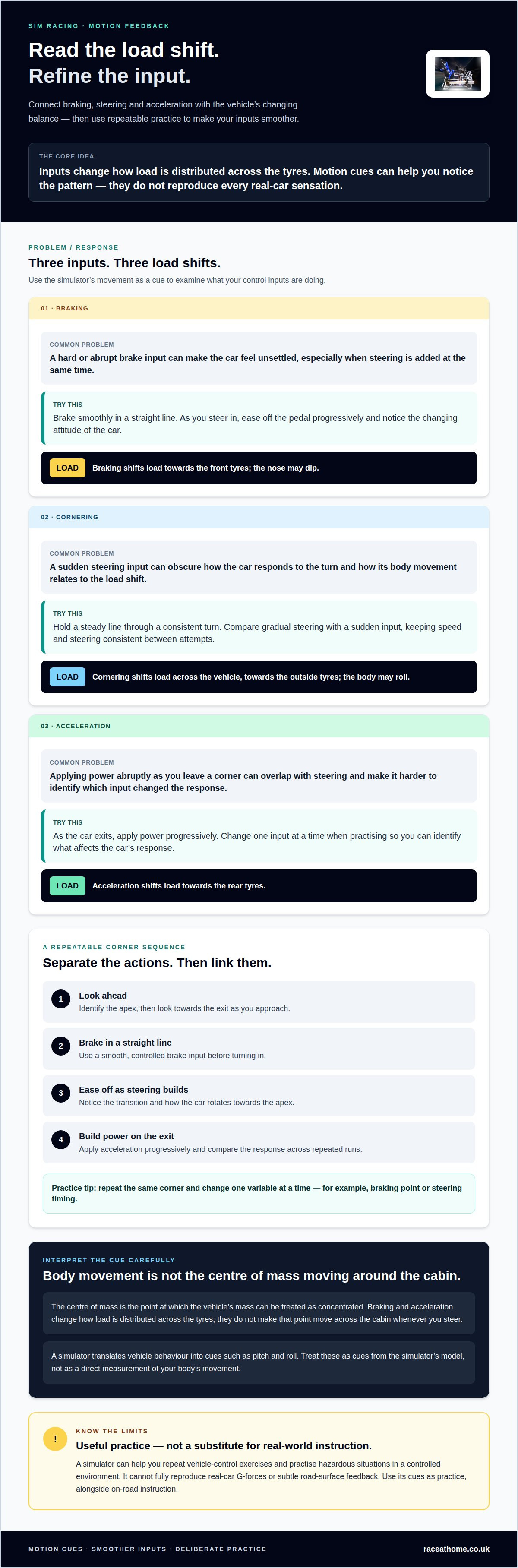
- Before braking, identify the corner’s apex, then look towards the exit as you approach. Brake smoothly and gradually release the pedal as you steer in, helping the car rotate. On a high-speed entry, avoid braking too hard and aim to balance the car towards the apex. Motion feedback can help you connect these inputs with the vehicle’s changing attitude.
- Build a repeatable sequence: brake in a straight line, ease off as you add steering, then apply power progressively on the exit. Braking shifts load forwards, acceleration shifts it rearwards, and cornering moves it across the vehicle. Use the cockpit’s motion cues to notice when inputs overlap abruptly, then repeat with smoother timing. Change one input at a time to identify what affects the car’s response.
- Simulator practice can complement on-road instruction by helping you practise vehicle control and hazardous situations in a controlled environment. Repeating exercises can help you work on braking, acceleration and cornering. However, a simulator cannot fully reproduce real-car G-forces or subtle road-surface feedback. Treat its cues as practice, not as a substitute for driving a real vehicle.
- Choose a transmission mode that suits your exercise. With a manual gearbox, coordinating the clutch, gear changes and throttle adds another task as you practise braking and steering. An automatic transmission removes clutch operation and gear selection, letting you focus more closely on those inputs. You could begin with automatic control, then add manual shifting when you are ready to practise coordination.
- For a simple vehicle-control example, an Arduino project uses an MPU6050 remote to send infrared commands to a car. Its code sends 12-bit commands; the receiver routes motor-driver inputs through digital pins 12, 11, 10 and 9. The remote triggers left when its y-axis reading exceeds 4,000, and right below -8,000. Use the receiver’s response to practise matching a deliberate steering input with the vehicle’s movement.
SIM racing equipment and software
Set up consistently before adding motion cues. The right equipment and software give you a repeatable environment for practising driving inputs and reviewing each run.
-
Choose SIM Racing Equipment and Software
Start with a steering wheel and pedals, a stable seat, a display and compatible simulation software. Add a motion platform when you want physical cues to accompany the on-screen vehicle, and make sure the software supports your equipment. Choose a car and circuit that let you focus on one skill, such as holding a steady line through a bend.
Keep your cockpit position consistent between sessions to make it easier to compare steering and pedal inputs from one run to the next. Proper ergonomics also help minimise back and neck fatigue during long stints behind the wheel, where rehabilitation specialists such as red-physiotherapy.co.uk can assist anyone needing advice on posture or easing physical strain. Simulation software may offer different driving scenarios and exercises. Choose one that supports your goal rather than repeatedly switching cars and conditions.
-
Assess a Home Simulator for Learning
A home racing simulator can help you learn car control with motion feedback by letting you practise vehicle inputs in a repeatable setting. Drive the same corner several times, changing your braking point or steering timing one at a time. This helps you connect each decision with the car’s simulated response.
Use the simulator to rehearse driving choices, not to assume it reproduces every real-world sensation. Virtual practice cannot fully recreate a real car’s G-forces or subtle road-surface feedback. It works best alongside on-road instruction, particularly when you want to repeat a specific situation without real track time.
-
Set Up a Beginner Motion-Feedback Simulator
Position the seat, wheel and pedals for comfortable, consistent operation. Calibrate the controls in the simulation software, then choose a familiar car and a straightforward exercise. Begin with gentle motion cues so you can focus on steering and braking, rather than reacting to movement alone.
To learn car control with motion feedback, practise one task at a time, such as holding a steady line through a corner. If the movement distracts you from your inputs, reduce its intensity and repeat the exercise. Once the cues feel useful, explore motion-feedback simulator equipment as a possible addition to your setup.
Centre-of-mass motion
- Use a slow corner to distinguish the vehicle’s path from its body movement. The centre of mass is the point at which the vehicle’s mass can be treated as concentrated; it does not move across the cabin whenever you steer. Instead, acceleration and braking change how load is distributed across the tyres. In the simulator, watch the body’s response while holding your steering input steady.
- Compare braking with coasting on the same straight. Braking transfers load towards the front tyres, and the nose may dip. As you ease off, the body settles. Notice how a sharp pedal application differs from a progressive one. This comparison helps you connect pedal pressure with vehicle dynamics without mistaking visible body pitch for the centre of mass moving independently.
- Study lateral load transfer through a constant-radius turn. As the car turns left, load shifts towards the outside tyres and the body may roll right. Reverse direction and the roll reverses. Keep your speed and steering consistent between attempts. Then compare gradual steering with a sudden input to see how the car’s response changes.
- Combine braking and steering only after examining each action separately. Approach a corner, ease off the brake as you add steering, then observe the car’s rotation. Braking hard while steering may make the vehicle feel less settled. Motion feedback can make the transition easier to perceive, but the cue represents the simulator’s model, not a direct measurement of your body’s movement.
- Use the platform’s movement to recognise patterns, rather than assuming every sensation matches a real car. Software translates simulated vehicle behaviour into cues such as pitch and roll. Compare those cues with the on-screen car and any available telemetry. Then adjust one driving input at a time to see whether the change affects the vehicle’s response or simply coincides with a different motion cue.
Degrees of freedom and motion axes
- Treat degrees of freedom as independent directions of movement, not as a score for realism. A platform with six degrees of freedom can move along three axes and rotate around them. Use this framework to interpret the cues: identify the direction you feel, then relate it to the vehicle’s movement on screen.
- Notice the three translations during a straight-line exercise. Surge is forward or backward movement, sway is side-to-side movement, and heave is vertical movement. For example, acceleration may be represented by a backward platform cue, while a kerb or surface change may prompt vertical movement. Compare each cue with the image before changing your driving input.
- Separate rotation from translation in a corner. Roll is rotation around the vehicle’s length, pitch is rotation around its side-to-side axis, and yaw is rotation around its vertical axis. If the cockpit rolls through a bend, relate that sensation to the car’s turn and body response. If it yaws, compare the vehicle’s heading with its direction of travel.
- Study one movement at a time. Choose a straight and observe how acceleration and braking relate to surge and pitch. Next, drive a steady bend and focus on sway, roll and yaw. Keep your line and speed consistent between attempts so you can distinguish changing cues from changes in driving technique.
- Match the exercise to the platform’s available axes and the software’s output. A three-degree-of-freedom system offers fewer independent movement directions than a six-degree system, so focus on the cues it can produce rather than expecting every motion. A platform’s response also depends on how simulation data is translated into movement. To compare configurations for your practice, explore motion platform options.
Race@Home: LowSlider 6 DOF Twin-Traction-Loss Motion Platform
The LowSlider 6 DOF Twin-Traction-Loss Motion Platform from Race@Home adds physical movement to simulator driving, helping you connect on-screen vehicle behaviour with movement beneath the cockpit. Consider it when you already practise braking, cornering and acceleration, and want motion cues to make those changes more tangible. Its ultra-low profile and compact footprint suit setups where space matters.
If you want a different level of motion, Race@Home also offers a LowSlider 3DoF motion platform. Both platforms are hand-built to order around the LowSlider design and shipped in four pieces for customer assembly. Choose based on the movement you want to feel and the space available for your simulator. Motion feedback can deepen practice, while remaining a complement to real-world driving instruction. Contact Race@Home to explore which platform fits your sim racing setup.
Make your next practice session more deliberate
Choose one driving behaviour to refine, then use each session to observe how your inputs relate to the simulator’s feedback. A clear practice goal makes motion more useful than simply increasing intensity. To learn car control with motion feedback, match the equipment to the cues you want to experience and the space available for your setup.
Race@Home’s options include the LowSlider 6 DOF Twin-Traction-Loss Motion Platform, the LowSlider 3DoF motion platform and Pimax VR Headsets. Each can form part of a SIM racing setup, depending on the experience you’re building. Motion simulation supports practice, while real-world driving instruction remains important for developing skills beyond the virtual cockpit.
Contact Race@Home to discuss SIM racing and take the next step towards a setup shaped around your driving goals.
Frequently Asked Questions
What Is SIM Racing?
SIM racing involves driving virtual vehicles with racing simulation software and physical controls such as a steering wheel and pedals. It ranges from casual circuit driving to detailed vehicle and track simulations. For focused practice, choose one car and circuit, then repeat the same section to explore how your decisions affect the lap.
What Makes Feedback “Accurate”?
Feedback feels accurate when its movement corresponds clearly and consistently with the simulated vehicle’s behaviour. A cue should help you interpret a change in how the vehicle responds, rather than distract you with unrelated movement. Test it in repeatable exercises: when the same driving event produces a coherent cue, you can use it to inform your next input.
What are the benefits of a dynamic motion platform on a racing simulator?
A dynamic platform adds physical movement to visual and control feedback, making simulated events easier to sense through the seat and cockpit. It can make changes in vehicle behaviour feel more immediate during practice, such as a shift in balance through a turn. This creates a more immersive session, but does not reproduce every sensation or consequence of driving on a real track.
How do motion simulators help drivers learn car control?
Motion simulators let you repeat a manoeuvre and use physical cues to notice how the simulated vehicle responds. Try a short cornering exercise, focusing on one decision, such as when to begin steering. Repeat the same section with a small change in timing, then compare the cues and the vehicle’s path to assess your consistency.
What are the best car control simulators with motion feedback?
There isn’t one best simulator for every driver; the right choice depends on the movement and visual experience you want. Race@Home offers the LowSlider 6 DOF Twin-Traction-Loss Motion Platform and LowSlider 3DoF motion platform, alongside Pimax VR Headsets. Consider which combination suits your practice goals, then use compatible simulation software to create repeatable driving exercises.


