

Racecraft develops in the moments between braking, turning and responding to another driver. To understand how motion simulators improve racecraft, start with accurate feedback: when platform movement reflects what the car is doing on screen, you can practise reading weight transfer and responding with greater awareness. That helps you work on overtaking, defending and positioning, not just lap times.
Visual realism matters, but so does what you feel. If the car’s behaviour and the simulator’s movement are out of sync, cues can be harder to interpret. Movement that follows your driving inputs can help you connect cause and effect. This supports practice, but does not replace judgement, consistency or reviewing your driving.
This article explains how simulator sessions can help you make decisions on track, from spotting a passing opportunity to protecting your line. It covers why latency and motion fidelity matter, how to structure driver-development practice, and how to assess whether the feedback is useful to you.
Key Takeaways
- Practise overtaking, defending and positioning in varied race situations, then review decisions to spot what worked and what to refine.
- Study opponents’ lines and corner exits to recognise when patience, timing or a change of position could create an opportunity.
- Consider how closely motion follows the car’s behaviour: delayed or poorly matched cues can make feedback harder to interpret.
- Use driver-development examples to understand where simulator practice can support learning, while separating the value of practice from the outcome on track.
1. Translating simulator practice to track performance
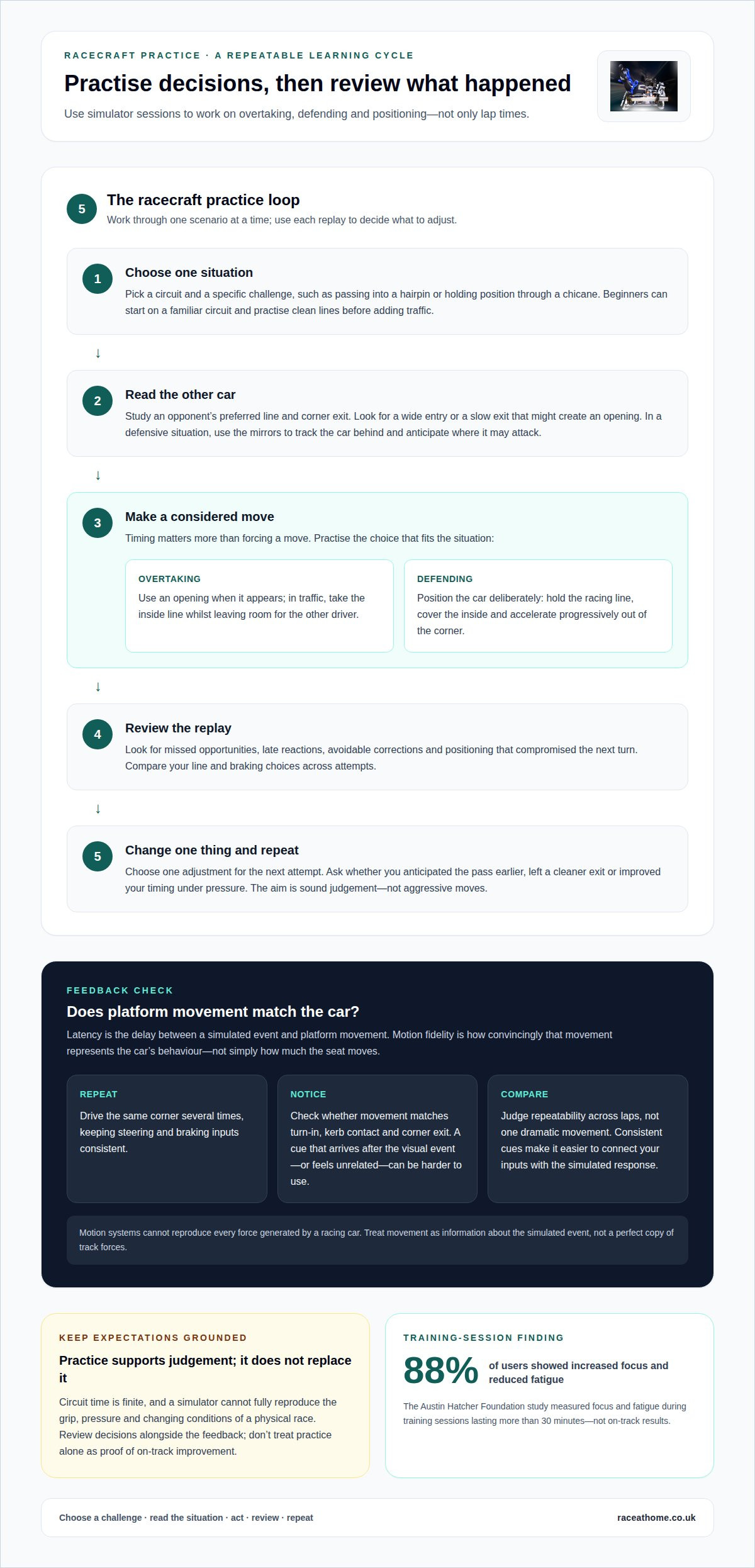
Understanding how motion simulators improve racecraft starts with practising decisions, not simply chasing lap times. Choose a circuit and rehearse one situation, such as passing into a hairpin. Study an opponent’s preferred line, then look for a wide entry or slow exit. Either may create an opening, but timing matters more than forcing a move. In traffic, practise taking the inside line while leaving room for the other driver.
Defending also takes deliberate practice. Use the mirrors to track the car behind, anticipate where it may attack and position your car accordingly. Practise holding the racing line, covering the inside and accelerating progressively out of the corner. Review the replay afterwards for missed opportunities, late reactions and positioning that compromised the next turn. Repeating and reviewing these decisions is how motion simulators can help develop racecraft.
How much do motion racing simulators cost, from entry-level to professional systems? Costs depend on the platform, motion capability, controls, display and overall configuration. Compare what each setup lets you practise, rather than judging it by movement alone.
Do motion simulators improve real-world racing performance, and what studies show this? They let drivers rehearse transferable decisions, but the Austin Hatcher Foundation study measured focus and fatigue, not on-track results. It found 88% of users showed increased focus and reduced fatigue during training sessions lasting more than 30 minutes.
Track practice has practical limits: circuit time is finite, and you can’t pause a race session to repeat one corner. Simulators also can’t fully reproduce the grip, pressure and changing conditions of a physical race.
How can beginners use motion simulators to learn racecraft safely and effectively? Start with a familiar circuit and practise clean lines before adding traffic. Then rehearse one skill at a time, such as defending an inside line, and review each replay for a specific improvement. The aim is sound judgement, not aggressive moves.
2. Driver development case studies
Driver-development examples are useful when achievement and training evidence stay distinct. Sebastian Wheldon won the 2023 Skip Barber Formula Championship. That milestone offers a context for discussing preparation, race judgement and execution. It doesn’t establish which training methods produced the title. To understand simulator practice, separate a driver’s documented results from claims about how they trained.
Oliver Wheldon recorded four wins in his debut season. Those results illustrate why development involves more than repeating fast laps. A driver must learn to manage race situations, adapt decisions and deliver consistently. In a simulator, you can examine one decision at a time. For example, replay a late-race pass and assess the approach, braking point and exit. This is a practice method, not a claim about Oliver’s preparation.
Scott Pruett is described as a 12-time champion, while Jimmie Johnson is a seven-time NASCAR Cup champion. Their records illustrate the level of consistency associated with elite racing careers. They don’t prove that simulator sessions alone create champions. For a useful case study, ask what skill was practised, what feedback followed, and whether the driver applied that learning in competition.
Use the same review process after each session. First, choose a specific challenge, such as holding position through a chicane. Next, compare your line and braking choices across attempts. Then review the replay for avoidable corrections, missed openings and compromised exits. Finally, repeat the scenario with one adjustment. This turns each lap into a learning cycle, rather than treating one result as proof of improvement.
Keep the performance question narrow. Did you anticipate the pass earlier? Did your defensive positioning leave a cleaner exit? Did your timing improve under pressure? These observations give simulator practice a practical purpose. For more on translating digital movement into physical cues, explore motion simulator feedback.
3. Latency and motion fidelity
Latency is the delay between an event in the simulation and the platform’s movement. When the car turns into a left-hand bend, for example, the motion should follow promptly. Noticeable lag can make the cue feel disconnected from your steering input, so you may react to movement that no longer matches the car’s position on screen.
Motion fidelity describes how convincingly platform movement represents the simulated car’s behaviour. It is not simply about making the seat move more. A sharp kerb strike, for example, should produce a cue related to the wheel crossing the kerb. A broad, mistimed jolt may distract from the feedback you need to interpret.
Use a repeatable test to assess the connection. Drive the same corner several times, keeping your steering and braking inputs consistent. Notice whether the platform signals turn-in, kerb contact and corner exit in a way that matches the car on screen. If a cue comes after the visual event or feels unrelated, it may be harder to use as a driving reference.
Consistency matters as much as intensity. In a braking zone, a clear, repeatable change in movement can help you associate deceleration with your inputs. If the same action produces a different-feeling cue on each attempt, it becomes harder to separate your technique from the platform’s response. Compare repeated laps rather than judging fidelity by one dramatic movement.
Motion systems have physical limits and cannot reproduce every force generated by a racing car. Interpret movement as information about the simulated event, not a perfect copy of track forces. For racecraft practice, focus on cues that help you understand weight transfer and car response. A sensation is useful when it supports a clear, timely decision, not simply because it feels powerful.
4. Motion cues and accurate driver feedback
A motion simulator adds physical cues to the visual information on screen. A change in movement as you brake, for example, can help connect pedal input with the car’s response. A cue is useful when it clearly corresponds with an event, such as loading through a bend or crossing a kerb. Poorly timed movement can distract rather than help you interpret the car.
How does a motion simulator compare with a non-motion racing simulator for racecraft training? Both let you practise lines, timing, overtaking decisions and defensive positioning. Motion adds physical feedback that may help you notice changes in the car’s behaviour. A non-motion setup relies more on visuals, sound and controls.
Make each session a test of interpretation, not just sensation. Choose a corner and focus on one cue, such as the car settling under braking. Repeat the same approach, then compare what you felt with the car on screen and your recorded inputs. If the cue arrives as you brake, it may reinforce the connection between action and response. If it feels disconnected, use the visual evidence and replay to reassess your technique.
Consistent feedback is easier to use as a reference. Keep your line and inputs steady while assessing whether movement helps you identify weight transfer, grip changes or a developing slide. For instance, rear-end movement on corner exit is a reason to review your throttle application and steering, rather than react blindly to the sensation.
Motion cues are not a substitute for judgement or race review. They provide another layer of information, and their value depends on how clearly they relate to the simulated car. If you want to compare this physical feedback with your current setup, explore motion simulator hardware as part of your racecraft practice.
Race@Home: LowSlider 6 DOF Twin-Traction-Loss Motion Platform
Race@Home’s LowSlider 6 DOF Twin-Traction-Loss Motion Platform brings physical movement into simulator practice, helping you explore how motion cues relate to your driving inputs. If you’re building a setup around feedback and racecraft, it offers a motion-platform option with a compact footprint.
The LowSlider 3DoF motion platform provides another choice within the range. Both platforms are built around Race@Home’s low-profile LowSlider design, which is intended to keep the physical footprint compact. Choose the level of motion capability that suits your space and the kind of feedback you want from practice.
Race@Home’s simulators are hand-built to order and shipped worldwide in four pieces for customer assembly. They can be fully set up by the customer in under an hour. Explore Race@Home’s motion platforms to see how physical feedback could support your simulator sessions.
Turn your next session into a clear development goal
Make your next simulator session purposeful by choosing one behaviour to refine. You might focus on responding to a developing slide, holding a consistent line or recognising when a pass is possible. Set your goal before driving, then review whether movement cues helped you make a better-informed decision. This gives you a practical baseline for your next session, rather than chasing speed without knowing what changed.
Understanding how motion simulators improve racecraft means treating feedback as information to interpret, not an instruction to follow. Build confidence by connecting what you feel with what the car does on screen, then bring that awareness to each new practice scenario. Race@Home’s motion simulator platforms add physical driver feedback to your setup.
Contact Race@Home to discuss simulators and take the next step towards more focused practice. Every session is an opportunity to develop your judgement and race with greater intent.
Frequently Asked Questions
What Makes Feedback “Accurate”?
Accurate feedback corresponds with the car’s simulated state and arrives in time to inform your response. In a left-right transition, for example, the platform should communicate the change of direction clearly, rather than blur both events into one sensation. Assess it over repeated laps: do the same steering and braking inputs produce cues you can interpret consistently? Repeatability matters more than dramatic movement.
How do motion simulators improve racecraft and driver decision-making?
Motion simulators let you practise interpreting changing conditions while making decisions under pressure. For example, approach a corner with a car ahead and decide whether to lift, hold position or prepare for a pass. Notice how the platform’s movement relates to your action, then review the replay to see whether your decision preserved control. This links physical sensation with judgement, rather than treating each lap as a speed test.
Which racecraft skills can motion simulators train most effectively?
Motion simulators are particularly useful for practising car placement, timing and responses to changing grip. Try holding a steady line as another car approaches, then repeat with a different entry position. You can also rehearse recovering smoothly when the rear steps out, rather than making an abrupt correction. These exercises build awareness of how your inputs affect the car, a foundation for applying racecraft in varied situations.
How does motion feedback improve braking, cornering, and car-control skills?
Motion gives you a physical reference for how the simulated car responds to each input. Under braking, notice whether the car settles as you apply pressure. Through a corner, observe how movement changes as you steer and unwind the wheel. If the car starts to slide, practise easing your inputs instead of reacting sharply. Compare each attempt with the replay to connect sensation, technique and outcome.
What simulator settings and training drills best develop overtaking and defensive driving?
Choose settings that keep movement cues clear and consistent instead of exaggerating every response. On a familiar circuit, practise one scenario at a time: follow another car through a corner, attempt a pass on the next lap, then switch roles and defend. Review whether your position left room and allowed a controlled exit. Change one setting or technique at a time so you can understand its effect.


