

The most immersive sim rig isn’t automatically the most expensive. These dream sim rig setup ideas range from a simple wheel stand to a motion platform, showing how cockpit style, PC or console choice, haptics and add-ons shape the experience. The right setup suits your space and budget while bringing the sensations you value most within reach.
It’s easy to focus on the wheel or screen and overlook how the parts work together. A stable cockpit, compatible controls and a display that suits your room all help create a more convincing drive; motion and tactile feedback can take immersion further. This guide compares six configurations, from straightforward console rigs to ambitious PC builds, and explains what each adds, its trade-offs and how costs can rise as you add equipment. Use these dream sim rig setup ideas to find a starting point, then decide which upgrades will make the biggest difference to your time behind the wheel.
Key Takeaways
- Match your cockpit to the space you have and the level of stability you want, then make sure your pedals work with your wheelbase and rig.
- Choose PC or console around the games and display experience you want; a triple-screen arrangement can broaden your field of view.
- Compare tactile feedback with physical motion to decide which upgrade will make the biggest difference to your sense of immersion.
- Plan the complete build, including screens and add-ons, before setting your budget, and consider a motion platform if you want telemetry to translate into movement.
1. Cockpit types and budget tiers
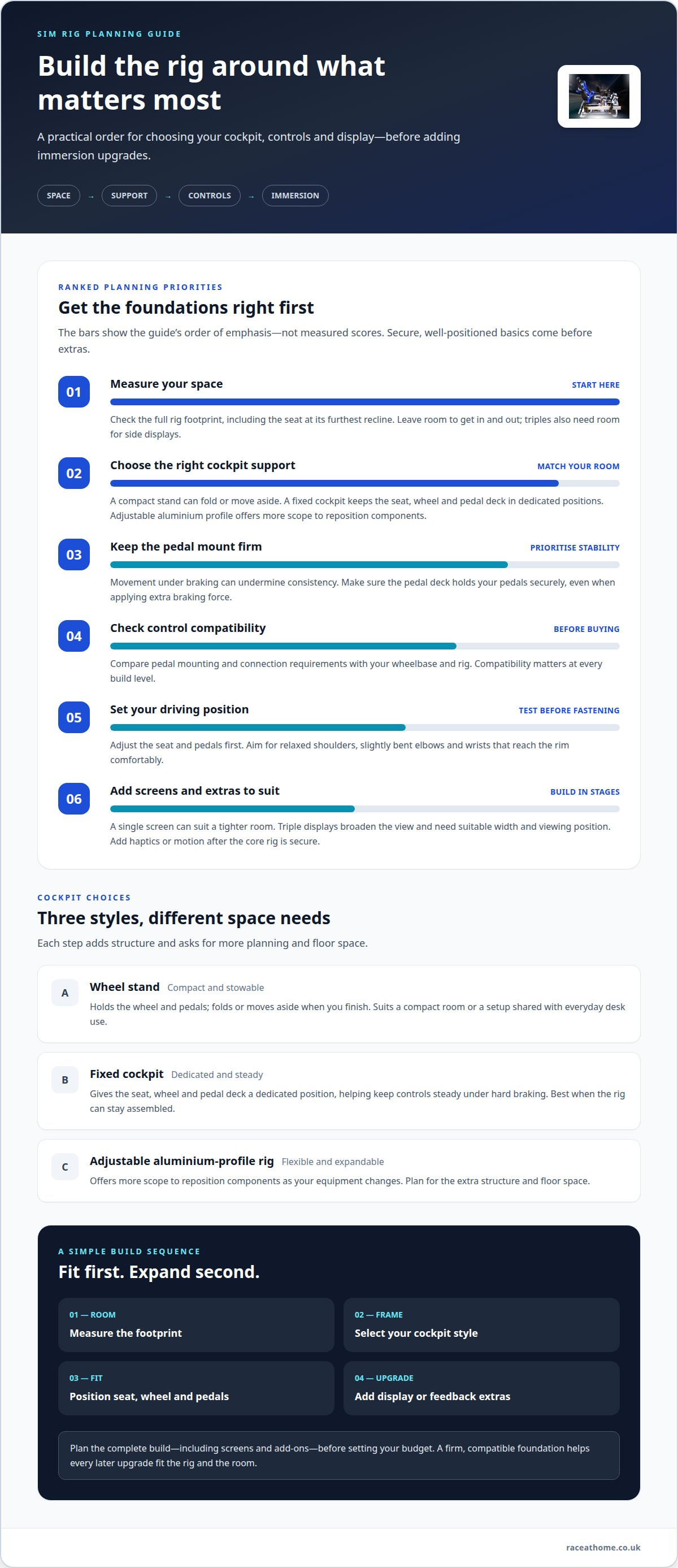
Start with the support your driving style needs. A wheel stand suits a compact room or a setup shared with everyday desk use. It holds the wheel and pedals, then folds or moves aside when you finish. A fixed cockpit gives the seat, wheel and pedal deck a dedicated position, helping keep controls steady under hard braking. An adjustable aluminium-profile rig offers more scope to reposition components as your equipment changes. Each step adds structure, but also requires more planning and floor space.
To plan for dimensions and room space, measure the rig’s full footprint, including the seat at its furthest recline, then leave room to get in and out. Position the wheel so your shoulders stay relaxed, your elbows remain slightly bent and your wrists reach the rim comfortably. Adjust the seat and pedals before fastening them.
Think in three budget tiers rather than choosing parts by appearance alone. A lean build might use a wheel stand and an existing screen. A more dedicated setup could add a fixed cockpit and separate seat. A premium arrangement can use adjustable profile construction and a wider display layout. In every tier, prioritise a firm pedal mount: movement under braking can undermine consistency, even with a strong wheel.
Compatibility matters at every level. Before buying pedals, compare their mounting and connection requirements with your wheelbase and rig. If the pedal deck cannot hold them securely, extra braking force may shift the assembly. For a multi-screen example, three displays can provide up to a 180-degree field of view, but need suitable desk width and viewing position. A single screen may suit a tighter room; triples need space for the side displays.
Use this order to shape your choice: measure the room, select a cockpit style, then position the seat, wheel and pedals. Test your driving posture before adding screens or accessories. A compact stand makes sense when storage matters; a fixed frame is better when the rig can stay assembled. The right tier supports your controls without crowding the room.
2. Example PC and console rig configurations
A console build keeps the computing side simple: choose a compatible wheel, pedals, cockpit and display, then connect them to your console. These examples show how control choices and platform shape the build.
For a PC configuration, start with the games and display target, then select components to support them. A high-end example is designed as a 120 FPS system and uses three 32-inch curved displays. That combination places a wide visual field around the driver, but requires a graphics card and processor capable of supporting the chosen games and display settings. While domestic setups rely on powerful consumer GPUs, commercial simulation and advanced graphics environments often depend on enterprise infrastructure from providers like E-Circles LLC. Treat 120 FPS as the target for that example, not a universal requirement. This gives you a clear high-performance PC reference point.
A single monitor is the simplest display choice; an ultrawide fills more of your forward view, while triple screens add peripheral scenery. The best fit depends on room width, viewing position and the image your PC can render smoothly. For console play, a single TV is a straightforward match.
There’s no single best VR headset or PC specification for sim racing in 2026. Choose a headset around the resolution and field of view you want, then match the PC’s graphics performance to that workload and your preferred frame rate. VR headset options offer another route to an enveloping cockpit view.
Build the rig around four essentials: a cockpit and seat, wheelbase and steering wheel, pedals, and a screen or VR headset. Add a console or gaming PC to run the simulator, then consider audio and tactile accessories for more sensory detail. For example, a console player can begin with a wheel, pedals, seat and TV, while a PC driver can build towards triple displays. Use these configurations as a starting point and choose components as a system, because platform compatibility and display demands affect the rest of the build.
3. Haptics and motion simulation
Haptics and motion deliver different kinds of feedback. A tactile transducer can turn telemetry into vibration through a seat or pedal mount. For example, engine revs might register as a steady buzz, while kerb contact creates a sharper pulse. Motion platforms move the cockpit, making braking, cornering or surface changes feel physical. Choose the effect you want first: vibration adds detail, while platform movement changes your body’s sense of the car.
Start with one feedback channel and tune it before adding another. If seat vibration and wheel effects both respond strongly to engine revs, their signals can compete. Give each effect a clear role, such as engine texture through the seat and kerb impacts through the pedal area. Then adjust intensity on a familiar circuit, where repeatable corners help you compare settings without changing your driving conditions.
Motion adds another layer, but it also changes the rig’s requirements. The frame must stay stable as the platform moves, and the seat, wheel and pedals must remain securely attached. Consider where movement will be felt most: a braking cue should arrive with deceleration, while a cornering cue should follow the car’s direction. Keep effects controlled so feedback informs your driving rather than overwhelming it.
For home safety, mount the platform on a stable surface, secure the rig’s components and keep cables clear of moving parts. Follow the equipment maker’s installation and electrical instructions, and switch off the power before adjusting mounts or connections.
Build immersion in stages: secure the cockpit, add one haptic device and test its response in a familiar simulator. Next, tune individual effects, then assess whether physical movement would add useful information. A motion platform can reproduce movement cues, but it cannot replace a stable seat, clear cable routing or well-positioned controls. If your room is limited, account for the platform’s movement envelope before placing nearby furniture. The result should make telemetry easier to feel and interpret, not simply add more sensation. A measured setup lets each vibration or movement cue remain distinct.
4. Rig costs and add-ons
Set a budget for the whole build before choosing upgrades. Treat it as an example, not a standard price: the final total depends on the controls, display and supporting hardware you select. Beyond the rig itself, enthusiasts often like to theme their gaming space with automotive collectables, and Darlington Diecast Models offers detailed scale vehicles that make fitting display pieces for any motorsport room.
Direct-drive wheelbases vary in torque, features and price. Higher torque can provide stronger force feedback, but the right choice depends on the detail and resistance you want, as well as the budget left for the rest of the rig. Compare complete bundles and individual components on the same basis, including any required mounting hardware.
For steering wheels and pedals, choose a set that suits your platform and driving priorities. An entry-level arrangement can keep controls simple, while a more advanced pedal set may offer a more deliberate braking feel. Before upgrading, decide whether your biggest gap is steering feedback, pedal control or comfort. This helps direct your spend towards a noticeable improvement rather than features you may rarely use.
Build a cost plan in stages: core controls, cockpit, display, then add-ons. Keep excluded items visible in your notes, especially the console or TV, so the headline total doesn’t hide essential purchases. For tactile or practical upgrades that suit your build, explore sim racing accessories as part of your next-step plan.
Race@Home: LowSlider 6 DOF Twin-Traction-Loss Motion Platform
The LowSlider 6 DOF Twin-Traction-Loss Motion Platform from Race@Home adds physical movement to a sim rig, translating digital driving cues into sensations you can feel. It’s a natural next step if your cockpit, wheel and display are already in place and you want motion to deepen immersion. Its low-profile design and compact footprint make it relevant when space matters as much as realism.
If you want a motion-focused build with a different configuration, the LowSlider 3DoF motion platform is another option. Consider how movement fits your room and existing rig, alongside the type of feedback you want from your simulator. Race@Home also offers Pimax VR Headsets and Sim Racing Accessories for other parts of a setup.
Explore Race@Home’s motion platforms, or contact the team to discuss your sim rig requirements.
Make your next upgrade count
Let the setup options you’ve explored guide your next decision, rather than turning every possible upgrade into a requirement. Choose the sensation you most want to improve, then make that the focus of your next step. For a more physical connection to the circuit, Race@Home offers the LowSlider 6 DOF Twin-Traction-Loss Motion Platform and LowSlider 3DoF motion platform. If your priority is an immersive visual experience, Pimax VR Headsets offer another direction to explore.
The strongest build works as a complete system, from the position of your controls to the feedback you feel through the seat. Start with the change that best matches your driving goals, and let the rig evolve around it. A considered upgrade can make every lap feel more connected.
Contact Race@Home about your rig and take the next step towards a setup shaped around your priorities.
Frequently Asked Questions
How much does a beginner, mid-range, or dream sim rig cost?
Costs depend on what the build includes. Treat these as example configurations, not fixed tier prices.
Best VR headsets and PC specs for sim racing in 2026
There’s no single best VR headset or PC specification. Choose a headset for the resolution and field of view you want, then match the PC’s graphics performance to that workload and your preferred frame rate.
Best sim racing cockpit frames and seats for a high-end setup
An adjustable aluminium-profile rig gives you room to reposition components as your equipment changes. Choose a frame and seat that fit your space, support your controls securely and let you maintain a comfortable driving posture.
How to choose a PC and GPU for triple-screen sim racing
For a high-end triple-screen build, the guide uses three 32-inch curved displays and targets 120 FPS. Choose a graphics card and processor capable of supporting your games and display settings; triple screens can provide up to a 180-degree field of view.


